
Your Linux sysadmin co-pilot. Plain language in. Typed plan out. You approve. Daemon executes.
What SysKnife does
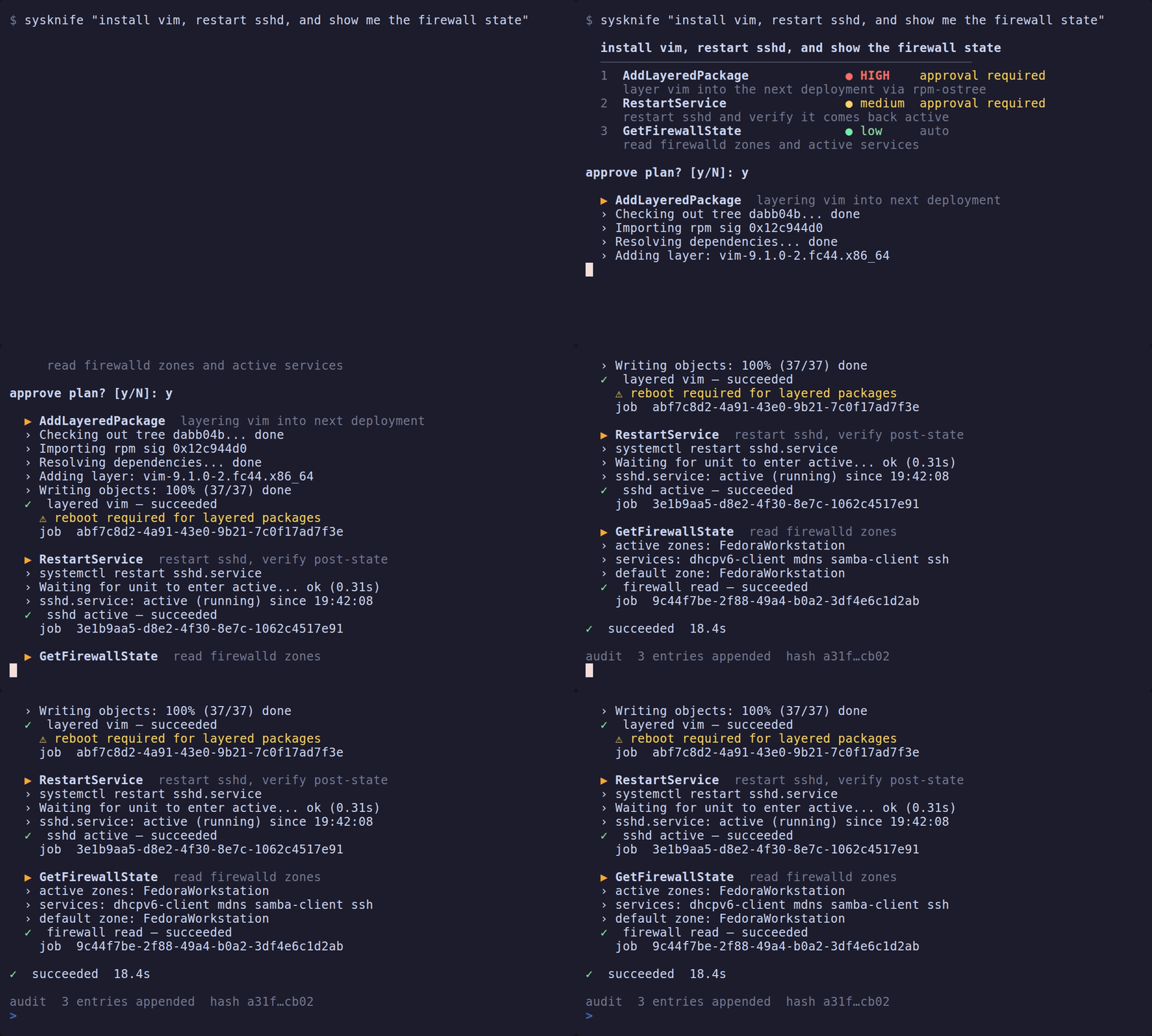
You describe a task in plain language. SysKnife asks an LLM to turn it into a typed plan — a list of named actions with formal risk levels. You review the plan, approve it, and the daemon executes it step by step with live output and automatic rollback on failure.
$ sysknife "install nginx and make sure it starts on boot"

  Install nginx and enable it at boot
  ──────────────────────────────────────────────────
  1  AptInstall                        medium  approval required
     Install the nginx package
  2  SetServiceEnabled                 medium  approval required
     Enable nginx.service at boot

  2 steps, medium risk — execute? [y/N]
The AI cannot run a shell command. It can only propose typed actions. The daemon is the only process that touches your system — and only after you say yes.
Why not just paste the shell command the AI gives you?
Because you find out what it did after. There is no record, no rollback, and no way to verify the AI proposed the minimal change rather than a sledgehammer.
SysKnife gives you:
- Typed actions — not shell strings.
AddLayeredPackage neovimnotrpm-ostree install neovim && ... - Risk levels — Low (read-only), Medium (reversible), High (irreversible, access-control, or reboot-required)
- Preview before execution — see the exact commands before they run
- Automatic rollback — if a high-risk action fails, the daemon reverses what it can
- Immutable audit trail — every execution is Ed25519-signed and hash-chained
How it works
┌─────────────────┐   plan    ┌──────────────────┐  approve  ┌─────────────────┐
│  sysknife-brain │ ────────► │ sysknife approve │ ────────► │ sysknife-daemon │
│  (unprivileged) │           │  (approval gate) │           │ (scoped grants) │
└─────────────────┘           └──────────────────┘           └─────────────────┘
   LLM + tools                   you review here               executes + audits
| Component | Privilege | Job |
|---|---|---|
| brain | none | Talks to the LLM, proposes a typed plan |
| approval gate | user | Shows you the plan, collects your approval: sysknife approve in a terminal (the paused Tauri shell is a second implementation) |
| daemon | sysknife system user, with scoped sudo and polkit grants | Executes approved actions, writes the audit log |
The brain proposes but cannot touch the system. The daemon executes but cannot be reached without an approved plan.
Fastest path: use via your AI coding tool (MCP)
MCP is how most people use SysKnife in 2026 — it's the dominant way AI tools talk to real systems, and Claude Code, Cursor, and Codex CLI all support it. One command wires it up:
npx sysknife-setup
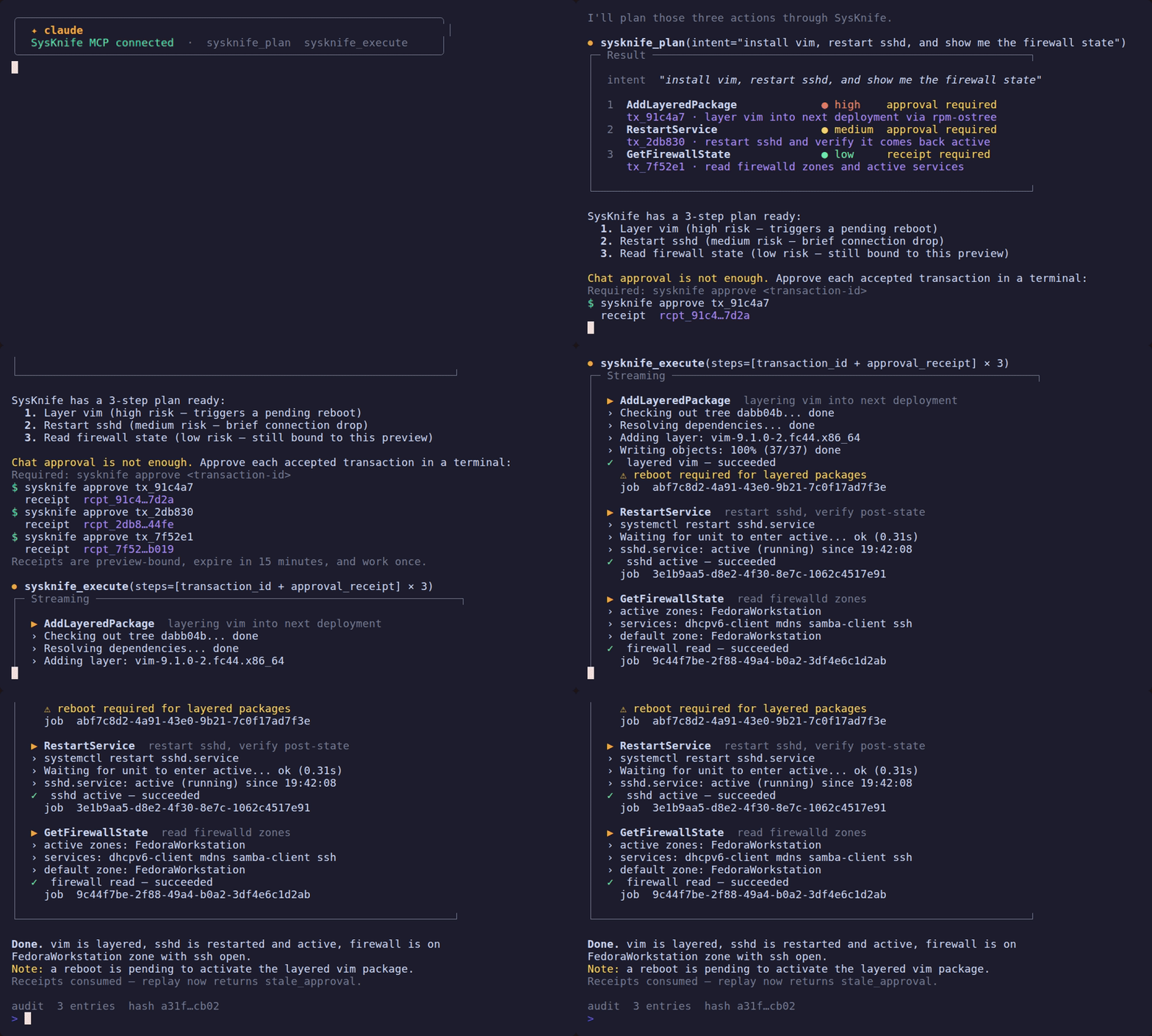
The demo above shows the whole loop: plan in chat, approve in a terminal, execute with a one-time receipt. See the MCP Server guide for full setup and the approval-gate hook.
Prefer the terminal? The CLI is a first-class path
No IDE and no MCP client — the same planner, approval gate, and Ed25519 audit chain, driven straight from your shell. This is a fully supported way to run SysKnife, not an afterthought.
ℹ️ Distro support
The current suite is 99 Ubuntu stories. All three Ubuntu LTS releases have a committed live-VM run covering 79 of those Ubuntu stories, in
tests/evidence/story-runs/: 22.04, 24.04 and 26.04 all at 79/79. The twenty additional stories are not yet included in a committed live-VM run. Each run has a replay twin that reproduces it, serving every call with zero misses. Every Debian-only action has a story. Fedora Atomic is supported by the rpm-ostree action family, but a current Silverblue 44 VM run is a release gate. Plain Fedora remains experimental until thednfaction family ships. See Distro Support for the full matrix.
sudo apt-get install -y build-essential          # Rust stable and a C compiler
git clone https://github.com/lacs-project/sysknife
cd sysknife && make build && sudo make install   # ~7-12 min: about 400 crates
sudo systemctl enable --now sysknife-daemon
sysknife "show disk usage"
For prebuilt binaries instead of a build, run npx sysknife-setup (Node 22+).
See the canonical Quick Start.
No API key needed if you have Ollama running locally — SysKnife auto-detects it. See Quick Start.
Also: a desktop GUI (a distant third option)
There is an experimental desktop GUI (sysknife-shell, built with Tauri) that
wraps the same plan → approve → execute loop in a window. It is the least
frequently maintained surface — a distant third behind the MCP integration and
the CLI — so reach for it only if you specifically want a graphical approval
flow.
Status
192 typed actions · 1,993 Rust tests + 72 frontend tests · MIT
SysKnife is the reference implementation of the LACS specification — a CC0 public-domain protocol for AI agents that operate at the Linux system level.