sysknife CLI Reference
sysknife is the command-line interface to the SysKnife daemon. It turns a
natural-language intent into a risk-labelled plan, asks for approval where
needed, and streams execution output in real time.
If you want SysKnife inside Claude Code / Cursor / Codex CLI instead, see
the main README and run npx sysknife-setup. Both paths
share the daemon, the audit chain, and the typed-action set.
Quick start
# Check that the daemon is reachable
sysknife doctor

# Plan + execute a single intent
sysknife "check disk usage"

# Preview the plan without executing
sysknife --dry-run "list running containers"

# Open the interactive REPL
sysknife
Synopsis
sysknife [GLOBAL FLAGS] [SUBCOMMAND | INTENT WORDS...]
When no subcommand is given and no intent words are provided, sysknife starts
an interactive REPL.
Subcommands
sysknife <intent>
Plan and (optionally) execute a natural-language intent.
sysknife "check disk usage"
sysknife check disk usage            # words are joined — same result
sysknife "list running containers"
sysknife "is firewalld active?"
sysknife "layer vim via rpm-ostree"
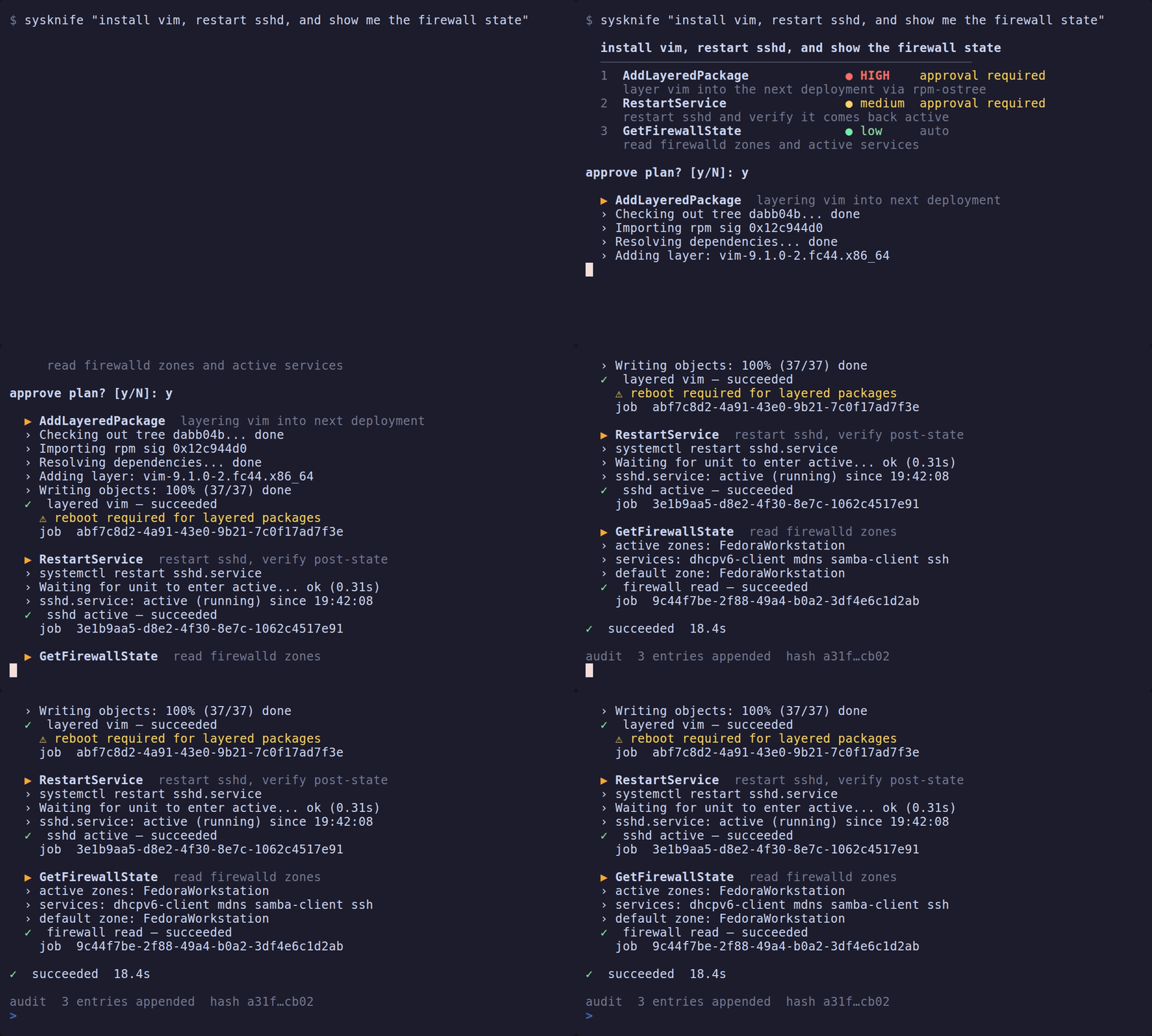
What happens:
- A spinner appears while the LLM plans (
Thinking…→Querying …→Proposing plan…). - The coloured plan is printed — each step shows a risk badge
(
● low/● medium/● HIGH), the action name, and a summary. - If any step requires approval, you are prompted. HIGH-risk steps always
require confirmation regardless of
--yes. - Execution streams output line by line with a
›prefix; a✓/✗result icon is printed after each step.
The natural-language planner has no secure way to collect or resolve a
credential after planning. It therefore does not offer Ubuntu Pro attachment,
and it joins open Wi-Fi networks only: a plan step that carries a Wi-Fi
password is refused. Do not put a Pro token or Wi-Fi password in an intent:
the admission check rejects known credential shapes before contacting the model.
Use the Ubuntu Pro or NetworkManager tools outside SysKnife for those
operations until a separate credential entry path exists. ProStatus, ProDetach, EnableProService, and
DisableProService remain available through SysKnife because they do not
take a credential parameter.
The sensitive-data fence matches value-bearing labels (such as
password=hunter2, API_KEY: value, or my password is hunter2), long
Bearer tokens, private-key PEM headers, and known API/token prefixes with
plausible bodies at token boundaries. Security administration requests such
as "set password aging to 90 days", "who can read /etc/passwd", and
"my root disk-full alert keeps firing" remain available. The same fence
checks summary prompts and remembered preferences and withholds matching
intents from the planning notice.
It also matches "with password" or "using token" followed by a quoted value, or a token containing digits or token punctuation, such as "with password hunter2". Policy phrases such as "with password aging enforcement" remain available.
Assignment labels must end in a credential term: ANTHROPIC_API_KEY and
AWS_SECRET_ACCESS_KEY match, while policy/path settings such as
PASSWORD_MAX_DAYS=90, TOKEN_LIFETIME=3600, and API_KEY_FILE=/etc/key
are allowed unless their values themselves match a known credential format.
This is a format heuristic: an unlabelled password such as "connect to MyNet with hunter2" can pass it. An allowed intent does not prove that it contains no secret. Keep credentials out of intents; the fence does not provide the separate credential entry path described above.
sysknife doctor
Check daemon connectivity and print the resolved configuration.
sysknife doctor
sysknife --json doctor      # machine-readable
Exit code 0 on success, non-zero if the daemon is unreachable.
Sample output:
✓  daemon ok
  socket    unix:///run/sysknife/daemon.sock
  host      my-silverblue
  provider  anthropic
  model     claude-sonnet-4-6
  distro    fedora
sysknife history
Query past SysKnife execution history.
sysknife history
sysknife history --limit 50
sysknife history --status failed
sysknife history --action InstallPackages
sysknife history --since 2026-04-01T00:00:00Z
sysknife history --status succeeded --limit 5 --since 2026-04-10T00:00:00Z
Flags:
| Flag | Default | Description |
|---|---|---|
--limit N | 20 | Maximum entries to return |
--status STATUS | — | Filter by job status (succeeded, failed, canceled, …) |
--action ACTION | — | Filter by action name (e.g. InstallPackages) |
--since DATETIME | — | Only entries after this ISO-8601 date or UTC-qualified datetime |
sysknife approve
Issue a one-time receipt for a transaction returned by the MCP
sysknife_plan tool. Issuing a receipt requires an interactive terminal. It first
loads and displays the daemon-authoritative action, risk, summary, and proposed
change so an agent cannot substitute an opaque transaction ID. It mints the
receipt only after confirmation; high-risk approvals require typing the exact
action name.
--max-risk checks the daemon's preview risk before prompting and refuses any
transaction above the ceiling. --non-interactive refuses receipt issuance,
including with --yes or unattended consent: a receipt records explicit human
approval. Those auto-approval flags apply to intent execution, not this command.
--dry-run loads and displays the preview without prompting or issuing a
receipt. It works without a terminal, including with --non-interactive, and
can display risks above --max-risk because it approves nothing. With --json,
the output contains transaction_id, action_name, preview and dry_run: true,
with no approval_receipt field.
sysknife approve 018f2c9d-...
sysknife --json approve 018f2c9d-...
sysknife approve 018f2c9d-... --full
sysknife --dry-run --json approve 018f2c9d-...
The proposed change is displayed through a bounded renderer: 40 lines, 512 characters per line. The bounds are there so a long change cannot scroll the action name and risk level off the screen before you answer.
When the bounds hide anything, approval is refused rather than accepted, and the message says how many lines were withheld and how many were cut short. Approving a change you were shown part of would produce a receipt proving you typed a word, not that you read what you agreed to.
--full prints every line and every character, with the same neutralisation
applied, and prints the action, risk and summary after the change so the
decision context is the last thing on screen however long the change is. Pipe it
to a pager if you like; the text cannot rewrite your terminal either way.
$ sysknife approve 018f2c9d-...
error: the proposed change does not fit the approval view: 132 line(s) were not
shown. Approving would mean consenting to text you were not shown. Re-run with
--full to see all of it: sysknife approve 018f2c9d-... --full
Give the printed approval_receipt to the MCP client for that exact step. The
receipt expires after 15 minutes, is bound to the preview's action and params,
and is consumed on first execution. A chat message saying "approved" is not a
receipt.
sysknife audit
Inspect and anchor the tamper-evident, Ed25519-signed audit chain the daemon writes for every executed action.
sysknife audit export
Export the transaction-chain rows from the configured SQLite or PostgreSQL
audit store as a JSON array, in ascending seq order. Each object contains the
17 stored ChainRow columns, including prev_chain_hash and chain_hash.
The latter is the Ed25519 signature and is deliberately not renamed. Optional
values that were not recorded are JSON null; argv, outcome, and a
separate signature field are not reconstructed.
sysknife audit export
sysknife audit export --since 2026-08-01T00:00:00Z --limit 500
| Flag | Description |
|---|---|
--since DATETIME | Include rows recorded at or after this RFC 3339 timestamp |
--limit N | Emit at most N matching rows; omitted means all matching rows |
An export is not a redacted artifact. It inherits the confidentiality class of
the audit database, which the daemon keeps 0600 inside a 0700 directory, and
writing one moves that content across the boundary those modes exist to hold.
Every row carries request_hash, a single unsalted SHA-256 over the action name
and the unredacted parameters. compute_request_hash runs before
redact_params, so redaction never reaches the hashed preimage. Where an
action's parameters are low entropy and partly public the hash is worth
attacking: for ConfigureWifi the SSID is broadcast, which leaves the
passphrase as the only unknown. High-entropy values such as ProAttach tokens
are unaffected.
The column cannot be dropped, because request_hash is part of the signed bytes
an offline verifier rebuilds. Treat an export with the same care as the database
itself rather than as a sanitised report.
sysknife audit verify
Verify the audit trail: the transaction chain, the approval-event chain, and
the binding between them. All three are reported and any one can fail the
command. Exits 0 if everything is intact, 1 if any check finds tampering,
2 if a check cannot establish the history (missing key, unreadable database,
or an empty unanchored transaction log). When the checks disagree the worst
wins, and 1 outranks 2 — if something is provably broken, "could not verify"
would understate it.
With --json the report is an object with a top-level status plus a chain,
approval_events and binding section, so a pipeline can act on which part
failed. A readable empty transaction log without an independent anchor reports
CANNOT VERIFY, exit 2, and top-level JSON cannot_verify, whether it is a
fresh store or an erased one. Its chain subresult still reports zero intact
rows: that row-integrity check does not establish which history occurred.
sysknife audit verify
sysknife audit verify --json
sysknife audit verify --pubkey /etc/sysknife/audit-key.pub
| Flag | Description |
|---|---|
--json | Machine-readable JSON report instead of human text |
--pubkey FILE | Verify with only the exported public key (<audit-key>.pub), no private key: the third-party / auditor path. Works with SQLite and PostgreSQL and proves the chain without signing access. |
sysknife audit checkpoint
Sign the current chain tip as a checkpoint and anchor it to an external append-only database, then verify all anchored checkpoints against the local chain. Anchoring the tip off-box is what makes tail-truncation and rewrite of the local chain detectable.
# credentials via env (preferred; keeps them off the command line)
SYSKNIFE_CHECKPOINT_DB=postgres://user@host/db sysknife audit checkpoint
# or explicitly
sysknife audit checkpoint --db postgres://user@host/db
| Flag | Description |
|---|---|
--db URL | Postgres URL of the append-only checkpoint database. Prefer SYSKNIFE_CHECKPOINT_DB so credentials are not exposed via ps / shell history. |
Each row is signed with Ed25519; verification uses the public key, so an auditor can verify without the ability to forge. See configuration for the key and checkpoint-DB env vars.
sysknife completions <shell>
Print a shell completion script to stdout.
sysknife completions bash   >> ~/.bashrc
sysknife completions zsh    >> ~/.zshrc
sysknife completions fish   >> ~/.config/fish/completions/sysknife.fish
Supported shells: bash, zsh, fish, elvish, powershell.
sysknife mcp-server
Start an MCP (Model Context Protocol) server over stdio, so Claude Code, Claude Desktop, Cursor, Codex, and any other MCP-capable agent can drive SysKnife.
sysknife mcp-server
It exposes five fixed tools backed by the SysKnife daemon: sysknife_plan,
sysknife_execute, sysknife_history, sysknife_doctor, and
sysknife_audit_verify. It also generates direct read-only query tools for the
detected distro, such as sysknife_get_disk_usage. Planning and execution stay
behind the same approval interlock as the CLI — sysknife_plan returns typed
steps with daemon-issued transaction IDs, and each step still requires an
explicit sysknife approve <transaction-id> in a real terminal before it can
run. Low risk is not treated as read-only: AptUpdate remains plan-only.
Register it with your agent by pointing it at the binary, e.g. in
claude_desktop_config.json:
{ "mcpServers": { "sysknife": { "command": "sysknife", "args": ["mcp-server"] } } }
npx sysknife-setup writes this configuration for the common clients
automatically.
REPL (no arguments)
sysknife
Starts an interactive session. Each line is treated as a natural-language intent and planned + executed in sequence.
Key bindings:
| Key | Action |
|---|---|
| ↑ / ↓ | Navigate command history |
| Ctrl+R | Reverse incremental history search |
| Ctrl+A / Ctrl+E | Jump to line start / end |
| Ctrl+W | Delete word before cursor |
| Ctrl+C | Exit the REPL (same as Ctrl+D; history is saved) |
| Ctrl+D | Exit the REPL |
exit / quit | Exit the REPL |
History is persisted to ~/.local/share/sysknife/history between sessions.
Global flags
Global flags may appear before or after a subcommand. Their behavior depends on the command:
--yes,--step-by-stepand the unattended auto-approval override apply to free-form intents and the REPL.approvealways requires human confirmation.--max-risk,--non-interactiveand--dry-runapply to intents, the REPL andapprove, as described above. Read-only subcommands perform no approval.--jsoncontrols structured output for intents,approve,doctorandaudit verify;historyandaudit exportalready emit JSON. It has no effect onaudit checkpoint, completions ormcp-server, which use their own output formats.--timeoutlimits the invocation and--log-totees output sent through the CLI logger.audit checkpoint, completions and the MCP server write directly to their output.- The two-key unattended consent check applies to every subcommand, even when the command performs no auto-approval.
| Flag | Description |
|---|---|
--yes | Auto-approve LOW-risk steps. With --max-risk medium, also approves MEDIUM. HIGH always requires human confirmation. |
--max-risk LEVEL | Abort if the plan or approval transaction exceeds this ceiling. Values: low, medium, high. |
--non-interactive | Fail immediately (exit 1) if any step would require interactive approval. Use in scripts and CI. |
--dry-run | Print the plan or approval preview and exit without executing or issuing a receipt. |
--step-by-step | Prompt for approval before each individual step instead of once for the whole plan. Each prompt comes after that step's daemon preview is printed. The whole-plan risk ceiling and non-interactive checks still run before any execution preview. |
--json | Emit NDJSON to stdout — one JSON object per event (plan, preview, result). All colour and spinner output is suppressed. Safe to pipe. |
--timeout SECS | Hard wall-clock limit for the CLI invocation in seconds. Stops waiting when exceeded; see exit codes below. |
--log-to FILE | Tee stdout to FILE in addition to the terminal. Appends if the file exists; stderr diagnostics are not captured. |
--dangerously-skip-approval | Raises the ceiling --yes is clamped to from MEDIUM to HIGH, so --yes --max-risk high approves HIGH-risk steps too. It does not switch on --yes, --max-risk or --non-interactive; pass them yourself. Refuses to run unless SYSKNIFE_I_ACCEPT_UNATTENDED_ROOT=1 is also set. See Unattended mode. |
Unattended mode
--dangerously-skip-approval lets a plan written by a language model execute
HIGH-risk actions with nobody confirming them. It exists for scheduled and
CI-driven runs, and it is the only way to lift the rule that --yes can never
auto-approve HIGH.
Two keys, on purpose
The flag alone does nothing but print an explanation and exit 1. It needs the environment variable as well:
SYSKNIFE_I_ACCEPT_UNATTENDED_ROOT=1 \
  sysknife --dangerously-skip-approval --yes --max-risk high --json \
     "apply pending security updates"
--yes is not optional here. The flag raises the ceiling that --yes is
clamped to; it does not switch auto-approval on by itself, so without --yes
the run reaches the first prompt, reads EOF on a closed stdin and exits 1.
Neither half is enough alone. A flag left in a script and a variable left in a
shell profile are the two ways this gets armed by accident, and requiring both
means neither accident is sufficient. Only the exact value 1 counts; true,
yes and 0 are all read as unset.
The consent check applies to every subcommand, including commands such as
doctor and audit export that do not approve actions. A wrapper that always
adds the flag must therefore also provide the environment variable. The
unattended-mode banner is written to stderr, so structured stdout remains clean.
The flag has no short form and no abbreviation. Typing it has to be a decision.
What it turns off
One thing: the approval gate.
--yesmay now auto-approve HIGH-risk steps. The cap moves from MEDIUM to HIGH, and nothing else is switched on.- When
--yesapproves a HIGH step, its post-preview confirmation no longer asks. The preview is still fetched and still printed, because it is the only record of what the run was about to change.
An explicit --max-risk still wins. --dangerously-skip-approval --max-risk low aborts on a MEDIUM step, because the flag removes the ceiling the project
imposes, not the one you asked for. --dry-run still executes nothing.
What it does not turn off
Everything that makes SysKnife more than a shell:
- Only actions in the typed catalogue can run, with validated parameters. There is no path from this flag to an arbitrary command.
- The polkit allowlist still gates every privileged D-Bus call.
- The run still aborts if the daemon rates a step above what the CLI approved.
- Role-based authorization is unchanged. An account that cannot run an action still cannot run it.
- Every step is still previewed, still gets a transaction row, and is still signed into the audit chain.
If you want a tool that will run any command an LLM writes, this is not it, and no flag here turns it into one.
The audit trail records it
A transaction previewed in this mode carries this sentence in its warnings:
Approved without a human: this step was previewed by a client running with --dangerously-skip-approval, so no operator confirmed it.
warnings is stored as warnings_json, and warnings_json is one of the
fields inside the row's Ed25519 signature. So the record is not a log line that
can be edited later: deleting it makes sysknife audit verify report that row
Broken. sysknife audit export carries it like any other field.
The CLI checks that the daemon sent the sentence back, and refuses to execute if it did not. A daemon older than this field accepts the declaration and drops it, which would leave an unattended run indistinguishable from an approved one. Upgrade the daemon, or drop the flag.
Before you use it
Run it against a machine you can rebuild. The failure mode is not a bad diff to revert; it is a system change applied by a model with no one watching. A VM snapshot beforehand costs less than the alternative.
Exit codes
| Code | Meaning |
|---|---|
0 | Success |
1 | Plan or step refused — you rejected it, it exceeded the configured risk ceiling, approval was required but the session is non-interactive, or the planner declined the request outright (distinct from a planning failure, which is 3) |
2 | Execution failed, including a daemon preview failure after an earlier plan step executed; also a command-line usage error or the whole-command --timeout expired (see below) |
3 | Planning failed — LLM error, provider unreachable, the intent could not be turned into a plan, or a daemon preview refusal before any plan step executed |
4 | Configuration or daemon error — invalid configuration, or the daemon could not be reached |
5 | Reboot required - a step returned needs_reboot; remaining steps were not executed and the plan is incomplete. Reboot and deliberately re-run or resume. |
Subcommands with their own semantics (for example sysknife audit verify) pass
through their own exit code.
Clap returns 2 for malformed command-line arguments, such as an invalid
--max-risk value, before planning or execution starts. --timeout also returns
2 and reports operation timed out after Ns; it applies to the whole command
and can expire during planning, execution, or another subcommand. Inspect the
diagnostic to distinguish these cases: exit 2 alone does not mean an action ran.
The timeout diagnostic does not identify which phase timed out. A CLI timeout
stops waiting; it does not guarantee cancellation of work already submitted to
the daemon.
Environment variables
LLM provider
sysknife auto-detects between Anthropic and local Ollama from the presence of
ANTHROPIC_API_KEY. Every other provider must be selected explicitly with
SYSKNIFE_LLM_PROVIDER (and its matching API key set).
| Variable | Description |
|---|---|
SYSKNIFE_LLM_PROVIDER | Force a provider: anthropic, openai, gemini, ollama, groq, deepseek, mistral, xai |
SYSKNIFE_LLM_MODEL | Override the model name for the selected provider |
ANTHROPIC_API_KEY | Use the Anthropic provider (default model: claude-sonnet-4-6) |
OPENAI_API_KEY | Use the OpenAI provider (default model: gpt-4.1) |
GEMINI_API_KEY | Use the Gemini provider (default model: gemini-2.0-flash) |
GROQ_API_KEY | Use the Groq provider (default model: openai/gpt-oss-120b) |
DEEPSEEK_API_KEY | Use the DeepSeek provider (default model: deepseek-chat) |
MISTRAL_API_KEY | Use the Mistral provider (default model: mistral-large-latest) |
XAI_API_KEY | Use the xAI provider (default model: grok-3) |
SYSKNIFE_ANTHROPIC_URL | Override the Anthropic base URL (default: https://api.anthropic.com) |
SYSKNIFE_OLLAMA_URL | Override the Ollama base URL (default: http://localhost:11434) |
SYSKNIFE_BRAIN_MAX_TURNS | Planning loop turn limit — integer ≥ 1 (default: 10) |
SYSKNIFE_OLLAMA_THINK | Set true/false to override thinking-mode detection for Ollama models |
Auto-detection (when SYSKNIFE_LLM_PROVIDER is not set):
ANTHROPIC_API_KEYpresent and non-empty →anthropic- Otherwise →
ollama(must be running locally)
The other providers (openai, gemini, groq, deepseek, mistral, xai)
are not auto-detected from their API-key variables. To use one, set
SYSKNIFE_LLM_PROVIDER to its name and provide the matching key from the table
above.
Daemon socket
| Variable | Description |
|---|---|
SYSKNIFE_SOCKET | Daemon socket the CLI dials (unix://, vsock://, or a bare path). Falls back to the same resolution as SYSKNIFE_LISTEN_URI: $XDG_RUNTIME_DIR/sysknife/daemon.sock, then /tmp/sysknife-$UID.sock as a last resort. Production deployments set this via the systemd unit to /run/sysknife/daemon.sock. Audit commands read a local database directly and do not use this socket. |
Audit database
| Variable | Description |
|---|---|
SYSKNIFE_DATABASE_PATH | SQLite audit database used by audit export and audit verify. Set this when inspecting a copied database or selecting one store on a machine with multiple deployments. |
Unattended-mode consent
| Variable | Value | Meaning |
|---|---|---|
SYSKNIFE_I_ACCEPT_UNATTENDED_ROOT | exactly 1 | Second half of the two-key rule for --dangerously-skip-approval. Inert on its own: setting it changes nothing until the flag is also passed. Any other value, including true and yes, reads as unset. |
See Unattended mode for what the flag does and does not turn off.
Scripting and CI
For non-interactive use (scripts, CI pipelines), combine --json,
--non-interactive, and --max-risk:
# Plan only — parse the JSON to inspect before executing
PLAN=$(sysknife --dry-run --json "check disk usage")
echo "$PLAN" | jq '.plan.steps[].action'

# Execute automatically up to medium risk; fail if anything higher appears
sysknife --yes --max-risk medium --non-interactive "list layered packages"

# Full pipeline with a timeout and log
sysknife --yes --max-risk low --non-interactive --timeout 60 \
     --log-to /var/log/sysknife/run.log \
     "check disk usage"

# Unattended, including HIGH-risk steps. Both keys are required, and every
# step is recorded in the signed chain as having had no human approval.
SYSKNIFE_I_ACCEPT_UNATTENDED_ROOT=1 \
  sysknife --dangerously-skip-approval --yes --max-risk high --json --timeout 300 \
     "apply pending security updates"
--log-to records stdout only. Capture stderr separately when the log must
include provider notices, planning progress, and failure diagnostics:
sysknife --yes --max-risk low --non-interactive --timeout 60 \
  --log-to /var/log/sysknife/run.log "check disk usage" \
  2>>/var/log/sysknife/run.err
The --json output schema:
// Planning output
{ "plan": { "intent": "…", "summary": "…", "steps": [
    { "action": "GetDiskUsage", "summary": "…", "risk": "low", "params": {} }
] } }

// Per-step preview (before execution)
{ "summary": "…", "risk_level": "low", "reboot_required": false,
  "warnings": [], "request_hash": "…", … }

// Per-step result (after execution)
{ "status": "succeeded", "summary": "…", "job_id": "…",
  "needs_reboot": false, "warnings": [], … }
Examples
# Check if any services are failing
sysknife "which systemd services are failed?"

# See recent SysKnife activity
sysknife history --limit 10

# Dry-run a destructive action to inspect the plan
sysknife --dry-run "layer vim via rpm-ostree"

# Execute step-by-step with manual approval of each action
sysknife --step-by-step "update system"

# Non-interactive: fail fast if the plan needs a human
sysknife --non-interactive --max-risk low "check memory pressure"

# Get JSON output and parse with jq
sysknife --dry-run --json "list containers" | jq '.plan.steps[].action'

# Override the LLM for a single run
SYSKNIFE_LLM_PROVIDER=openai OPENAI_API_KEY=sk-... sysknife "check disk usage"

# Use a local Ollama model
SYSKNIFE_LLM_PROVIDER=ollama SYSKNIFE_LLM_MODEL=llama3.2:3b sysknife "list services"
Shell completion setup
Run once per shell:
# bash (add to ~/.bashrc)
eval "$(sysknife completions bash)"

# zsh (add to ~/.zshrc)
eval "$(sysknife completions zsh)"

# fish
sysknife completions fish | source
Related
- Architecture overview — trust boundary between CLI, shell, and daemon
- Developer guide — building and testing locally
- User stories — end-to-end scenario descriptions