SysKnife MCP Server
The sysknife mcp-server subcommand exposes five fixed MCP tools plus direct
read-only query tools selected for the detected distro. MCP-capable AI
assistants (Claude Code, Cursor, Codex CLI, …) can inspect live state without an
LLM planning round trip, while every mutation still uses SysKnife's
approval-gated, audit-logged path.
💡 One command to configure everything
Run
npx sysknife-setup— it detects which AI clients you have installed and writes the correct config files for each one automatically.Found SysKnife on a directory page where the tools error out? Discovery works anywhere: a directory sandbox lists the five fixed tools plus only the cross-distro direct queries when distro detection is unavailable. Calling them needs a
sysknife-daemonon a real host, which a build container has no way to provide, sodoctorreports the socket absent and the rest fail. That is the trust boundary, not a packaging defect. See Registry and Directory Listings.
Tools
sysknife_plan
Turn a natural-language intent into a risk-labelled plan. No action is executed.
Input
| Field | Type | Description |
|---|---|---|
intent | string | Natural-language intent, e.g. "check disk usage" |
Output — PlanOutput
| Field | Type | Description |
|---|---|---|
intent | string | The original intent |
summary | string | One-line plan summary |
explanation | string | Why this plan was chosen |
steps | PlanStep[] | Ordered steps to execute |
Each PlanStep:
| Field | Type | Description |
|---|---|---|
action_name | string | Canonical action name, e.g. GetDiskUsage |
summary | string | What this step does |
risk_level | string | "low", "medium", or "high" |
params | object | Action-specific parameters |
command | string | Daemon-resolved shell command, e.g. "timedatectl" |
transaction_id | string | Daemon identity for this immutable preview |
warnings | string[] | Preview-time warnings (reboot required, platform caveats). Relay these to the operator before collecting approval |
current_state | object | Relevant system state as the daemon found it |
proposed_change | object | What the daemon will change, as it resolved it — the substance of what is being approved |
expected_side_effects | string[] | Side effects beyond the change itself |
reboot_required | bool | Whether the step needs a reboot to take effect |
rollback_available | bool | Whether failure can be rolled back automatically |
params must be an object containing only keys accepted by that action. Unknown
or misspelled keys are rejected before approval, including on actions with no
parameters. For example, SetKernelArguments accepts add and remove;
GrubSetKargs accepts append and delete. Existing aliases such as user for
username on user-scoped actions remain accepted. Planner providers may encode
an object as a JSON string; scalar, array, and null values are rejected after
decoding.
sysknife_execute
Execute a plan produced by sysknife_plan. Each step must include the
one-time receipt printed by sysknife approve <transaction-id>.
Input
| Field | Type | Description |
|---|---|---|
steps | StepToExecute[] | Approved steps from sysknife_plan |
Each StepToExecute contains the original transaction_id, action_name, and
params, plus an approval_receipt. Execution halts on the first step whose
status is anything other than succeeded: failed, unknown, rolled_back,
canceled, and needs_reboot all stop the plan. Results already received
remain in the response, followed by the interrupted step; subsequent steps are
not attempted.
Output — ExecuteOutput
| Field | Type | Description |
|---|---|---|
steps | StepResult[] | Results for attempted steps, in order |
needs_reboot | bool | True if any step confirmed a reboot is required |
Each StepResult:
| Field | Type | Description |
|---|---|---|
action_name | string | Action whose execution was attempted |
status | string | "succeeded", "failed", "unknown", "rolled_back", "canceled", "needs_reboot" |
summary | string | Human-readable outcome |
output | string[] | Progress lines (ANSI stripped) |
warnings | string[] | Daemon warnings or outcome recovery guidance |
needs_reboot | bool | Whether the daemon confirmed a reboot is required |
transaction_id | string | Daemon audit transaction ID |
rollback_ref | string | null | Reported rollback after a failure; null when no rollback was reported |
A connection failure before sending a request or an explicit daemon rejection
(including a resource conflict) is reported as a failed step with the error
text in summary. A send failure,
closed socket, timeout, or unreadable response leaves the outcome unknown:
the action may already have applied or may still be running. The interrupted
step retains its transaction ID and any progress received, with a recovery
warning. Its needs_reboot: false and rollback_ref: null mean these effects
were not confirmed, rather than proving that neither occurred.
Inspect transaction history and host state before deciding how to recover an unknown outcome. Do not automatically replay the plan: completed steps may already have consumed their one-time receipts.
sysknife_history
List audit-log entries with optional status, action, since, and limit
filters. This tool is read-only and does not require a plan or receipt.
sysknife_doctor
Check daemon connectivity, active brain configuration, audit storage, and a quick audit-chain status. This tool is read-only.
sysknife_audit_verify
Verify the Ed25519-signed audit chain and report intact, broken, or
cannot_verify, including the first offending row when verification fails.
This tool is read-only.
Direct read-only action tools
Every explicitly classified read-only catalogue action is exposed as
sysknife_<snake_case_action>, for example:
GetDiskUsage→sysknife_get_disk_usageGetServiceStatus→sysknife_get_service_statusAptSearch→sysknife_apt_searchon Ubuntu-family hostsGetSystemState→sysknife_get_system_stateon Fedora-family hosts
Tool arguments are the action parameters described in each tool's generated
description. Calls go through the daemon's query_action path, which preserves
the Observer-role and distro fences and independently rejects every action in
the shared Observer-mutating classification. The tool annotations declare the
routes read-only and non-destructive.
Results arrive wrapped in an envelope:
<untrusted_tool_output source="AptShow">
nginx - small, powerful, scalable web/proxy server
</untrusted_tool_output>
The managed host wrote that text, and the envelope is how your assistant is told
so. A package description, a unit description and a journal line are all writable
by whoever influenced the machine you pointed SysKnife at, so before the envelope
goes on, the body is stripped of invisible Unicode carriers, ANSI sequences and
any forged envelope tag, then capped at 64 KiB with a [...truncated] marker if
it runs longer. SECURITY.md covers what the envelope does and does not buy you.
The allowlist is deliberately not equivalent to RiskLevel::Low. AptUpdate
runs sudo apt-get update; it is Low/Observer-callable but mutating, so it is
never registered as a direct tool and the daemon refuses raw query_action
requests for it. A drift test compares the explicit read-only and mutating
classifications with the live catalogue, forcing every future Observer action
to be reviewed before the surface can change.
The Approval Workflow
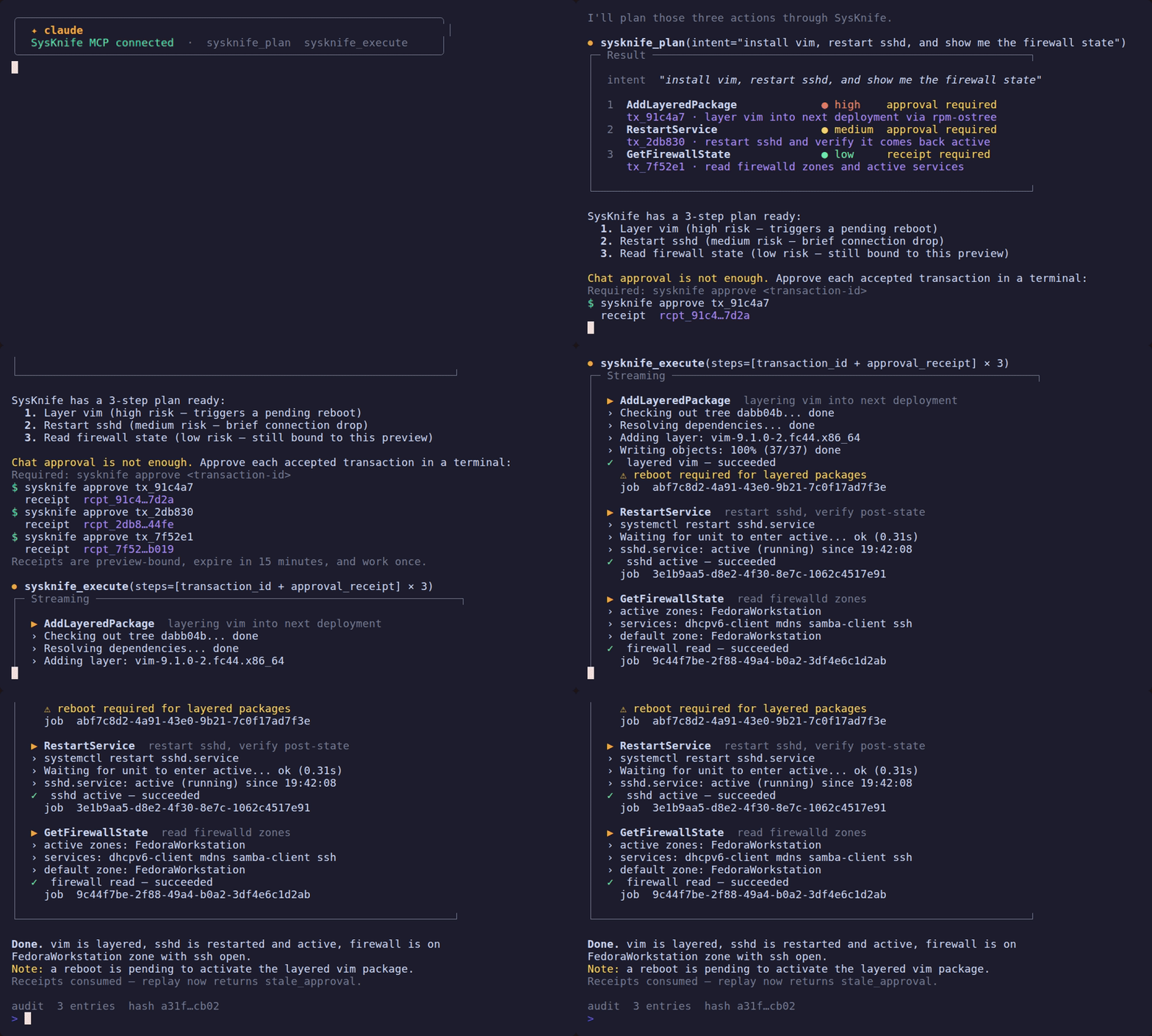
The assistant must always follow this order — no exceptions:
1. sysknife_plan { intent }
        ↓
   Present the plan (steps + risk levels) to the user
        ↓
2. STOP and wait for the user
        ↓
3. User runs: sysknife approve <transaction-id>
   Repeat for each accepted step and return the printed receipt
        ↓
4. sysknife_execute { steps with approval_receipt }
        ↓
   Report results
Never call sysknife_execute without a receipt minted by the separate CLI
command. A chat response such as "yes" is not an approval receipt. Receipts
are bound to one immutable preview, expire after 15 minutes, and are consumed
atomically on first use.
The daemon enforces this protocol. Prompt hooks provide guidance but are not the security boundary.
Setup
1. Run the setup wizard
npx sysknife-setup
Needs Node 22 or newer (Ubuntu 22.04's apt Node is 12, which is too old). The
wizard detects your installed sysknife binary, asks for the daemon socket and
LLM provider, and then asks which integration to configure. No manual file
editing needed. For install options and prerequisites in full, see the
canonical Quick Start.
If you already know the target, skip the picker:
npx sysknife-setup --claude
npx sysknife-setup --cursor
npx sysknife-setup --codex
.mcp.json is gitignored — it contains secrets and local paths.
2. Connect to a daemon in a VM
If the daemon runs inside a VM, two transports are available:
SSH socket tunnel (works with any hypervisor):
ssh -fN -L /tmp/sysknife-vm.sock:/run/sysknife/daemon.sock \
    <user>@<vm-host>
Set SYSKNIFE_SOCKET=/tmp/sysknife-vm.sock when the setup wizard asks for
the socket path.
virtio-vsock (KVM/QEMU only, no SSH required):
# Find the guest CID from the host
virsh dumpxml <vm-name> | grep cid
The daemon must be told to listen on vsock as well — it binds a Unix socket by default, so configuring only the client leaves the two on different transports and nothing connects. On the VM:
sudo systemctl edit sysknife-daemon
# [Service]
# Environment="SYSKNIFE_LISTEN_URI=vsock://:9734"
sudo systemctl restart sysknife-daemon
Then, on the host, set SYSKNIFE_SOCKET=vsock://<CID>:9734 and
SYSKNIFE_TOKEN=<hex> when the wizard asks. The wizard detects the vsock://
prefix and prompts for the token automatically.
See VM + Daemon Setup for the complete walkthrough including token generation, libvirt XML, and troubleshooting.
3. Manual configuration
If you prefer to edit .mcp.json by hand:
{
  "mcpServers": {
    "sysknife": {
      "command": "/path/to/sysknife",
      "args": ["mcp-server"],
      "env": {
        "SYSKNIFE_SOCKET": "/run/sysknife/daemon.sock",
        "SYSKNIFE_LLM_PROVIDER": "openai",
        "OPENAI_API_KEY": "<your-api-key>",
        "SYSKNIFE_LLM_MODEL": "gpt-4.1"
      }
    }
  }
}
For vsock add SYSKNIFE_TOKEN alongside SYSKNIFE_SOCKET.
4. If you skipped the prebuilt download: build the binary
Not a step in the sequence above — an alternative to the wizard's download, for
building from source. Needs a C compiler (sudo apt-get install -y build-essential on Ubuntu); cmake is not required.
cargo build -p sysknife-cli --release
# binary at target/release/sysknife
5. Reload the MCP server in your client
In Claude Code: run /reload-plugins.
Example Session
User:    check disk usage on the VM

Claude:  [calls sysknife_plan { intent: "check disk usage" }]

         Plan: Check disk usage on all filesystems
         Steps:
           ● low  GetDiskUsage — Retrieve current disk usage

         Execute?

User:    [runs sysknife approve 018f2c9d-... in a terminal]
         Approval receipt: 5f493f80-...

Claude:  [calls sysknife_execute with transaction_id and approval_receipt]

         GetDiskUsage ✓
         Filesystem     Size  Used Avail Use%  Mounted on
         /dev/vda3       38G   18G   19G  49%  /var
         ...
Risk Levels
| Level | Meaning | Approval |
|---|---|---|
low | Read-only or fully reversible | One-time receipt |
medium | Modifies state but reversible (e.g. set timezone) | One-time receipt |
high | Destructive or hard to reverse (e.g. rpm-ostree) | One-time receipt |
Risk changes how prominently the plan should be reviewed; it never replaces the receipt requirement. The standalone CLI additionally uses stronger confirmation prompts for high-risk actions.