
Your Linux sysadmin co-pilot. Plain language in. Typed plan out. You approve. Daemon executes.
What SysKnife does
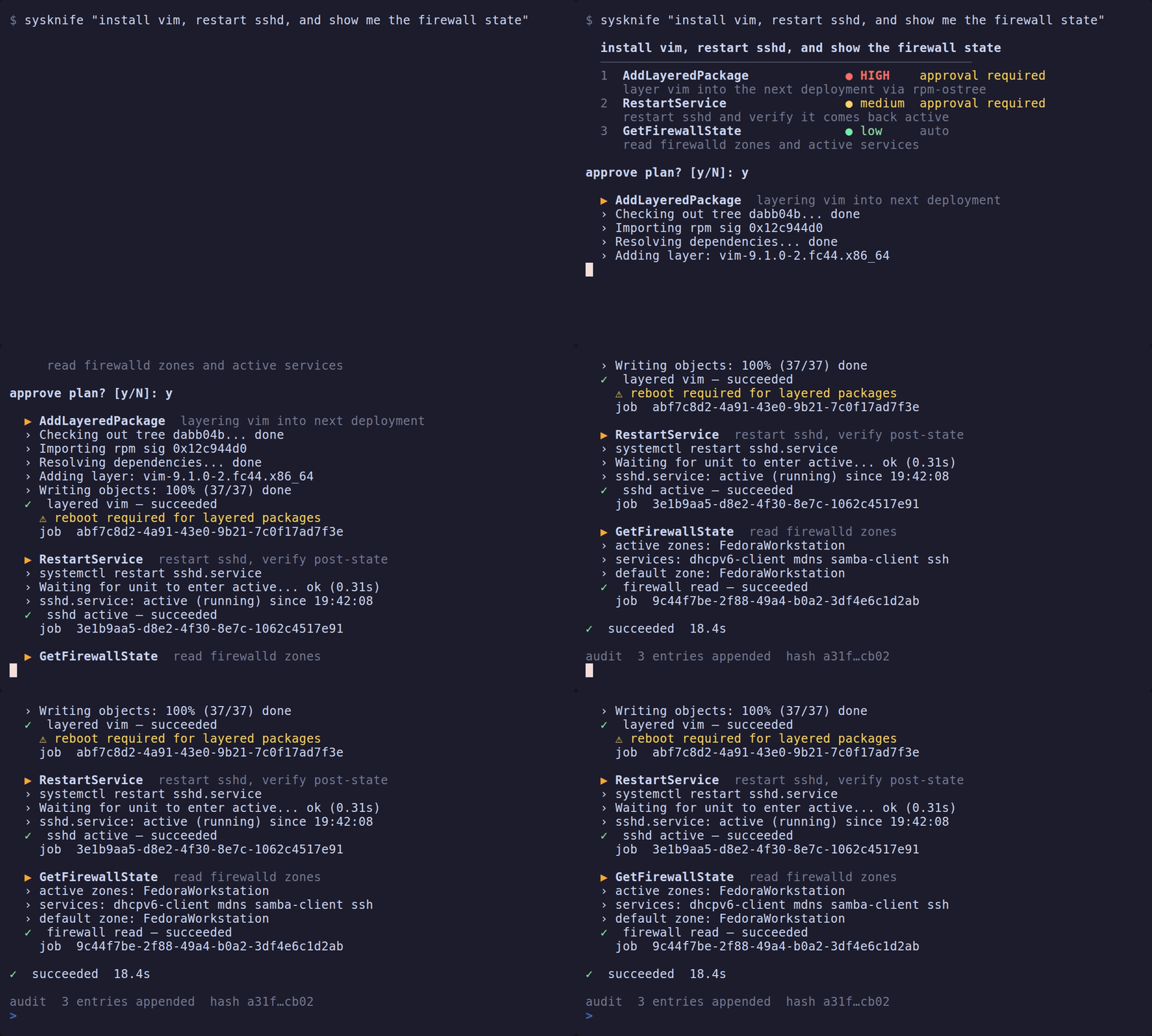
You describe a task in plain language. SysKnife asks an LLM to turn it into a typed plan — a list of named actions with formal risk levels. You review the plan, approve it, and the daemon executes it step by step with live output and automatic rollback on failure.
$ sysknife "install nginx and make sure it starts on boot"

  Install nginx and enable it at boot
  ──────────────────────────────────────────────────
  1  AptInstall                        medium  approval required
     Install the nginx package
  2  SetServiceEnabled                 medium  approval required
     Enable nginx.service at boot

  2 steps, medium risk — execute? [y/N]
The AI cannot run a shell command. It can only propose typed actions. The daemon is the only process that touches your system — and only after you say yes.
Why not just paste the shell command the AI gives you?
Because you find out what it did after. There is no record, no rollback, and no way to verify the AI proposed the minimal change rather than a sledgehammer.
SysKnife gives you:
- Typed actions — not shell strings.
AddLayeredPackage neovimnotrpm-ostree install neovim && ... - Risk levels — Low (read-only), Medium (reversible), High (irreversible, access-control, or reboot-required)
- Preview before execution — see the exact commands before they run
- Automatic rollback — if a high-risk action fails, the daemon reverses what it can
- Immutable audit trail — every execution is Ed25519-signed and hash-chained
How it works
┌─────────────────┐   plan    ┌──────────────────┐  approve  ┌─────────────────┐
│  sysknife-brain │ ────────► │ sysknife approve │ ────────► │ sysknife-daemon │
│  (unprivileged) │           │  (approval gate) │           │ (scoped grants) │
└─────────────────┘           └──────────────────┘           └─────────────────┘
   LLM + tools                   you review here               executes + audits
| Component | Privilege | Job |
|---|---|---|
| brain | none | Talks to the LLM, proposes a typed plan |
| approval gate | user | Shows you the plan, collects your approval: sysknife approve in a terminal (the paused Tauri shell is a second implementation) |
| daemon | sysknife system user, with scoped sudo and polkit grants | Executes approved actions, writes the audit log |
The brain proposes but cannot touch the system. The daemon executes but cannot be reached without an approved plan.
Fastest path: use via your AI coding tool (MCP)
MCP is how most people use SysKnife in 2026 — it's the dominant way AI tools talk to real systems, and Claude Code, Cursor, and Codex CLI all support it. One command wires it up:
npx sysknife-setup
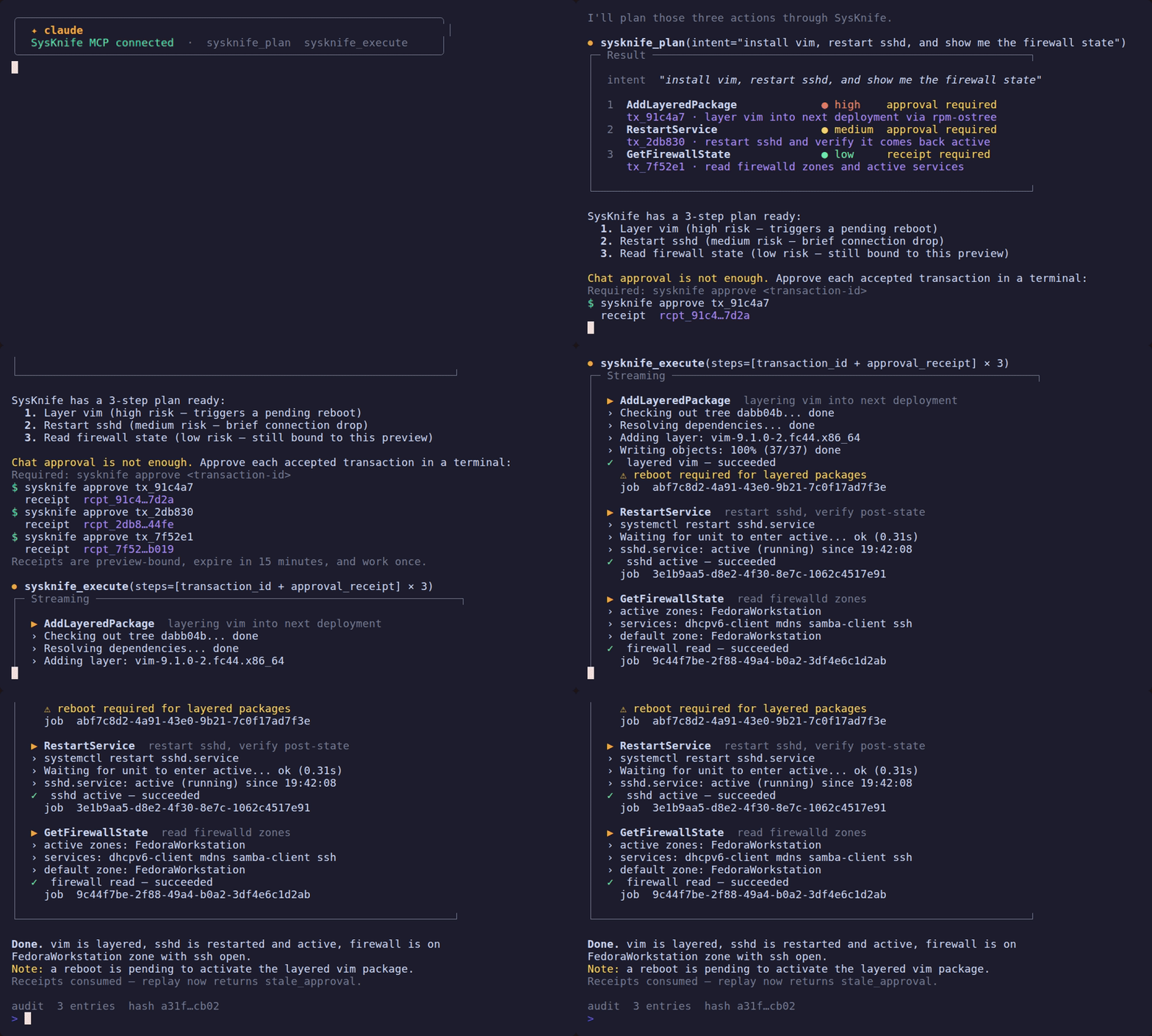
The demo above shows the whole loop: plan in chat, approve in a terminal, execute with a one-time receipt. See the MCP Server guide for full setup and the approval-gate hook.
Prefer the terminal? The CLI is a first-class path
No IDE and no MCP client — the same planner, approval gate, and Ed25519 audit chain, driven straight from your shell. This is a fully supported way to run SysKnife, not an afterthought.
ℹ️ Distro support
The current suite is 99 Ubuntu stories. All three Ubuntu LTS releases have a committed live-VM run covering 79 of those Ubuntu stories, in
tests/evidence/story-runs/: 22.04, 24.04 and 26.04 all at 79/79. The twenty additional stories are not yet included in a committed live-VM run. Each run has a replay twin that reproduces it, serving every call with zero misses. Every Debian-only action has a story. Fedora Atomic is supported by the rpm-ostree action family, but a current Silverblue 44 VM run is a release gate. Plain Fedora remains experimental until thednfaction family ships. See Distro Support for the full matrix.
sudo apt-get install -y build-essential          # Rust stable and a C compiler
git clone https://github.com/lacs-project/sysknife
cd sysknife && make build && sudo make install   # ~7-12 min: about 400 crates
sudo systemctl enable --now sysknife-daemon
sysknife "show disk usage"
For prebuilt binaries instead of a build, run npx sysknife-setup (Node 22+).
See the canonical Quick Start.
No API key needed if you have Ollama running locally — SysKnife auto-detects it. See Quick Start.
Also: a desktop GUI (a distant third option)
There is an experimental desktop GUI (sysknife-shell, built with Tauri) that
wraps the same plan → approve → execute loop in a window. It is the least
frequently maintained surface — a distant third behind the MCP integration and
the CLI — so reach for it only if you specifically want a graphical approval
flow.
Status
192 typed actions · 1,993 Rust tests + 72 frontend tests · MIT
SysKnife is the reference implementation of the LACS specification — a CC0 public-domain protocol for AI agents that operate at the Linux system level.
Quick Start
This is the canonical install page. Everywhere else links here rather than repeating a second, slightly different sequence.
💡 Prefer your AI coding tool?
If you use Claude Code, Cursor, or Codex CLI — run
npx sysknife-setupand follow the wizard. See MCP Server for the full guide. You can skip this page entirely.
Step 1 — Install
Two paths. The wizard needs no toolchain and no compile; building from source needs both.
Fastest: prebuilt binaries
npx sysknife-setup
Prerequisites: Node 22 or newer. On Ubuntu 22.04, apt install nodejs
installs Node 12, which is too old — the installer will tell you so and how to
get a current Node. It downloads SHA-256-verified binaries from the release
page, installs the daemon service, and writes your MCP client config.
Unattended runs must say which daemon to install, because the choice decides what will work:
npx sysknife-setup --claude --no-prompts --daemon-mode=system
--daemon-mode=user installs an unprivileged service that runs as you: read-only
actions work, and anything mutating (installing packages, restarting services)
does not, because the sudoers grants belong to the sysknife system user.
For system mode, follow the printed installation commands; the wizard does not
install the system service itself. A skipped install or a host without systemd
gets manual daemon steps instead of commands for a user unit that was never
installed. With --no-prompts, supply any required API key through the
environment (see Step 2); the wizard does not collect one interactively.
Redirected downloads print periodic progress lines and a final byte count.
The wizard suggests SYSKNIFE_LLM_PROVIDER when set, otherwise the first provider
with a nonblank API key in the displayed order (OpenAI first), otherwise keyless
Ollama. Interactive answers can override that suggestion; --no-prompts uses it.
This selects a configuration, without checking server or model availability.
For Ollama, start ollama serve and load the selected model with ollama pull
(the default model is qwen3:8b).
From source
Prerequisites: Rust stable (rustup update stable), a C compiler and
linker, and an LLM provider (see Step 2). The TLS and SQLite dependencies
build native code, so a machine with only rustup fails at
error: linker cc not found. cmake is not required.
sudo apt-get install -y build-essential   # Debian/Ubuntu
git clone https://github.com/lacs-project/sysknife
cd sysknife
make build
sudo make install
sudo systemctl enable --now sysknife-daemon
make build compiles around 400 crates: expect 7 to 12 minutes on a first
build (measured 6m56s on Ubuntu 24.04, 11m43s on 22.04).
ℹ️ Fedora / Silverblue
Ubuntu 22.04, 24.04 and 26.04 are each validated by a committed live-VM story run (79/79) with a replay twin; other Ubuntu releases from 20.04 up are eligible without a per-release run. Fedora Atomic uses the rpm-ostree action family and requires a current Silverblue 44 validation run for each release. Plain Fedora remains experimental. See distro support.
Step 2 — Choose an LLM
Pick one. No account needed for Ollama.
Ollama — local, fully offline, recommended for homelabs:
ollama pull qwen3:8b        # runs well on 16 GB RAM
# SysKnife auto-detects Ollama when no cloud key is set
Anthropic:
export ANTHROPIC_API_KEY=sk-ant-...
OpenAI / Gemini / others — see Configuration for the full list of supported providers.
Optional config file (~/.config/sysknife/config.toml):
[llm]
provider = "ollama"
model    = "qwen3:8b"
Step 3 — Run
# Safe first run — plan only, nothing executes
sysknife --dry-run "show disk usage"

# Full run with the daemon
sysknife "what packages do I have installed as layers?"
⚠️ Daemon required for execution
--dry-runworks anywhere and is a great way to test the planner without installing the daemon. Full execution requiressysknife-daemonrunning (enabled in Step 1). It runs as the unprivilegedsysknifesystem user and reaches root only through the scoped sudo and polkit grants it installs.
That's it. The planner proposes a typed plan, you approve, the daemon executes.
Try the planner without the daemon
On any Linux machine with an API key:
export ANTHROPIC_API_KEY=sk-ant-...
cargo run --bin sysknife -- --dry-run "show disk usage"
Plans the intent and prints the result. No daemon and no root: nothing privileged runs, so this is the way to evaluate the planner or run it in CI.
It is not, however, free of installation — cargo run builds the workspace, so
it needs Rust plus build-essential and the same 7 to 12 minutes as any other
first build. If what you want is the quickest look at SysKnife, use
npx sysknife-setup and the prebuilt binaries instead.
What to read next
- CLI Reference — all flags, subcommands, and output formats
- MCP Server — use SysKnife from Claude Code, Cursor, Codex CLI
- Configuration — full provider and storage options
- Distro Support — what works on which distributions
SysKnife MCP Server
The sysknife mcp-server subcommand exposes five fixed MCP tools plus direct
read-only query tools selected for the detected distro. MCP-capable AI
assistants (Claude Code, Cursor, Codex CLI, …) can inspect live state without an
LLM planning round trip, while every mutation still uses SysKnife's
approval-gated, audit-logged path.
💡 One command to configure everything
Run
npx sysknife-setup— it detects which AI clients you have installed and writes the correct config files for each one automatically.Found SysKnife on a directory page where the tools error out? Discovery works anywhere: a directory sandbox lists the five fixed tools plus only the cross-distro direct queries when distro detection is unavailable. Calling them needs a
sysknife-daemonon a real host, which a build container has no way to provide, sodoctorreports the socket absent and the rest fail. That is the trust boundary, not a packaging defect. See Registry and Directory Listings.
Tools
sysknife_plan
Turn a natural-language intent into a risk-labelled plan. No action is executed.
Input
| Field | Type | Description |
|---|---|---|
intent | string | Natural-language intent, e.g. "check disk usage" |
Output — PlanOutput
| Field | Type | Description |
|---|---|---|
intent | string | The original intent |
summary | string | One-line plan summary |
explanation | string | Why this plan was chosen |
steps | PlanStep[] | Ordered steps to execute |
Each PlanStep:
| Field | Type | Description |
|---|---|---|
action_name | string | Canonical action name, e.g. GetDiskUsage |
summary | string | What this step does |
risk_level | string | "low", "medium", or "high" |
params | object | Action-specific parameters |
command | string | Daemon-resolved shell command, e.g. "timedatectl" |
transaction_id | string | Daemon identity for this immutable preview |
warnings | string[] | Preview-time warnings (reboot required, platform caveats). Relay these to the operator before collecting approval |
current_state | object | Relevant system state as the daemon found it |
proposed_change | object | What the daemon will change, as it resolved it — the substance of what is being approved |
expected_side_effects | string[] | Side effects beyond the change itself |
reboot_required | bool | Whether the step needs a reboot to take effect |
rollback_available | bool | Whether failure can be rolled back automatically |
params must be an object containing only keys accepted by that action. Unknown
or misspelled keys are rejected before approval, including on actions with no
parameters. For example, SetKernelArguments accepts add and remove;
GrubSetKargs accepts append and delete. Existing aliases such as user for
username on user-scoped actions remain accepted. Planner providers may encode
an object as a JSON string; scalar, array, and null values are rejected after
decoding.
sysknife_execute
Execute a plan produced by sysknife_plan. Each step must include the
one-time receipt printed by sysknife approve <transaction-id>.
Input
| Field | Type | Description |
|---|---|---|
steps | StepToExecute[] | Approved steps from sysknife_plan |
Each StepToExecute contains the original transaction_id, action_name, and
params, plus an approval_receipt. Execution halts on the first step whose
status is anything other than succeeded: failed, unknown, rolled_back,
canceled, and needs_reboot all stop the plan. Results already received
remain in the response, followed by the interrupted step; subsequent steps are
not attempted.
Output — ExecuteOutput
| Field | Type | Description |
|---|---|---|
steps | StepResult[] | Results for attempted steps, in order |
needs_reboot | bool | True if any step confirmed a reboot is required |
Each StepResult:
| Field | Type | Description |
|---|---|---|
action_name | string | Action whose execution was attempted |
status | string | "succeeded", "failed", "unknown", "rolled_back", "canceled", "needs_reboot" |
summary | string | Human-readable outcome |
output | string[] | Progress lines (ANSI stripped) |
warnings | string[] | Daemon warnings or outcome recovery guidance |
needs_reboot | bool | Whether the daemon confirmed a reboot is required |
transaction_id | string | Daemon audit transaction ID |
rollback_ref | string | null | Reported rollback after a failure; null when no rollback was reported |
A connection failure before sending a request or an explicit daemon rejection
(including a resource conflict) is reported as a failed step with the error
text in summary. A send failure,
closed socket, timeout, or unreadable response leaves the outcome unknown:
the action may already have applied or may still be running. The interrupted
step retains its transaction ID and any progress received, with a recovery
warning. Its needs_reboot: false and rollback_ref: null mean these effects
were not confirmed, rather than proving that neither occurred.
Inspect transaction history and host state before deciding how to recover an unknown outcome. Do not automatically replay the plan: completed steps may already have consumed their one-time receipts.
sysknife_history
List audit-log entries with optional status, action, since, and limit
filters. This tool is read-only and does not require a plan or receipt.
sysknife_doctor
Check daemon connectivity, active brain configuration, audit storage, and a quick audit-chain status. This tool is read-only.
sysknife_audit_verify
Verify the Ed25519-signed audit chain and report intact, broken, or
cannot_verify, including the first offending row when verification fails.
This tool is read-only.
Direct read-only action tools
Every explicitly classified read-only catalogue action is exposed as
sysknife_<snake_case_action>, for example:
GetDiskUsage→sysknife_get_disk_usageGetServiceStatus→sysknife_get_service_statusAptSearch→sysknife_apt_searchon Ubuntu-family hostsGetSystemState→sysknife_get_system_stateon Fedora-family hosts
Tool arguments are the action parameters described in each tool's generated
description. Calls go through the daemon's query_action path, which preserves
the Observer-role and distro fences and independently rejects every action in
the shared Observer-mutating classification. The tool annotations declare the
routes read-only and non-destructive.
Results arrive wrapped in an envelope:
<untrusted_tool_output source="AptShow">
nginx - small, powerful, scalable web/proxy server
</untrusted_tool_output>
The managed host wrote that text, and the envelope is how your assistant is told
so. A package description, a unit description and a journal line are all writable
by whoever influenced the machine you pointed SysKnife at, so before the envelope
goes on, the body is stripped of invisible Unicode carriers, ANSI sequences and
any forged envelope tag, then capped at 64 KiB with a [...truncated] marker if
it runs longer. SECURITY.md covers what the envelope does and does not buy you.
The allowlist is deliberately not equivalent to RiskLevel::Low. AptUpdate
runs sudo apt-get update; it is Low/Observer-callable but mutating, so it is
never registered as a direct tool and the daemon refuses raw query_action
requests for it. A drift test compares the explicit read-only and mutating
classifications with the live catalogue, forcing every future Observer action
to be reviewed before the surface can change.
The Approval Workflow
The assistant must always follow this order — no exceptions:
1. sysknife_plan { intent }
        ↓
   Present the plan (steps + risk levels) to the user
        ↓
2. STOP and wait for the user
        ↓
3. User runs: sysknife approve <transaction-id>
   Repeat for each accepted step and return the printed receipt
        ↓
4. sysknife_execute { steps with approval_receipt }
        ↓
   Report results
Never call sysknife_execute without a receipt minted by the separate CLI
command. A chat response such as "yes" is not an approval receipt. Receipts
are bound to one immutable preview, expire after 15 minutes, and are consumed
atomically on first use.
The daemon enforces this protocol. Prompt hooks provide guidance but are not the security boundary.
Setup
1. Run the setup wizard
npx sysknife-setup
Needs Node 22 or newer (Ubuntu 22.04's apt Node is 12, which is too old). The
wizard detects your installed sysknife binary, asks for the daemon socket and
LLM provider, and then asks which integration to configure. No manual file
editing needed. For install options and prerequisites in full, see the
canonical Quick Start.
If you already know the target, skip the picker:
npx sysknife-setup --claude
npx sysknife-setup --cursor
npx sysknife-setup --codex
.mcp.json is gitignored — it contains secrets and local paths.
2. Connect to a daemon in a VM
If the daemon runs inside a VM, two transports are available:
SSH socket tunnel (works with any hypervisor):
ssh -fN -L /tmp/sysknife-vm.sock:/run/sysknife/daemon.sock \
    <user>@<vm-host>
Set SYSKNIFE_SOCKET=/tmp/sysknife-vm.sock when the setup wizard asks for
the socket path.
virtio-vsock (KVM/QEMU only, no SSH required):
# Find the guest CID from the host
virsh dumpxml <vm-name> | grep cid
The daemon must be told to listen on vsock as well — it binds a Unix socket by default, so configuring only the client leaves the two on different transports and nothing connects. On the VM:
sudo systemctl edit sysknife-daemon
# [Service]
# Environment="SYSKNIFE_LISTEN_URI=vsock://:9734"
sudo systemctl restart sysknife-daemon
Then, on the host, set SYSKNIFE_SOCKET=vsock://<CID>:9734 and
SYSKNIFE_TOKEN=<hex> when the wizard asks. The wizard detects the vsock://
prefix and prompts for the token automatically.
See VM + Daemon Setup for the complete walkthrough including token generation, libvirt XML, and troubleshooting.
3. Manual configuration
If you prefer to edit .mcp.json by hand:
{
  "mcpServers": {
    "sysknife": {
      "command": "/path/to/sysknife",
      "args": ["mcp-server"],
      "env": {
        "SYSKNIFE_SOCKET": "/run/sysknife/daemon.sock",
        "SYSKNIFE_LLM_PROVIDER": "openai",
        "OPENAI_API_KEY": "<your-api-key>",
        "SYSKNIFE_LLM_MODEL": "gpt-4.1"
      }
    }
  }
}
For vsock add SYSKNIFE_TOKEN alongside SYSKNIFE_SOCKET.
4. If you skipped the prebuilt download: build the binary
Not a step in the sequence above — an alternative to the wizard's download, for
building from source. Needs a C compiler (sudo apt-get install -y build-essential on Ubuntu); cmake is not required.
cargo build -p sysknife-cli --release
# binary at target/release/sysknife
5. Reload the MCP server in your client
In Claude Code: run /reload-plugins.
Example Session
User:    check disk usage on the VM

Claude:  [calls sysknife_plan { intent: "check disk usage" }]

         Plan: Check disk usage on all filesystems
         Steps:
           ● low  GetDiskUsage — Retrieve current disk usage

         Execute?

User:    [runs sysknife approve 018f2c9d-... in a terminal]
         Approval receipt: 5f493f80-...

Claude:  [calls sysknife_execute with transaction_id and approval_receipt]

         GetDiskUsage ✓
         Filesystem     Size  Used Avail Use%  Mounted on
         /dev/vda3       38G   18G   19G  49%  /var
         ...
Risk Levels
| Level | Meaning | Approval |
|---|---|---|
low | Read-only or fully reversible | One-time receipt |
medium | Modifies state but reversible (e.g. set timezone) | One-time receipt |
high | Destructive or hard to reverse (e.g. rpm-ostree) | One-time receipt |
Risk changes how prominently the plan should be reviewed; it never replaces the receipt requirement. The standalone CLI additionally uses stronger confirmation prompts for high-risk actions.
MCP Registry listing
SysKnife's MCP server is the sysknife mcp-server subcommand (stdio). This note
records how it maps onto the official MCP Registry
and the exact steps to publish a listing.
The official registry is in preview — it may reset data before general availability, so treat a published entry as non-permanent for now.
Distribution: the cargo package type
The registry supports a cargo package type: registryType is an open string
(the schema's enumerated examples are only npm/pypi/oci/nuget/mcpb, so cargo
is permitted rather than listed), and the registry validator
(internal/validators/registries/cargo.go) implements it. That lets us list the
crate directly:
registryType:cargo,identifier:sysknife-cli(the crate that installs thesysknifebinary),transport:stdio.- Because
sysknife's MCP server is a subcommand, the package entry passesmcp-serveras a positionalpackageArgumentsvalue. A client resolves the listing tocargo install sysknife-clithen runssysknife mcp-server. - Two things that install implies, and which the registry entry has no field for:
it needs a C compiler (
build-essential; not cmake, verified in clean Ubuntu containers) and takes 7 to 12 minutes; and the CLI alone can plan but not execute, because execution belongs to the privilegedsysknife-daemon. Both are stated up front inapps/sysknife-cli/README.md, which is the page crates.io renders and therefore what a registry visitor actually reads.
This supersedes the earlier npm-launcher plan: the npm package sysknife-setup
is an installer/wizard, not a stdio server, and npx sysknife-setup would launch
the wizard rather than the server. Worse than merely wrong, the wizard reads
answers from stdin when stdin is not a TTY, so it would consume a client's
initialize frame as a prompt answer. The cargo type avoids that entirely: no
dedicated launcher package is needed.
The root server.json is accepted by mcp-publisher validate, which checks
against the live registry rather than only the local schema.
Namespace: io.github.lacs-project/sysknife (verified by GitHub identity — the
authenticating account must belong to the lacs-project org; no DNS needed).
Ownership marker (already in place)
crates.io ownership is proven by a visible mcp-name: token in the crate's
rendered README. crates.io strips HTML comments when rendering, so the
marker must be plain text — apps/sysknife-cli/README.md carries:
mcp-name: io.github.lacs-project/sysknife
The verifier fetches https://crates.io/api/v1/crates/sysknife-cli/<version>/readme
and searches the rendered README for that token. The marker only takes effect
in a published crate version, so the server.json version must match a
crate version whose README carries it (see the release step below).
server.json
Shipped at the repository root. The version is coupled to a published crate
version that carries the marker, and two checks keep that coupling honest:
scripts/check_release_versions.shincludes bothserver.jsonversion fields in the release-wide version comparison, so a release cannot bump the crates and leave the listing pointing at the previous version.tests/release/registry-manifest.test.shasserts the rest of the manifest:registryType/registryBaseUrl/transport, that the identifier is the CLI crate, that themcp-serverpositional argument is present, and that the ownership marker is in the crate README outside an HTML comment. It runs in CI and in the release preflight.
Both mean a stale or incoherent listing fails a check rather than a publish.
Publish steps
The crate README marker (apps/sysknife-cli/README.md) is in the repo and has
shipped in every published crate since 0.2.6, so any current version is
registry-ready. To publish the listing:
- Confirm the marker is live in the version
server.jsonnames. The validator reads the rendered README from crates.io, in two calls:
A count of# Read the version from the manifest rather than retyping it: checking the # marker for a version other than the one being published proves nothing. version="$(node -p 'require("./server.json").version')" ua='sysknife-release/1.0 (https://github.com/lacs-project/sysknife)' url="$(curl -sS -H 'Accept: application/json' -H "User-Agent: $ua" \ "https://crates.io/api/v1/crates/sysknife-cli/${version}/readme" \ | node -p 'JSON.parse(require("fs").readFileSync(0,"utf8")).url')" curl -sS -H "User-Agent: $ua" "$url" \ | grep -c 'mcp-name: io.github.lacs-project/sysknife'1means the marker is visible to the validator. A0means the listing cannot be published for that version, whatever the repo says. - Install the publisher CLI:
brew install mcp-publisher # or download from the registry's GitHub Releases - Authenticate as the
lacs-projectorg. In practice there is one option, not two: see Authentication: namespace comes from the identity below. Inside a GitHub Actions job withpermissions: id-token: write(the./reflects the binary downloaded into the job's working directory rather than a PATH install):
The./mcp-publisher login github-oidcpublish-registryjob in.github/workflows/release.ymldoes this on every tag, and.github/workflows/publish-mcp.ymlcan be dispatched by hand for a retry or a backfill. - Validate and publish (from the repo root):
mcp-publisher validate # checks server.json against the live registry mcp-publisher publishvalidateneeds no authentication, so it is worth running before the login step. Onlypublishrequires the token. - Verify:
Thecurl "https://registry.modelcontextprotocol.io/v0/servers?search=sysknife"countin the response metadata goes from0to1.
Authentication: namespace comes from the identity
server.json publishes io.github.lacs-project/sysknife, and the registry mints
publishing permissions from whoever authenticated, not from what the manifest
asks for. That distinction is the whole reason this cannot be done from a laptop.
mcp-publisher login github authenticates the user. The registry token it
returns carries a single permission:
{"action": "publish", "resource": "io.github.vladimirrott/*"}
so publish fails with 403 Forbidden ... You have permission to publish: io.github.vladimirrott/*. Attempting to publish: io.github.lacs-project/sysknife.
Making org membership public does not fix it, and neither does being an org admin:
the device-flow OAuth grant does not carry read:org, so the registry never sees
the membership at all. Verified 2026-07-30 on two consecutive fresh logins with
membership already public.
mcp-publisher login github-oidc authenticates the repository. The namespace
is derived from the repository owner, so it matches server.json by construction,
and the credential is permissions: id-token: write rather than a stored secret.
The practical consequence: a release published from a laptop can reach crates.io, npm and GitHub Releases but cannot reach the MCP Registry. Publish the registry listing from Actions.
Downstream propagation
One publish to the official registry auto-propagates to the GitHub MCP Registry and PulseMCP, which ingest from it. Everything else takes a separate submission. Verified by walking each flow on 2026-07-29:
| Directory | How it takes a server |
|---|---|
| PulseMCP | No submission form exists for servers. Choosing "MCP Server" on pulsemcp.com/submit returns instructions only: they ingest the official registry daily and process weekly. The URL field on that page belongs to the MCP Client branch. Email hello@pulsemcp.com only if a week has passed since the registry publish without a listing. |
| mcpservers.org | Web form: server name, one-sentence description, link, category, contact email. Free tier with a review pass; a paid tier only buys queue position. |
| Glama | Browser-only build spec at glama.ai/mcp/servers/lacs-project/sysknife/admin/dockerfile. Keep the mcp-proxy -- prefix in the CMD arguments: that wrapper is how Glama exposes a stdio server. |
| Smithery | smithery.yaml is in the repository root, declaring the stdio form: their CLI spawns sysknife mcp-server on the user's own machine, where a daemon can actually exist. Their two hosted runtimes (typescript, container) require Streamable HTTP and would run a daemonless sandbox, so they are the wrong shape here, and tests/release/smithery-manifest.test.sh fails the build if someone switches to one. The user still needs the sysknife binary installed first; Smithery spawns it, it does not install it. |
| mcp.so, LobeHub | Separate submissions; both reject automated fetches, so use a real browser. |
What a directory sandbox can and cannot tell you
Most directories work the same way: build a container from the repository, boot the server inside it, introspect the tool list, and score what they find. That model assumes a self-contained server, one that reaches an API over the network or reads files inside its own sandbox. SysKnife is not that, by design, and it pays to be precise about which half of the model still applies.
It claimed a sandbox would show SysKnife with an empty tool list, because there
is no daemon to ask. That is not what happens. Glama's build of v0.3.0
enumerated all five tools, and its Schema tab lists them, with no daemon
anywhere. Current builds also generate direct read-only query definitions from
the local action catalogue and detected distro. tools/list still never touches
the daemon socket.
The empty "tools": [] that prompted the wrong explanation meant something
duller: no build had been run against the spec yet, so there was no inventory to
report. Running the build filled it in.
sysknife mcp-server is the unprivileged half of the system. It plans,
previews, renders, and forwards. It cannot change anything. Every mutation
travels over a unix socket to sysknife-daemon, which holds the sudoers, polkit
and helper policy that sudo make install owns. The socket is
/run/sysknife/daemon.sock, mode 0660, inside the 0750 sysknife:sysknife
directory /run/sysknife. That split is the
product: it is why an agent cannot hand a shell string to root, and why every
executed action lands in the signed chain. See
Architecture & Trust Boundaries.
So the split is between describing and doing:
- Discovery works, and should.
initializeandtools/listare answered from the binary's own definitions, so a sandbox sees the five fixed tools and the direct read-only queries compatible with the distro it detects (only cross-distro queries if detection fails), all with schemas. - Every tool that needs the daemon fails there, and should.
sysknife_plan,sysknife_execute,sysknife_historyandsysknife_doctorall reachsysknife-daemonover a unix socket at/run/sysknife/daemon.sock; the generated direct queries use the same socket and daemon authorization fence. The socket sits in the0750 sysknife:sysknifedirectory/run/sysknife, and the daemon behind it holds the sudoers, polkit and helper policysudo make installowns. In a container there is nothing listening, sodoctorreports the socket absent and the rest return errors. That is the trust boundary doing its job, not a packaging defect. See Architecture & Trust Boundaries. - stdio needs a wrapper. Container-based hosts front the binary with a proxy
(Glama uses
mcp-proxy --). Strip that prefix while editing a build spec and the listing stops working. - A green sandbox run still proves little. "It booted and listed tools" says the binary starts and its schemas parse. It says nothing about whether SysKnife administers a real Ubuntu host correctly, because the only thing it could have administered was a throwaway container.
The practical guidance: treat these listings as discovery surface, not as validation. They are cheap inbound links from where people look for MCP servers. The evidence that actually bears on correctness lives elsewhere: the VM runs recorded in Distro Support, the story suite, and an audit chain a third party can verify with only the public key.
And the inverse, which matters more: do not relax the daemon boundary to score better in a sandbox. Enumerating tools there is free and already happens; being able to execute from inside an unprivileged container is the thing that would score higher and make SysKnife not worth installing.
sysknife CLI Reference
sysknife is the command-line interface to the SysKnife daemon. It turns a
natural-language intent into a risk-labelled plan, asks for approval where
needed, and streams execution output in real time.
If you want SysKnife inside Claude Code / Cursor / Codex CLI instead, see
the main README and run npx sysknife-setup. Both paths
share the daemon, the audit chain, and the typed-action set.
Quick start
# Check that the daemon is reachable
sysknife doctor

# Plan + execute a single intent
sysknife "check disk usage"

# Preview the plan without executing
sysknife --dry-run "list running containers"

# Open the interactive REPL
sysknife
Synopsis
sysknife [GLOBAL FLAGS] [SUBCOMMAND | INTENT WORDS...]
When no subcommand is given and no intent words are provided, sysknife starts
an interactive REPL.
Subcommands
sysknife <intent>
Plan and (optionally) execute a natural-language intent.
sysknife "check disk usage"
sysknife check disk usage            # words are joined — same result
sysknife "list running containers"
sysknife "is firewalld active?"
sysknife "layer vim via rpm-ostree"
What happens:
- A spinner appears while the LLM plans (
Thinking…→Querying …→Proposing plan…). - The coloured plan is printed — each step shows a risk badge
(
● low/● medium/● HIGH), the action name, and a summary. - If any step requires approval, you are prompted. HIGH-risk steps always
require confirmation regardless of
--yes. - Execution streams output line by line with a
›prefix; a✓/✗result icon is printed after each step.
The natural-language planner has no secure way to collect or resolve a
credential after planning. It therefore does not offer Ubuntu Pro attachment,
and it joins open Wi-Fi networks only: a plan step that carries a Wi-Fi
password is refused. Do not put a Pro token or Wi-Fi password in an intent:
the admission check rejects known credential shapes before contacting the model.
Use the Ubuntu Pro or NetworkManager tools outside SysKnife for those
operations until a separate credential entry path exists. ProStatus, ProDetach, EnableProService, and
DisableProService remain available through SysKnife because they do not
take a credential parameter.
The sensitive-data fence matches value-bearing labels (such as
password=hunter2, API_KEY: value, or my password is hunter2), long
Bearer tokens, private-key PEM headers, and known API/token prefixes with
plausible bodies at token boundaries. Security administration requests such
as "set password aging to 90 days", "who can read /etc/passwd", and
"my root disk-full alert keeps firing" remain available. The same fence
checks summary prompts and remembered preferences and withholds matching
intents from the planning notice.
It also matches "with password" or "using token" followed by a quoted value, or a token containing digits or token punctuation, such as "with password hunter2". Policy phrases such as "with password aging enforcement" remain available.
Assignment labels must end in a credential term: ANTHROPIC_API_KEY and
AWS_SECRET_ACCESS_KEY match, while policy/path settings such as
PASSWORD_MAX_DAYS=90, TOKEN_LIFETIME=3600, and API_KEY_FILE=/etc/key
are allowed unless their values themselves match a known credential format.
This is a format heuristic: an unlabelled password such as "connect to MyNet with hunter2" can pass it. An allowed intent does not prove that it contains no secret. Keep credentials out of intents; the fence does not provide the separate credential entry path described above.
sysknife doctor
Check daemon connectivity and print the resolved configuration.
sysknife doctor
sysknife --json doctor      # machine-readable
Exit code 0 on success, non-zero if the daemon is unreachable.
Sample output:
✓  daemon ok
  socket    unix:///run/sysknife/daemon.sock
  host      my-silverblue
  provider  anthropic
  model     claude-sonnet-4-6
  distro    fedora
sysknife history
Query past SysKnife execution history.
sysknife history
sysknife history --limit 50
sysknife history --status failed
sysknife history --action InstallPackages
sysknife history --since 2026-04-01T00:00:00Z
sysknife history --status succeeded --limit 5 --since 2026-04-10T00:00:00Z
Flags:
| Flag | Default | Description |
|---|---|---|
--limit N | 20 | Maximum entries to return |
--status STATUS | — | Filter by job status (succeeded, failed, canceled, …) |
--action ACTION | — | Filter by action name (e.g. InstallPackages) |
--since DATETIME | — | Only entries after this ISO-8601 date or UTC-qualified datetime |
sysknife approve
Issue a one-time receipt for a transaction returned by the MCP
sysknife_plan tool. Issuing a receipt requires an interactive terminal. It first
loads and displays the daemon-authoritative action, risk, summary, and proposed
change so an agent cannot substitute an opaque transaction ID. It mints the
receipt only after confirmation; high-risk approvals require typing the exact
action name.
--max-risk checks the daemon's preview risk before prompting and refuses any
transaction above the ceiling. --non-interactive refuses receipt issuance,
including with --yes or unattended consent: a receipt records explicit human
approval. Those auto-approval flags apply to intent execution, not this command.
--dry-run loads and displays the preview without prompting or issuing a
receipt. It works without a terminal, including with --non-interactive, and
can display risks above --max-risk because it approves nothing. With --json,
the output contains transaction_id, action_name, preview and dry_run: true,
with no approval_receipt field.
sysknife approve 018f2c9d-...
sysknife --json approve 018f2c9d-...
sysknife approve 018f2c9d-... --full
sysknife --dry-run --json approve 018f2c9d-...
The proposed change is displayed through a bounded renderer: 40 lines, 512 characters per line. The bounds are there so a long change cannot scroll the action name and risk level off the screen before you answer.
When the bounds hide anything, approval is refused rather than accepted, and the message says how many lines were withheld and how many were cut short. Approving a change you were shown part of would produce a receipt proving you typed a word, not that you read what you agreed to.
--full prints every line and every character, with the same neutralisation
applied, and prints the action, risk and summary after the change so the
decision context is the last thing on screen however long the change is. Pipe it
to a pager if you like; the text cannot rewrite your terminal either way.
$ sysknife approve 018f2c9d-...
error: the proposed change does not fit the approval view: 132 line(s) were not
shown. Approving would mean consenting to text you were not shown. Re-run with
--full to see all of it: sysknife approve 018f2c9d-... --full
Give the printed approval_receipt to the MCP client for that exact step. The
receipt expires after 15 minutes, is bound to the preview's action and params,
and is consumed on first execution. A chat message saying "approved" is not a
receipt.
sysknife audit
Inspect and anchor the tamper-evident, Ed25519-signed audit chain the daemon writes for every executed action.
sysknife audit export
Export the transaction-chain rows from the configured SQLite or PostgreSQL
audit store as a JSON array, in ascending seq order. Each object contains the
17 stored ChainRow columns, including prev_chain_hash and chain_hash.
The latter is the Ed25519 signature and is deliberately not renamed. Optional
values that were not recorded are JSON null; argv, outcome, and a
separate signature field are not reconstructed.
sysknife audit export
sysknife audit export --since 2026-08-01T00:00:00Z --limit 500
| Flag | Description |
|---|---|
--since DATETIME | Include rows recorded at or after this RFC 3339 timestamp |
--limit N | Emit at most N matching rows; omitted means all matching rows |
An export is not a redacted artifact. It inherits the confidentiality class of
the audit database, which the daemon keeps 0600 inside a 0700 directory, and
writing one moves that content across the boundary those modes exist to hold.
Every row carries request_hash, a single unsalted SHA-256 over the action name
and the unredacted parameters. compute_request_hash runs before
redact_params, so redaction never reaches the hashed preimage. Where an
action's parameters are low entropy and partly public the hash is worth
attacking: for ConfigureWifi the SSID is broadcast, which leaves the
passphrase as the only unknown. High-entropy values such as ProAttach tokens
are unaffected.
The column cannot be dropped, because request_hash is part of the signed bytes
an offline verifier rebuilds. Treat an export with the same care as the database
itself rather than as a sanitised report.
sysknife audit verify
Verify the audit trail: the transaction chain, the approval-event chain, and
the binding between them. All three are reported and any one can fail the
command. Exits 0 if everything is intact, 1 if any check finds tampering,
2 if a check cannot establish the history (missing key, unreadable database,
or an empty unanchored transaction log). When the checks disagree the worst
wins, and 1 outranks 2 — if something is provably broken, "could not verify"
would understate it.
With --json the report is an object with a top-level status plus a chain,
approval_events and binding section, so a pipeline can act on which part
failed. A readable empty transaction log without an independent anchor reports
CANNOT VERIFY, exit 2, and top-level JSON cannot_verify, whether it is a
fresh store or an erased one. Its chain subresult still reports zero intact
rows: that row-integrity check does not establish which history occurred.
sysknife audit verify
sysknife audit verify --json
sysknife audit verify --pubkey /etc/sysknife/audit-key.pub
| Flag | Description |
|---|---|
--json | Machine-readable JSON report instead of human text |
--pubkey FILE | Verify with only the exported public key (<audit-key>.pub), no private key: the third-party / auditor path. Works with SQLite and PostgreSQL and proves the chain without signing access. |
sysknife audit checkpoint
Sign the current chain tip as a checkpoint and anchor it to an external append-only database, then verify all anchored checkpoints against the local chain. Anchoring the tip off-box is what makes tail-truncation and rewrite of the local chain detectable.
# credentials via env (preferred; keeps them off the command line)
SYSKNIFE_CHECKPOINT_DB=postgres://user@host/db sysknife audit checkpoint
# or explicitly
sysknife audit checkpoint --db postgres://user@host/db
| Flag | Description |
|---|---|
--db URL | Postgres URL of the append-only checkpoint database. Prefer SYSKNIFE_CHECKPOINT_DB so credentials are not exposed via ps / shell history. |
Each row is signed with Ed25519; verification uses the public key, so an auditor can verify without the ability to forge. See configuration for the key and checkpoint-DB env vars.
sysknife completions <shell>
Print a shell completion script to stdout.
sysknife completions bash   >> ~/.bashrc
sysknife completions zsh    >> ~/.zshrc
sysknife completions fish   >> ~/.config/fish/completions/sysknife.fish
Supported shells: bash, zsh, fish, elvish, powershell.
sysknife mcp-server
Start an MCP (Model Context Protocol) server over stdio, so Claude Code, Claude Desktop, Cursor, Codex, and any other MCP-capable agent can drive SysKnife.
sysknife mcp-server
It exposes five fixed tools backed by the SysKnife daemon: sysknife_plan,
sysknife_execute, sysknife_history, sysknife_doctor, and
sysknife_audit_verify. It also generates direct read-only query tools for the
detected distro, such as sysknife_get_disk_usage. Planning and execution stay
behind the same approval interlock as the CLI — sysknife_plan returns typed
steps with daemon-issued transaction IDs, and each step still requires an
explicit sysknife approve <transaction-id> in a real terminal before it can
run. Low risk is not treated as read-only: AptUpdate remains plan-only.
Register it with your agent by pointing it at the binary, e.g. in
claude_desktop_config.json:
{ "mcpServers": { "sysknife": { "command": "sysknife", "args": ["mcp-server"] } } }
npx sysknife-setup writes this configuration for the common clients
automatically.
REPL (no arguments)
sysknife
Starts an interactive session. Each line is treated as a natural-language intent and planned + executed in sequence.
Key bindings:
| Key | Action |
|---|---|
| ↑ / ↓ | Navigate command history |
| Ctrl+R | Reverse incremental history search |
| Ctrl+A / Ctrl+E | Jump to line start / end |
| Ctrl+W | Delete word before cursor |
| Ctrl+C | Exit the REPL (same as Ctrl+D; history is saved) |
| Ctrl+D | Exit the REPL |
exit / quit | Exit the REPL |
History is persisted to ~/.local/share/sysknife/history between sessions.
Global flags
Global flags may appear before or after a subcommand. Their behavior depends on the command:
--yes,--step-by-stepand the unattended auto-approval override apply to free-form intents and the REPL.approvealways requires human confirmation.--max-risk,--non-interactiveand--dry-runapply to intents, the REPL andapprove, as described above. Read-only subcommands perform no approval.--jsoncontrols structured output for intents,approve,doctorandaudit verify;historyandaudit exportalready emit JSON. It has no effect onaudit checkpoint, completions ormcp-server, which use their own output formats.--timeoutlimits the invocation and--log-totees output sent through the CLI logger.audit checkpoint, completions and the MCP server write directly to their output.- The two-key unattended consent check applies to every subcommand, even when the command performs no auto-approval.
| Flag | Description |
|---|---|
--yes | Auto-approve LOW-risk steps. With --max-risk medium, also approves MEDIUM. HIGH always requires human confirmation. |
--max-risk LEVEL | Abort if the plan or approval transaction exceeds this ceiling. Values: low, medium, high. |
--non-interactive | Fail immediately (exit 1) if any step would require interactive approval. Use in scripts and CI. |
--dry-run | Print the plan or approval preview and exit without executing or issuing a receipt. |
--step-by-step | Prompt for approval before each individual step instead of once for the whole plan. Each prompt comes after that step's daemon preview is printed. The whole-plan risk ceiling and non-interactive checks still run before any execution preview. |
--json | Emit NDJSON to stdout — one JSON object per event (plan, preview, result). All colour and spinner output is suppressed. Safe to pipe. |
--timeout SECS | Hard wall-clock limit for the CLI invocation in seconds. Stops waiting when exceeded; see exit codes below. |
--log-to FILE | Tee stdout to FILE in addition to the terminal. Appends if the file exists; stderr diagnostics are not captured. |
--dangerously-skip-approval | Raises the ceiling --yes is clamped to from MEDIUM to HIGH, so --yes --max-risk high approves HIGH-risk steps too. It does not switch on --yes, --max-risk or --non-interactive; pass them yourself. Refuses to run unless SYSKNIFE_I_ACCEPT_UNATTENDED_ROOT=1 is also set. See Unattended mode. |
Unattended mode
--dangerously-skip-approval lets a plan written by a language model execute
HIGH-risk actions with nobody confirming them. It exists for scheduled and
CI-driven runs, and it is the only way to lift the rule that --yes can never
auto-approve HIGH.
Two keys, on purpose
The flag alone does nothing but print an explanation and exit 1. It needs the environment variable as well:
SYSKNIFE_I_ACCEPT_UNATTENDED_ROOT=1 \
  sysknife --dangerously-skip-approval --yes --max-risk high --json \
     "apply pending security updates"
--yes is not optional here. The flag raises the ceiling that --yes is
clamped to; it does not switch auto-approval on by itself, so without --yes
the run reaches the first prompt, reads EOF on a closed stdin and exits 1.
Neither half is enough alone. A flag left in a script and a variable left in a
shell profile are the two ways this gets armed by accident, and requiring both
means neither accident is sufficient. Only the exact value 1 counts; true,
yes and 0 are all read as unset.
The consent check applies to every subcommand, including commands such as
doctor and audit export that do not approve actions. A wrapper that always
adds the flag must therefore also provide the environment variable. The
unattended-mode banner is written to stderr, so structured stdout remains clean.
The flag has no short form and no abbreviation. Typing it has to be a decision.
What it turns off
One thing: the approval gate.
--yesmay now auto-approve HIGH-risk steps. The cap moves from MEDIUM to HIGH, and nothing else is switched on.- When
--yesapproves a HIGH step, its post-preview confirmation no longer asks. The preview is still fetched and still printed, because it is the only record of what the run was about to change.
An explicit --max-risk still wins. --dangerously-skip-approval --max-risk low aborts on a MEDIUM step, because the flag removes the ceiling the project
imposes, not the one you asked for. --dry-run still executes nothing.
What it does not turn off
Everything that makes SysKnife more than a shell:
- Only actions in the typed catalogue can run, with validated parameters. There is no path from this flag to an arbitrary command.
- The polkit allowlist still gates every privileged D-Bus call.
- The run still aborts if the daemon rates a step above what the CLI approved.
- Role-based authorization is unchanged. An account that cannot run an action still cannot run it.
- Every step is still previewed, still gets a transaction row, and is still signed into the audit chain.
If you want a tool that will run any command an LLM writes, this is not it, and no flag here turns it into one.
The audit trail records it
A transaction previewed in this mode carries this sentence in its warnings:
Approved without a human: this step was previewed by a client running with --dangerously-skip-approval, so no operator confirmed it.
warnings is stored as warnings_json, and warnings_json is one of the
fields inside the row's Ed25519 signature. So the record is not a log line that
can be edited later: deleting it makes sysknife audit verify report that row
Broken. sysknife audit export carries it like any other field.
The CLI checks that the daemon sent the sentence back, and refuses to execute if it did not. A daemon older than this field accepts the declaration and drops it, which would leave an unattended run indistinguishable from an approved one. Upgrade the daemon, or drop the flag.
Before you use it
Run it against a machine you can rebuild. The failure mode is not a bad diff to revert; it is a system change applied by a model with no one watching. A VM snapshot beforehand costs less than the alternative.
Exit codes
| Code | Meaning |
|---|---|
0 | Success |
1 | Plan or step refused — you rejected it, it exceeded the configured risk ceiling, approval was required but the session is non-interactive, or the planner declined the request outright (distinct from a planning failure, which is 3) |
2 | Execution failed, including a daemon preview failure after an earlier plan step executed; also a command-line usage error or the whole-command --timeout expired (see below) |
3 | Planning failed — LLM error, provider unreachable, the intent could not be turned into a plan, or a daemon preview refusal before any plan step executed |
4 | Configuration or daemon error — invalid configuration, or the daemon could not be reached |
5 | Reboot required - a step returned needs_reboot; remaining steps were not executed and the plan is incomplete. Reboot and deliberately re-run or resume. |
Subcommands with their own semantics (for example sysknife audit verify) pass
through their own exit code.
Clap returns 2 for malformed command-line arguments, such as an invalid
--max-risk value, before planning or execution starts. --timeout also returns
2 and reports operation timed out after Ns; it applies to the whole command
and can expire during planning, execution, or another subcommand. Inspect the
diagnostic to distinguish these cases: exit 2 alone does not mean an action ran.
The timeout diagnostic does not identify which phase timed out. A CLI timeout
stops waiting; it does not guarantee cancellation of work already submitted to
the daemon.
Environment variables
LLM provider
sysknife auto-detects between Anthropic and local Ollama from the presence of
ANTHROPIC_API_KEY. Every other provider must be selected explicitly with
SYSKNIFE_LLM_PROVIDER (and its matching API key set).
| Variable | Description |
|---|---|
SYSKNIFE_LLM_PROVIDER | Force a provider: anthropic, openai, gemini, ollama, groq, deepseek, mistral, xai |
SYSKNIFE_LLM_MODEL | Override the model name for the selected provider |
ANTHROPIC_API_KEY | Use the Anthropic provider (default model: claude-sonnet-4-6) |
OPENAI_API_KEY | Use the OpenAI provider (default model: gpt-4.1) |
GEMINI_API_KEY | Use the Gemini provider (default model: gemini-2.0-flash) |
GROQ_API_KEY | Use the Groq provider (default model: openai/gpt-oss-120b) |
DEEPSEEK_API_KEY | Use the DeepSeek provider (default model: deepseek-chat) |
MISTRAL_API_KEY | Use the Mistral provider (default model: mistral-large-latest) |
XAI_API_KEY | Use the xAI provider (default model: grok-3) |
SYSKNIFE_ANTHROPIC_URL | Override the Anthropic base URL (default: https://api.anthropic.com) |
SYSKNIFE_OLLAMA_URL | Override the Ollama base URL (default: http://localhost:11434) |
SYSKNIFE_BRAIN_MAX_TURNS | Planning loop turn limit — integer ≥ 1 (default: 10) |
SYSKNIFE_OLLAMA_THINK | Set true/false to override thinking-mode detection for Ollama models |
Auto-detection (when SYSKNIFE_LLM_PROVIDER is not set):
ANTHROPIC_API_KEYpresent and non-empty →anthropic- Otherwise →
ollama(must be running locally)
The other providers (openai, gemini, groq, deepseek, mistral, xai)
are not auto-detected from their API-key variables. To use one, set
SYSKNIFE_LLM_PROVIDER to its name and provide the matching key from the table
above.
Daemon socket
| Variable | Description |
|---|---|
SYSKNIFE_SOCKET | Daemon socket the CLI dials (unix://, vsock://, or a bare path). Falls back to the same resolution as SYSKNIFE_LISTEN_URI: $XDG_RUNTIME_DIR/sysknife/daemon.sock, then /tmp/sysknife-$UID.sock as a last resort. Production deployments set this via the systemd unit to /run/sysknife/daemon.sock. Audit commands read a local database directly and do not use this socket. |
Audit database
| Variable | Description |
|---|---|
SYSKNIFE_DATABASE_PATH | SQLite audit database used by audit export and audit verify. Set this when inspecting a copied database or selecting one store on a machine with multiple deployments. |
Unattended-mode consent
| Variable | Value | Meaning |
|---|---|---|
SYSKNIFE_I_ACCEPT_UNATTENDED_ROOT | exactly 1 | Second half of the two-key rule for --dangerously-skip-approval. Inert on its own: setting it changes nothing until the flag is also passed. Any other value, including true and yes, reads as unset. |
See Unattended mode for what the flag does and does not turn off.
Scripting and CI
For non-interactive use (scripts, CI pipelines), combine --json,
--non-interactive, and --max-risk:
# Plan only — parse the JSON to inspect before executing
PLAN=$(sysknife --dry-run --json "check disk usage")
echo "$PLAN" | jq '.plan.steps[].action'

# Execute automatically up to medium risk; fail if anything higher appears
sysknife --yes --max-risk medium --non-interactive "list layered packages"

# Full pipeline with a timeout and log
sysknife --yes --max-risk low --non-interactive --timeout 60 \
     --log-to /var/log/sysknife/run.log \
     "check disk usage"

# Unattended, including HIGH-risk steps. Both keys are required, and every
# step is recorded in the signed chain as having had no human approval.
SYSKNIFE_I_ACCEPT_UNATTENDED_ROOT=1 \
  sysknife --dangerously-skip-approval --yes --max-risk high --json --timeout 300 \
     "apply pending security updates"
--log-to records stdout only. Capture stderr separately when the log must
include provider notices, planning progress, and failure diagnostics:
sysknife --yes --max-risk low --non-interactive --timeout 60 \
  --log-to /var/log/sysknife/run.log "check disk usage" \
  2>>/var/log/sysknife/run.err
The --json output schema:
// Planning output
{ "plan": { "intent": "…", "summary": "…", "steps": [
    { "action": "GetDiskUsage", "summary": "…", "risk": "low", "params": {} }
] } }

// Per-step preview (before execution)
{ "summary": "…", "risk_level": "low", "reboot_required": false,
  "warnings": [], "request_hash": "…", … }

// Per-step result (after execution)
{ "status": "succeeded", "summary": "…", "job_id": "…",
  "needs_reboot": false, "warnings": [], … }
Examples
# Check if any services are failing
sysknife "which systemd services are failed?"

# See recent SysKnife activity
sysknife history --limit 10

# Dry-run a destructive action to inspect the plan
sysknife --dry-run "layer vim via rpm-ostree"

# Execute step-by-step with manual approval of each action
sysknife --step-by-step "update system"

# Non-interactive: fail fast if the plan needs a human
sysknife --non-interactive --max-risk low "check memory pressure"

# Get JSON output and parse with jq
sysknife --dry-run --json "list containers" | jq '.plan.steps[].action'

# Override the LLM for a single run
SYSKNIFE_LLM_PROVIDER=openai OPENAI_API_KEY=sk-... sysknife "check disk usage"

# Use a local Ollama model
SYSKNIFE_LLM_PROVIDER=ollama SYSKNIFE_LLM_MODEL=llama3.2:3b sysknife "list services"
Shell completion setup
Run once per shell:
# bash (add to ~/.bashrc)
eval "$(sysknife completions bash)"

# zsh (add to ~/.zshrc)
eval "$(sysknife completions zsh)"

# fish
sysknife completions fish | source
Related
- Architecture overview — trust boundary between CLI, shell, and daemon
- Developer guide — building and testing locally
- User stories — end-to-end scenario descriptions
SysKnife User Stories — End-to-End Code Trace
Ten user stories from the perspective of sysadmins, developers, and Linux enthusiasts. Each story traces the request through every layer of the stack: shell UI → Tauri backend → brain (LLM) → daemon → system.
Read this as one path through the stack, not the maintained one. These traces enter through the Tauri GUI, whose development is paused. The layers below the entry point — brain, daemon, executor, audit chain — are identical whichever surface you come in through, so the traces stay accurate for the CLI and MCP paths from the planner downwards. Only the first hop differs.
Code references name a file and a function rather than a line number. They used to cite
file.rs:NNN, and after a refactor every one of them pointed at unrelated code — a line number is a claim that rots silently on any edit above it.
Story 1: Sysadmin layers vim on Silverblue
Persona: Sysadmin managing a fleet of Silverblue workstations.
Intent: "Install vim as a layered package"
E2E trace:
-
IntentPane (
apps/sysknife-shell/src/components/IntentPane.tsx) User types intent, clicks Submit → dispatchesintent_submitted. -
daemonBridge (
apps/sysknife-shell/src/daemonBridge.ts:10)requestPlan(intent)→ Tauri IPCinvoke("plan_intent", { intent }). -
Tauri command (
apps/sysknife-shell/src-tauri/src/commands.rs)plan_intent()→execute_plan_intent()callsstate.planner.plan_intent(intent). -
LLM planning loop (
crates/sysknife-brain/src/planner.rs—plan_intent()) Turn 0: LLM receives system prompt (192-action catalogue, risk rules) + user message. LLM callsget_system_state. -
State injection (
crates/sysknife-brain/src/planner.rs—plan_intent())state_client.curated_state()→ daemon IPC →collect_state()(crates/sysknife-daemon/src/state_collector.rs—collect_state()) runshostname,rpm-ostree status(once, for both the deployment and the layered packages),systemctl list-units,flatpak list,toolbox list,podman psandgetent passwd. Returns JSON with host, deployment, services, flatpaks, toolboxes, layered packages, containers and users. -
LLM proposes plan — calls
propose_planwith:{"summary": "Layer vim via rpm-ostree", "explanation": "This layers the vim package...", "steps": [{"action_name": "InstallPackages", "summary": "Layer vim", "risk_level": "high", "params": {"packages": ["vim"]}}]} -
Safety fence (
crates/sysknife-brain/src/planning_tools/propose_plan.rs)ActionName::parse("InstallPackages")→ OK (in KNOWN_ACTIONS). Risk "high" →PlanRiskLevel::High.PlanStep::new()succeeds. -
Plan returned to shell as
PlanResponse(commands.rsplan_to_response()). -
PlanPane (
apps/sysknife-shell/src/components/PlanPane.tsx) Shows step "InstallPackages" with red HIGH badge. Aggregate risk = high → user must type "InstallPackages" to confirm. -
Approval →
requestApproval(steps)→ Tauriapprove_preview. -
Daemon preview (
crates/sysknife-daemon/src/dispatcher.rs—handle_preview())handle_preview("InstallPackages", params)→ callspreview_action()→ returns risk=High, rollback_available=true, side_effects, request_hash. -
Daemon execute (
crates/sysknife-daemon/src/dispatcher.rs—handle_execute()) Validates approval_hash == request_hash. Callsbuild_action_spec("InstallPackages", params)(crates/sysknife-daemon/src/executor.rs—build_action_spec()) → buildsrpm-ostree install vim. Executes viaexecute_spec(). Streams stdout lines asJobProgressframes. -
Live output → shell emits
sysknife:timeline-entryevents → ExecutionPane shows live log. -
Completion →
sysknife:job-completedwithsucceededorneeds_reboot. Transaction persisted to SQLite.
Gap identified: The LLM sees Resolved: the curated state now
carries flatpaks and services but not
the list of already-layered packages.layered_packages, and the planner can also call
query_packages before proposing AddLayeredPackage.
Story 2: Developer rebases to Fedora 42
Persona: Developer on Silverblue who wants to upgrade.
Intent: "Rebase this system to Fedora 42"
E2E trace:
-
Intent →
plan_intent→ LLM callsget_system_state, seesdeployment: "fedora/41". -
LLM proposes:
{"steps": [ {"action_name": "RebaseSystem", "risk_level": "high", "params": {"target_ref": "fedora:fedora/42/x86_64/silverblue"}}, {"action_name": "RebootSystem", "risk_level": "high", "params": {}} ]} -
Safety fence: both actions in KNOWN_ACTIONS, both high risk. Valid.
-
PlanPane: two steps, both HIGH. User types "RebaseSystem" to approve.
-
Daemon executes
rpm-ostree rebase fedora:fedora/42/x86_64/silverblue. Live output streams download progress. If rebase fails,rollback_spec_for("RebaseSystem")triggersrpm-ostree rollbackautomatically (crates/sysknife-daemon/src/executor.rsrollback path). -
Job completes with
needs_reboot. ExecutionPane shows reboot banner.
Gap identified: The LLM hardcodes the ostree ref string in
params. There is no tool to query available refs or validate that
fedora/42 exists before proposing the rebase. A
ListAvailableRefs action would prevent plans that fail at
execution.
Story 3: Sysadmin checks what is running
Persona: On-call sysadmin investigating a slow system.
Intent: "Show me all running services and installed flatpaks"
E2E trace:
-
LLM receives intent. Calls
get_system_state— gets services and flatpaks from CuratedState. But this is a summary, not the full list. -
LLM proposes:
{"steps": [ {"action_name": "ListServices", "risk_level": "low", "params": {}}, {"action_name": "SearchFlatpakApps", "risk_level": "low", "params": {"term": "firefox"}} ]} -
Both low risk →
approval_required = false. Plan auto-executes (no gate). -
Daemon runs
systemctl list-units --type=service --state=runningandflatpak list. Output streams to timeline. -
User sees full output in ExecutionPane live log.
Gap identified: Low-risk read-only plans still go through the full approval pipeline even though no mutation occurs. The UX could short-circuit to show results inline without the execution pane ceremony. Also, the LLM does not receive the output of these commands — it only proposes them. The user sees the output, but the LLM cannot reason about what it found (no feedback loop for read-only queries).
Story 4: Developer sets up a toolbox for Rust development
Persona: Developer who wants an isolated dev environment.
Intent: "Create a new toolbox called rust-dev and enter it"
E2E trace:
-
LLM proposes:
{"steps": [
  {"action_name": "CreateToolbox", "risk_level": "medium",
   "params": {"name": "rust-dev"}}
]}
(
EnterToolboxwas removed — the LLM will not propose it.) -
Medium risk. PlanPane shows an orange MEDIUM badge. User checks "I understand this will modify system state" and clicks Approve.
-
Daemon runs
toolbox create rust-dev. The plan completes after creation. -
EnterToolboxwas removed from the action catalogue because entering a toolbox is an interactive TTY operation that the daemon cannot perform on behalf of the user. The LLM will not propose this step.
Note: EnterToolbox was removed (not deferred) after review
determined that the daemon cannot meaningfully execute an interactive
shell session.
Story 5: Sysadmin hardens firewall rules
Persona: Security-conscious sysadmin.
Intent: "Allow SSH and block everything else on the firewall"
E2E trace:
-
LLM calls
get_system_state, sees current services and firewall state (viaGetFirewallStateif it proposes that first). -
LLM proposes:
{"steps": [ {"action_name": "GetFirewallState", "risk_level": "low", "params": {}}, {"action_name": "ConfigureFirewall", "risk_level": "high", "params": {"zone": "public", "service": "ssh", "enabled": true}} ]} -
Problem:
ConfigureFirewallenables or disables one service per step. "Block everything else" requires knowledge of what is currently allowed, then removing each service. The LLM cannot see the output of step 1 (GetFirewallState) before proposing step 2 — all steps are proposed in a singlepropose_plancall.
Gap identified: The planning model is single-shot: the LLM proposes all steps at once without seeing intermediate execution results. For iterative workflows ("check state, then decide what to change"), the LLM would need a multi-round planning capability where step outputs feed back into subsequent planning.
Story 6: Linux enthusiast explores the system
Persona: Curious Fedora user who just installed SysKnife.
Intent: "What containers are running and what flatpaks do I have?"
E2E trace:
-
LLM proposes two low-risk read-only steps:
ListContainers+SearchFlatpakApps(orListFlatpakRemotes). -
No approval required. Daemon runs
podman psandflatpak list. -
User sees container and flatpak listing in the timeline.
What works well: The zero-friction path for read-only queries is good. Low risk = no checkbox, no typing. The user just asks and gets answers.
What could be better: The output appears as raw command stdout in the timeline. The LLM could summarize or format the output if it had access to it after execution. Currently it is a "fire and forget" model — the LLM never sees what the commands produced.
Story 7: Sysadmin creates a service account
Persona: Sysadmin provisioning a new CI runner.
Intent: "Create a user called ci-runner and add it to the docker group"
E2E trace:
-
LLM proposes:
{"steps": [ {"action_name": "CreateUser", "risk_level": "high", "params": {"username": "ci-runner"}}, {"action_name": "AddUserToGroup", "risk_level": "high", "params": {"username": "ci-runner", "group": "docker"}} ]} -
CreateUser = high, AddUserToGroup = high. Aggregate = high. User re-types each high-risk action name to confirm.
-
Daemon input validation (
crates/sysknife-daemon/src/actions/validate.rs) checksvalidated_username("ci-runner")andvalidated_group("docker")— rejects shell metacharacters. -
Daemon runs
sudo /usr/lib/sysknife/action-steps user-create ci-runnerthensudo /usr/lib/sysknife/action-steps group-add ci-runner docker. The helper re-validates every token and builds theuseraddandusermodargv itself, because a sudoers grant cannot forbid the options that follow a wildcard. -
Transaction logged to SQLite with both action names, params, caller role and principal, and timestamps.
What works well: The role-based authorization
(crates/sysknife-daemon/src/policy.rs — action_allowed()) ensures the caller has
Admin rights for AddUserToGroup. The input validation prevents
injection (e.g., ci-runner; rm -rf /).
Story 8: Developer rolls back a failed update
Persona: Developer whose system broke after an update.
Intent: "Roll back to the previous deployment"
E2E trace:
-
LLM calls
get_system_state, sees current deployment. -
LLM proposes:
{"steps": [ {"action_name": "RollbackDeployment", "risk_level": "high", "params": {}}, {"action_name": "RebootSystem", "risk_level": "high", "params": {}} ]} -
User types "RollbackDeployment" to confirm.
-
Daemon runs
rpm-ostree rollback. If this succeeds, proceeds toRebootSystem(systemctl reboot). -
If
RollbackDeploymentfails, nothing rolls it back:rollback_spec_for(executor.rs) deliberately returnsNoneforRollbackDeployment, to prevent rollback recursion. The job endsFailed.
What works well: RollbackDeployment is itself the recovery
action, so it never chains an automatic rollback of its own.
Story 9: Sysadmin pins the current deployment before experimenting
Persona: Cautious sysadmin about to try something risky.
Intent: "Pin the current deployment so I can experiment safely"
E2E trace:
-
LLM calls
get_system_state, sees deployment info. -
LLM proposes:
{"steps": [ {"action_name": "PinDeployment", "risk_level": "high", "params": {"index": 0}} ]} -
index: 0refers to the booted deployment. Daemon runsrpm-ostree pin 0. -
User sees confirmation in timeline. Deployment is now pinned and cannot be garbage-collected.
Gap identified: The LLM has to guess that index: 0 is the
current deployment. The CuratedState includes deployment info
but not the index. A more robust approach would be for the LLM to
first call ListDeployments and use the output — but again, the
single-shot planning model prevents this.
Story 10: First-time user with no LLM configured
Persona: Curious developer who just cloned and built SysKnife.
Intent: (none yet — first launch)
E2E trace:
-
App mount (
apps/sysknife-shell/src/App.tsx)checkSetupStatus()→ Tauri command →commands.rsconfig_path_exists()checks~/.config/sysknife/config.toml,provider_is_configured()checks env vars and config. -
If neither is set →
needsSetup = true→ SetupWizard (apps/sysknife-shell/src/components/SetupWizard.tsx) renders. -
Step 1: User picks Ollama (recommended, no API key) or Anthropic.
-
Step 2: Wizard shows config.toml content to copy. For Ollama: reminds the user to pull the chosen model.
-
Step 3: "Restart the shell to apply."
-
After restart,
BrainConfig::from_env()(crates/sysknife-brain/src/config.rs) auto-detects Ollama (noANTHROPIC_API_KEY→ fallback to Ollama provider). -
LlmPlanner::from_config()(crates/sysknife-brain/src/planner.rs) builds the Ollama provider (throughRigCompletionAdapter) againsthttp://localhost:11434, with the configured model or, when none is set,qwen3:8b(DEFAULT_OLLAMA_MODEL). -
User can now type intents. Header shows the provider and model, for example "via ollama/qwen3:8b".
What works well: Zero-API-key path with Ollama is a strong onboarding story for privacy-conscious sysadmins.
Gap identified: If Ollama is not running, the error is
llm_http_error with a connection-refused message. The wizard
does not verify that Ollama is actually reachable before marking
setup as complete.
Summary of Gaps Found
| # | Gap | Impact | Severity |
|---|---|---|---|
| 1 | Resolved: layered_packages is in the curated state | — | |
| 2 | No tool to query available ostree refs | Rebase plans can reference non-existent refs | Medium |
| 3 | Execution output never reaches the LLM | Read-only query_* tools feed results back during planning, but a plan cannot react to what its own steps print | Medium |
| 4 | Resolved: action removed from catalogue | — | |
| 5 | Single-shot planning — all steps proposed at once | Cannot adapt plan based on intermediate results | High |
| 6 | Raw stdout in timeline, no LLM summarization | Read-only queries produce unformatted output | Low |
| 7 | SetupWizard does not verify Ollama reachability | User completes setup but gets connection errors | Low |
| 8 | Resolved: the prompt dispatches per distro (ADR 0004) | — |
Configuration reference
SysKnife reads configuration from three places, in lowest-to-highest priority:
- Built-in defaults — compiled into
sysknife-brainandsysknife-core ~/.config/sysknife/config.toml— optional, user-owned- Environment variables — always win
Set whatever's stable for your install in config.toml; override with env
vars when you need to (CI runs, ad-hoc experiments, distro packagers).
config.toml reference
Path: $XDG_CONFIG_HOME/sysknife/config.toml, falling back to
~/.config/sysknife/config.toml. The daemon, the CLI and the MCP server
(sysknife mcp-server, which shares the CLI's entry point) read it at startup.
Values in the file are applied as defaults: anything already set in the
environment wins, so a one-off SYSKNIFE_SOCKET=… sysknife doctor still
overrides the file. The load happens before the async runtime starts, because
applying it sets environment variables and that is only sound while the process
is single-threaded.
The system daemon is configured by its unit, not by this file.
Environment=lines inpackaging/sysknife-daemon.servicereach only the daemon's own process, which is whysysknife audit verifyresolves the system audit store explicitly rather than expecting to inheritSYSKNIFE_DATABASE_PATH.
# ─── [daemon] ────────────────────────────────────────────────────────
[daemon]
# Unix socket path the daemon listens on. CLI / shell connect here.
socket   = "/run/sysknife/daemon.sock"
# SQLite database path for the local audit log.
# Production deployments should switch to [storage] backend = "postgres"
# (see below).
database = "/var/lib/sysknife/daemon.sqlite"

# ─── [llm] ───────────────────────────────────────────────────────────
[llm]
provider     = "ollama"          # ollama | anthropic | openai | gemini |
                                 # groq | deepseek | mistral | xai
model        = "qwen3:8b"        # provider-specific model identifier
ollama_url   = "http://localhost:11434"
anthropic_url = "https://api.anthropic.com"
max_turns    = 10                # planning loop turn limit (>= 1)

# Optional: override the auto-detected thinking mode for Ollama.
# Default: auto-detect from the model name (qwen3 / qwq / deepseek-r → true).
# Set to `false` on CPU-only hosts running thinking models — thinking
# traces exceed Ollama's internal request timeout on 4 vCPUs.
# ollama_think = false

# ─── [storage] ───────────────────────────────────────────────────────
# Audit-log backend. Default (absent or backend = "sqlite") uses the
# local rusqlite store at [daemon].database. Production deployments
# should set backend = "postgres" — the SQLite path dies with the host.
[storage]
backend = "postgres"
url     = "postgres://sysknife:${PG_PASSWORD}@db.example.com:5432/audit?sslmode=verify-full"

[storage.pool]
max_connections          = 8
acquire_timeout_secs     = 10
statement_cache_capacity = 100   # set to 0 for transaction-mode poolers

# ─── [policy] ────────────────────────────────────────────────────────
# Per-action risk-level overrides. Map from action name → risk level
# ("Low" | "Medium" | "High"). Validated at startup; unknown action
# names or attempted downgrades are fatal — overrides may only RAISE
# the minimum role required, never lower it.
[policy.risk_overrides]
InstallFlatpak = "High"     # require Admin in this org (default: Medium/Dev)

# ─── [audit.forward] ─────────────────────────────────────────────────
# Optional SIEM forwarding. Best-effort — never blocks daemon execution.
# Phase 1 ships RFC 5424 syslog over UDP; CEF and NDJSON-over-TCP
# arrive in follow-up PRs.
[audit.forward.syslog]
host     = "siem.internal:514"
facility = 1                 # 1 = user-level (default)
enterprise_number = 32473    # IANA Private Enterprise Number for the SD-ID.
                              # Defaults to RFC 5612's documentation/test PEN
                              # (32473) — replace with your own IANA-assigned
                              # PEN before forwarding into a production SIEM.
                              # Rejected at startup if set to 0.
The transaction database is the durable audit record. Safety-fence JSONL,
journald watermarks, and UDP syslog forwarding are operational signals and may
be unavailable or lossy. PostgreSQL migrations run automatically at daemon
startup; backup and restore requirements are documented in
storage-cloud.md.
Environment variables
Env vars always win over config.toml. Useful for CI runs, distro
packagers, and ad-hoc experiments. Variable names mirror the config
file's section.field path.
| Variable | Default | What it sets |
|---|---|---|
SYSKNIFE_LISTEN_URI | unix://$XDG_RUNTIME_DIR/sysknife/daemon.sock (falls back to unix:///tmp/sysknife-$UID.sock if XDG_RUNTIME_DIR is unset; production systemd unit sets unix:///run/sysknife/daemon.sock) | Daemon socket / vsock URI |
SYSKNIFE_DATABASE_PATH | $XDG_STATE_HOME/sysknife/daemon.sqlite (falls back to ~/.local/state/sysknife/daemon.sqlite; production systemd unit sets /var/lib/sysknife/daemon.sqlite) | SQLite audit log path |
SYSKNIFE_LLM_PROVIDER | auto-detect | LLM provider name (8 supported) |
SYSKNIFE_LLM_MODEL | provider default | Model identifier |
SYSKNIFE_OLLAMA_URL | http://localhost:11434 | Ollama base URL |
SYSKNIFE_OLLAMA_THINK | auto-detect | true / false thinking-mode override |
SYSKNIFE_ANTHROPIC_URL | https://api.anthropic.com | Anthropic base URL |
SYSKNIFE_BRAIN_MAX_TURNS | 10 | Planning loop turn limit |
SYSKNIFE_MAX_RPM | 20 | Rate limit (requests / 60s sliding window) |
SYSKNIFE_AUDIT_KEY_PATH | <db_dir>/audit-key | Ed25519 signing key path for the audit chain (daemon, CLI/MCP: e.g. audit verify, audit checkpoint, doctor) |
SYSKNIFE_CHECKPOINT_DB | — | Postgres URL for audit checkpoint external anchoring (keeps DB credentials off the command line) |
SYSKNIFE_SOCKET | falls back to the same default as SYSKNIFE_LISTEN_URI | CLI / MCP daemon address |
SYSKNIFE_TOKEN | — | Vsock auth token (when daemon runs in a VM) |
SYSKNIFE_TOKEN_ROLE | Dev | CallerRole granted to a vsock caller that presents SYSKNIFE_TOKEN. An unrecognised value fails closed to Observer (read-only) with a warning rather than granting the mutating tier on a typo |
SYSKNIFE_ACTION_TIMEOUT_SECS | 7200 (2 hours) | Backstop before the daemon kills a running action. Deliberately generous: a release upgrade or an OSTree rebase legitimately runs for tens of minutes, and killing a half-finished package transaction is worse than waiting. A non-numeric or zero value is ignored with a warning |
XDG_CONFIG_HOME | ~/.config | Base path for sysknife/config.toml |
Provider API keys
Required when the corresponding provider is selected:
OPENAI_API_KEY— OpenAIANTHROPIC_API_KEY— AnthropicGEMINI_API_KEY— GeminiGROQ_API_KEY— GroqDEEPSEEK_API_KEY— DeepSeekMISTRAL_API_KEY— MistralXAI_API_KEY— xAI- none — Ollama (local, no key)
Validating your config
sysknife doctor
Reports connectivity and the resolved daemon configuration (socket, host,
provider, model, and distro). For audit chain integrity, use
sysknife audit verify. A failing doctor is the fastest way to catch a
typo'd env var, a bad socket path, or an unreachable daemon.
Where each setting lives in the source
For maintainers — the canonical types are:
crates/sysknife-core/src/config.rs—LacsConfig,DaemonSection,LlmSection,PolicySection,AuditSection,StorageSection,StoragePoolSectioncrates/sysknife-brain/src/config.rs—BrainConfig,ProviderConfigcrates/sysknife-core/src/lib.rs—default_listen_uri,default_database_pathcrates/sysknife-core/src/config.rs—prefs_path
Adding a new config knob: add the field to LacsConfig, surface the env
var in apply_defaults_to_env, and update this document. A test in
crates/sysknife-core/src/config.rs should cover the new field.
Distro support matrix
Ubuntu is the primary platform: every release from 20.04 onward, LTS and interim alike. That is a focus decision, not a judgement about other families: Ubuntu simply has far more users. Fedora Atomic remains a real target. Its rpm-ostree, Flatpak and toolbox action families are implemented and mutations are allowed from Fedora Atomic 41 onward; what it lacks is a current live-VM validation run, which is why it sits at a lower evidence tier below.
SysKnife reports operating-system support by evidence, not by family name
alone. Recognition in /etc/os-release means the planner can select the right
action vocabulary; it does not prove that every action has passed on that
release.
Eligibility is not validation
Two separate things get called "support", and conflating them is what produced the bug this section now documents:
- Eligibility — will the daemon act on this host at all? That is
DistroId::is_supported()incrates/sysknife-core/src/distro.rs. When it is false, or the distro cannot be detected, the daemon refuses every mutating action and every hard-fenced (FEDORA_ONLY/DEBIAN_ONLY/UBUNTU_ONLY) action, reads included. Only portable Observer reads are exempt. It is true for all Ubuntu releases from 20.04 up, Fedora Atomic 41 and later, and Debian stable releases with a known version of 12 or later. - Validation tier — has the full story suite been run on that release? That is the table below, and it will always be narrower than eligibility.
Eligibility was previously pinned to three LTS releases, so Ubuntu 20.04 and every interim release (25.10, 26.10, …) could plan but not execute: users on a supported OS were told their host was unsupported. Releases below 20.04 stay ineligible because they no longer receive Ubuntu security updates, and Ubuntu Core stays ineligible for a structural reason rather than an age one — it has no apt and a read-only root, so the Debian-family action set cannot apply.
Debian 11 is below the floor because its LTS ended on 2026-08-31. Debian 12
remains eligible during LTS; Debian 13 is eligible as well. Testing/sid images
without VERSION_ID remain ineligible: Debian identity alone does not establish
security support. This enables the existing Debian mechanisms, not Ubuntu-only
services, PPAs or reboot-sentinel assumptions. Firewall backend coverage remains
tracked separately in #239.
Status definitions
| Tier | Meaning |
|---|---|
| Validated | The documented full story suite passed on a real VM. |
| Smoke-tested | Bootstrap and basic daemon/tooling checks passed; full action parity was not exercised. |
| Current validation required | An action backend exists, but the current distro release still needs its launch-gate VM run. |
| Blocked | An action backend exists, but a known defect stops installation on the release; the linked issue tracks it. |
| Experimental | Detection or partial code exists, but production support is not claimed. |
| Planned | No complete action backend exists. |
Launch matrix
| Distro | Action backend | Evidence | Launch tier |
|---|---|---|---|
| Ubuntu 24.04 LTS | apt, ufw, netplan, snap, AppArmor, systemd, containers | live-VM story suite, 79/79, recorded in ubuntu-24.04-gpt-oss-120b.json and fully reproduced by its .replay.json twin — zero misses, cassette_audit.verdict ok | Validated |
| Ubuntu 22.04 LTS | apt, ufw, netplan, snap, AppArmor, systemd, containers | live-VM story suite, 79/79, recorded in ubuntu-22.04-gpt-oss-120b.json and fully reproduced by its .replay.json twin — zero misses, cassette_audit.verdict ok. This is the release whose twin exercises the recorded-rejection path: story 101's first call was refused by the provider (tool_use_failed), and the replay serves the refusal, the correction and the answer, 81 calls for 79 stories | Validated |
| Ubuntu 26.04 LTS | apt, ufw, netplan, snap, AppArmor, systemd, containers | live-VM story suite, 79/79, recorded in ubuntu-26.04-gpt-oss-120b.json and fully reproduced by its .replay.json twin — zero misses, cassette_audit.verdict ok; plus sudo-rs sudoers verification (26.04 ships sudo-rs 0.2.x; visudo -cf parses the SysKnife sudoers and every grant — including the trailing-* wildcard grants — is honoured) | Validated |
| Every other Ubuntu 20.04+ release (20.04, 20.10, 21.x, 23.x, 25.x, 26.10, …) | Ubuntu/apt family | Eligible by release family; no per-release VM run | Smoke-tested |
| Fedora Silverblue 44 | rpm-ostree, Flatpak, toolbox, firewalld, systemd, containers | Harness and fixture coverage; no live-VM run on this release | Blocked (make install does not complete on rpm-ostree, #301) |
| Other Fedora Atomic 41+ variants | rpm-ostree family | Detection and shared action tests, plus a live VM run on Fedora 43 Silverblue (2026-08-24) that provisioned and then stopped at make install | Blocked (make install does not complete on rpm-ostree, #301) |
| Fedora Workstation / Server | dnf family incomplete | Detection tests only | Experimental |
| Debian stable 12+ | Existing apt/dpkg and portable actions; Ubuntu-only actions excluded | Version and routing fixtures; no live Debian story-suite run | Current validation required |
Fedora Atomic cannot be installed yet
A live run on Fedora 43 Silverblue on 2026-08-24 provisioned the guest and then stopped:
install -Dm 755 packaging/sysknife-apt-pin-edit /usr/lib/sysknife/apt-pin-edit
install: cannot create directory '/usr/lib/sysknife': Read-only file system
HELPERS defaults to /usr/lib/sysknife, and rpm-ostree mounts /usr
read-only. The fifteen privileged helper scripts have nowhere to go, and the
path is not a free choice: the daemon names it, and so do the NOPASSWD
sudoers grants for fourteen of them (firewall-state runs without sudo). #301
carries the options and
discussion #307 is
where the shape is being argued.
make install no longer discovers this halfway. daemon-install-preflight
checks every directory in INSTALL_DIRS before the first write and refuses the
whole install, naming the directories at fault. Before that, the run had already
written the daemon binary, the systemd unit, the polkit rules and the sudoers
grants, leaving live grants for helper scripts that did not exist.
Everything above the install still holds: detection, the rpm-ostree action family and the atomic story family are implemented and covered by the workspace suite. What is missing is a way to put the helpers somewhere the daemon's own grants already point.
The deterministic workspace baseline is 1,993 Rust tests plus 72 frontend tests. Those tests verify action construction, policy, approval, storage, and UI behavior, but they do not replace a real distribution VM run.
Important scope differences
- Atomic rollback applies to rpm-ostree deployment changes. Ubuntu package operations are mutable and cannot offer equivalent deployment rollback.
- Ubuntu Server may use netplan with
systemd-networkd; Ubuntu Desktop often uses NetworkManager. SysKnife detects and routes those mechanisms. aptcan contend with unattended upgrades andneedrestart; the Ubuntu actions use non-interactive execution and bounded lock handling.- Fedora Workstation and Server require a dedicated
dnfaction family. Falling through to rpm-ostree commands would be incorrect, so they are not reported as supported.
The complete Ubuntu action catalogue is in the Ubuntu action reference.
Distro detection
SysKnife parses /etc/os-release without evaluating it as shell code:
IDselects Fedora, Ubuntu, Debian, or another exact distribution.ID_LIKEsupplies a family fallback for planning.VERSION_IDdetermines the release.VARIANT_IDdistinguishes Fedora Atomic variants and Ubuntu Core.
Ubuntu Core is detected separately and is not supported. Unknown Debian- or Fedora-family systems receive a warning rather than a false support claim.
Planned systems
| Distro | State |
|---|---|
Debian testing / sid without VERSION_ID | Ineligible; no known supported stable version |
| Arch / EndeavourOS | Planned; requires a pacman action family |
| openSUSE Leap / Tumbleweed | Planned; requires zypper and transactional-update design |
| NixOS | Out of scope; configuration evaluation does not fit per-action mutation |
| macOS, Windows, WSL | Out of scope; SysKnife is a native Linux system daemon |
Verify a host
sysknife doctor
doctor reports detected distribution, daemon reachability, provider, and
audit-chain status. For release evidence, follow the current VM procedures in
Testing and record the exact image, architecture,
model, commit, and story results in the release checklist.
Adding support
- Document the action mapping and unsupported semantics.
- Add real
/etc/os-releasefixtures and detection tests. - Implement typed actions without raw shell strings.
- Add policy, preview, and executor consistency tests.
- Add a reproducible VM harness and record a full run before using the Validated label.
Architecture
SysKnife is a local Linux control plane built around a strict boundary between planning, presentation, and execution.
Crate and App Layout
| Location | Package | Role |
|---|---|---|
crates/sysknife-brain/ | sysknife-brain | Unprivileged LLM planner |
crates/sysknife-types/ | sysknife-types | Shared domain types |
crates/sysknife-core/ | sysknife-core | Config file loading, constants |
crates/sysknife-daemon/ | sysknife-daemon | Privileged executor |
crates/sysknife-daemon-test/ | sysknife-daemon-test | TAP integration harness for the daemon IPC layer, run in the test VM; not published or installed |
crates/sysknife-proto/ | sysknife-proto | Protobuf definitions (future use) |
apps/sysknife-shell/ | sysknife-shell | Tauri + React GUI (development paused) |
apps/sysknife-cli/ | sysknife | Production CLI — also used headlessly by E2E stories (--dry-run --json) |
sysknife-brain
Unprivileged. Reads the user's intent, queries the daemon for system state, then calls the LLM in a tool-use loop until a typed plan is produced. Provides:
LlmPlanner— the planning loop entry pointBrainConfig— provider and model selection- Provider adapters: Anthropic, OpenAI, Gemini, Ollama, Groq, DeepSeek, Mistral, xAI
- Planning tools:
get_system_state,query_*,propose_plan,remember,forget - Safety fence: validates every action name and risk level before a plan leaves the brain
Prompt construction — per-distro dispatch
build_system_prompt in crates/sysknife-brain/src/prompt.rs dispatches to one
of three pure render functions based on distro_hint.family:
| Distro family | Render function | Actions included |
|---|---|---|
Fedora (fedora) | render_fedora_prompt | rpm-ostree, flatpak, toolbox, firewalld, … |
Debian (debian) | render_debian_prompt | apt, snap, distrobox, ufw, netplan, … |
| Unknown | render_generic_prompt | Cross-distro actions only |
Each render function concatenates shared const blocks (role, rule, examples)
with per-distro const blocks (action catalogue, worked examples, parameter
reference). Fedora prompts never contain Debian action names and vice versa —
the isolation is structural. This prevents the model from proposing
AptInstall on Fedora or AddLayeredPackage on Ubuntu regardless of what the
user types.
The prompt is rebuilt on every plan_intent() call so that injected user
preferences (~/.config/sysknife/prefs.md) are always current.
See ADR 0004 for the full rationale.
sysknife-types
Shared domain types used by every crate. Contains:
CallerRole—Observer|Dev|Admin|BootRiskLevel—Low|Medium|HighJobState—Queued|Running|Succeeded|Failed|Canceled|RolledBack|NeedsReboot- Request and result envelopes for IPC messages
sysknife-core
Shared constants and ~/.config/sysknife/config.toml loading via
LacsConfig. Config file values become env-var defaults so every
component uses the same resolution order.
sysknife-daemon
Privileged. The only component that touches the system. Provides:
- 192 typed actions (rpm-ostree, systemd, firewall, users, containers, flatpak, toolbox, SSH, kernel args, …)
- Role-based authorization (
Observer→Dev→Admin, plusBoot) - Policy enforcement: stale-approval detection, request hash validation
- Preview generation: risk level, side effects, reboot flag, rollback metadata, content hash
- IPC dispatcher over a Unix domain socket
- Live stdout streaming as
JobProgressframes - Automatic rollback for supported high-risk actions that fail
- SQLite transaction audit log
sysknife-shell
The user-facing surface. A Tauri app (Rust backend + React frontend) that provides:
- Intent entry pane
- Plan review with risk badges and previews
- Approval gate (explicit checkbox for Medium; typed action name for High)
- Live job timeline with streaming output
- Setup wizard for first-run LLM configuration
sysknife-cli
The production CLI (apps/sysknife-cli/). Accepts a natural-language intent,
calls the LLM planner, and prints or executes the resulting plan.
--dry-run --json mode emits the plan as JSON on stdout without executing —
this is the mode used by every E2E story script.
Trust Boundary
The daemon is trusted. The brain and shell are not trusted with raw privileged execution.
sysknife-brain  ──plan──►  approval gate  ──receipt──►  sysknife-daemon
 (planner)               (terminal, or the        (executor)
                          paused Tauri shell)
The middle box is whichever surface collects the human's approval and returns a
one-time receipt. sysknife approve in a terminal is the maintained one, and
the one MCP clients are required to use; sysknife-shell is a second
implementation of the same gate whose development is paused. Neither is a
component the other passes through.
The daemon owns:
- authorization (role-based: Observer → Dev → Admin, plus Boot)
- policy (stale-approval detection, request validation)
- previews (risk level, side effects, rollback metadata)
- jobs (execution, live output streaming)
- transaction records (SQLite audit log)
- rollback (automatic on failure for supported actions)
Neither the brain nor the shell can execute a privileged action directly. The daemon verifies and atomically consumes a one-time approval receipt before running anything.
Request Flow
- A user enters intent in the CLI, or an MCP client calls
sysknife_plan. - The brain proposes a typed plan.
- The client sends each mutating step to the daemon for preview.
- The daemon persists an immutable preview and returns its transaction ID, risk level, side effects, reboot requirement, and rollback availability.
- The approval gate shows the preview and captures approval:
sysknife approvein a terminal, or the paused Tauri shell. High-risk steps require the user to type the action name explicitly. - The daemon issues a deterministic, domain-separated Ed25519 receipt and stores its SHA-256 commitment inside the signed transaction row.
- The client sends the exact transaction, action, params, and receipt.
- The daemon verifies the preview is fresh and atomically consumes the receipt, then runs the action.
- During execution, the daemon streams live stdout output line-by-line
as
JobProgressframes. - The client displays each line as it arrives.
- On failure, if
rollback_availableis true, the daemon runs the rollback action automatically and reports the result. - The transaction is persisted to the configured SQLite or PostgreSQL store with the final job state.
IPC Protocol
Clients (the CLI, the MCP server, and the paused shell) reach the daemon over
a Unix domain socket or, between a host and a guest VM, over virtio-vsock. The
packaged unit sets SYSKNIFE_LISTEN_URI=unix:///run/sysknife/daemon.sock.
With the variable unset, the daemon falls back to
$XDG_RUNTIME_DIR/sysknife/daemon.sock, then /tmp/sysknife-<uid>.sock, for
development runs. A Unix peer is identified by its kernel-attested uid
(SO_PEERCRED); a vsock peer authenticates with a pre-shared token.
The framing is a 4-byte little-endian u32 length prefix followed by
a UTF-8 JSON body. Each message carries a "type" discriminant so
the dispatcher can route without a full decode.
Maximum message size is 4 MiB. The daemon limits concurrent connections to 16 via a tokio semaphore; excess connections are dropped immediately rather than queued.
The protocol is human-readable. You can inspect live traffic with:
socat - UNIX-CONNECT:"$XDG_RUNTIME_DIR/sysknife/daemon.sock"
See ADR 0003 for the rationale behind length-prefixed JSON over gRPC or binary protobuf.
Design Principles
- typed instead of free-form
- local instead of remote
- auditable instead of opaque
- rollback-aware instead of irreversible
- explicit approval instead of hidden mutation
Typed Actions
Every AI-driven system administration tool has to answer one question: what, exactly, is the model allowed to make the machine do? Most answer it with an allowlist or a regex over a shell command string. SysKnife answers it differently — the model is never given a channel to produce a shell string in the first place.
Reading ufw rule numbers
For ufw rule deletion, read current indices with UfwStatus and
{"numbered":true} (sysknife_ufw_status in MCP). During planning,
query_ufw_rules performs that read. The default {} still returns verbose
status. Pass the selected index to UfwDeleteRule; refresh the listing after
rule changes, because indices shift. This does not make listing and deletion
atomic or change the deletion approval requirement.
Why string allowlists fail
The independent security research known as GuardFall tested AI coding agents against shell-command guardrails — allowlists and regex filters applied to the command string the model was about to run — and found that 10 of 11 agents could be talked into bypassing them. That is not a bug in any one guard; it is a structural property of the approach. A string allowlist has to anticipate every syntactic trick (quoting, encoding, command substitution, argument smuggling, alias/function shadowing) a sufficiently motivated or merely creative model can produce, in a language — shell — that was designed to make exactly those tricks easy. Filtering a dangerous language after the fact is an arms race you don't get to stop fighting.
SysKnife's answer is architectural, not defensive: don't give the model the dangerous language at all.
The model: typed actions, not shell strings
The brain (sysknife-brain) runs the LLM in a tool-use loop against a single
terminal tool, propose_plan. That tool's schema is built from
KNOWN_ACTIONS in crates/sysknife-brain/src/planning_tools/propose_plan.rs
— a fixed, named list of actions such as InstallPackages, StartService, or
AptUpdate, each with a one-line description of its purpose and parameters.
The model can only emit one of these names plus a small parameter object; it
has no field, anywhere in the schema, into which a shell string fits.
There is no run_command, no exec, no free-text field that reaches a
shell. The typed catalogue is the model's entire vocabulary for changing
the system. If an action isn't in the catalogue, the model cannot request it
— it can only fall back to a different, already-typed action, or tell the
user it can't do that.
Every proposed action name is checked against ActionName::parse before a
plan leaves the brain — this is the safety fence referenced throughout the
codebase. On the daemon side (sysknife-daemon), each action is backed by an
ActionSpec (crates/sysknife-daemon/src/actions/mod.rs) that pins down:
| Field | What it fixes |
|---|---|
mechanism | Exactly one privileged operation: a Command with a fixed program and a typed argument list, or a scoped FileWrite / FilePatch / FileDelete / FileScan |
risk_level | Low, Medium, or High — drives approval UX and policy |
reboot_required | Whether the daemon should warn the caller before proceeding |
rollback_available | Whether a failure triggers automatic rollback |
As of this writing the catalogue defines 192 actions across families such
as Deployment, Services, Package Layering, Flatpak, Containers, Toolbox,
Network, Identity, SSH Keys, Package Repositories, apt/snap/ufw/netplan/grub
and AppArmor/cloud-init (Debian-family), Ubuntu Pro (Ubuntu-only), and
rpm-ostree and dnf repositories (Fedora-family). Each family is also fenced by
distro: crates/sysknife-core/src/action_family.rs is the single source of
truth for which actions are Fedora-only, Debian-only or Ubuntu-only (plus the
NON_CANONICAL_ON_* lists of portable actions a distro's planner does not
offer), and those lists are shared — not duplicated — across the brain's
prompt construction, the CLI's routing guard, and the daemon's execution
fence, specifically so the three can never silently drift apart.
The daemon is the sole executor and the sole authority. It does not trust the
brain's judgment about parameters — every ActionSpec's mechanism is
re-validated against the actual request before anything runs. A typed action
name plus a parameter object cannot be turned into an arbitrary command line,
because the daemon, not the model, decides which program and argv shape that
action maps to.
A concrete example
Say a user asks something that sounds routine but is actually destructive:
"Clean up old kernels, I'm low on disk space."
An allowlist-guarded shell agent has to decide, in the moment, whether whatever command string it's about to construct is safe — and a determined or confused model can dress up something worse as "cleanup." SysKnife never gets to that fork. The brain can only propose the one typed action that matches this intent:
{
  "action_name": "CleanupDeployments",
  "params": {}
}
The daemon looks up CleanupDeployments in its catalogue and finds:
risk_level: High, reboot_required: false, rollback_available: false —
because this action permanently deletes the rollback and pending deployments
(sudo rpm-ostree cleanup --rollback --pending), it destroys the very safety
net that would undo it. That fact isn't something the model asserts and the
daemon has to believe; it's a property of the fixed ActionSpec the daemon
already owns. The risk level and the missing rollback both surface in the
approval prompt before anything executes.
Composing with approval and rollback
A typed action alone is not the whole safety story — it's the piece that determines what can be requested at all. What happens to a request after it's typed is covered elsewhere:
- Every preview the daemon issues must be approved before it can be executed, and every mutating action — including its risk level and the approval that authorized it — is recorded in a forward, Ed25519-signed hash chain. See The Audit Chain.
- When an action whose
ActionSpeccarriesrollback_available: truefails, the daemon executes its rollback automatically, in the same job, before the caller ever sees a terminal result. See Automatic Rollback.
Typed actions are what make both of those guarantees possible to state
precisely: the audit chain can name an exact action_name and risk_level
because those are fixed catalogue facts, not free text extracted from a
shell command after the fact; automatic rollback can look up "is there a
rollback for this" because the mapping from action to rollback action is a
lookup table, not a heuristic.
The tradeoff, honestly
Typed actions are a closed catalogue. If an operation isn't in it, the model cannot perform it — full stop, no escape hatch. That is the entire point, but it has a real cost:
- Adoption cost. Every new operation SysKnife should support requires an
engineer to add an
ActionSpec, wire its mechanism, decide its risk level, and — if applicable — its rollback. This is slower than "the model can run any command it comes up with." - Coverage gaps. A user's request that doesn't map to any action in the
catalogue gets a "I can't do that yet" rather than a best-effort shell
command.
docs/ubuntu-action-gap-analysis.mdis a historical (2026-04-25) snapshot of this tradeoff playing out in the Debian/Ubuntu action set — almost all of the gaps it identified have since been closed.
SysKnife accepts this tradeoff deliberately: a finite, auditable vocabulary that the daemon fully understands is worth more than an open-ended one the daemon can only try to filter.
Action reference
This file is generated. Do not edit by hand.
Regenerate with UPDATE_ACTION_REFERENCE=1 cargo test -p sysknife-daemon --test action_reference_doc; a plain cargo test fails if it drifts from the catalogue.
Every row is derived from the live code: the command from each action's ActionSpec mechanism, the risk from its risk_level, the distro from sysknife-core::action_family, and the description from the brain's KNOWN_ACTIONS list. Distro identifies the default supported catalogue: All, Ubuntu, or Fedora. It includes planner preferences, not just hard execution fences; see action compatibility. Rb = requires reboot; Ro = automatic rollback available.
Deployment (atomic host)
| Action | Command | Risk | Distro | Rb | Ro | Description |
|---|---|---|---|---|---|---|
GetSystemState | rpm-ostree status --json | Low | Fedora | – | – | full rpm-ostree deployment snapshot: layered packages, pinned/staged deployments, booted/pending OSTree refs — Fedora/atomic only; on Ubuntu use GetHostState |
CollectDiagnostics | journalctl -b -n 500 --no-pager | Low | All | – | – | recent system journal log (last 500 lines) for error diagnosis and troubleshooting |
GetDeploymentHistory | rpm-ostree status --json | Low | Fedora | – | – | rpm-ostree deployment history: past and current OSTree commits with timestamps |
ListDeployments | rpm-ostree status --json | Low | Fedora | – | – | list all currently staged, pending, and booted deployments |
UpdateSystem | sudo rpm-ostree upgrade | High | Fedora | ✓ | ✓ | download and stage the latest OSTree update (does not reboot) |
PinDeployment | sudo ostree admin pin 0 | High | Fedora | – | – | pin a deployment so it is not GC'd — param: index (u32, deployment index from ListDeployments) |
UnpinDeployment | sudo ostree admin pin --unpin 0 | High | Fedora | – | – | unpin a previously pinned deployment — param: index (u32) |
RebaseSystem | sudo rpm-ostree rebase fedora/41/x86_64/silverblue | High | Fedora | ✓ | ✓ | switch to a different OSTree ref/remote — param: target_ref (string, e.g. fedora/40/x86_64/silverblue) |
CleanupDeployments | sudo rpm-ostree cleanup --rollback --pending | High | Fedora | – | – | remove old staged deployments to free disk space |
RebootSystem | sudo systemctl reboot | High | All | ✓ | – | reboot the machine into the current or staged deployment |
RollbackDeployment | sudo rpm-ostree rollback | High | Fedora | ✓ | – | roll back to the previous booted deployment |
GetKernelArguments | rpm-ostree kargs | Low | Fedora | – | – | list current kernel command-line arguments (kargs) |
SetKernelArguments | sudo rpm-ostree kargs | High | Fedora | ✓ | ✓ | add/remove kernel command-line args — params: add (string[]), remove (string[]) — either may be []; both lists are screened: no weakening arg may be added, and no protective one (lockdown=, module.sig_enforce=1, pti=on, mitigations=, selinux=1, slab_nomerge, …) removed |
Package layering (rpm-ostree)
| Action | Command | Risk | Distro | Rb | Ro | Description |
|---|---|---|---|---|---|---|
InstallPackages | sudo rpm-ostree install --idempotent podman | High | Fedora | ✓ | ✓ | layer multiple RPM packages — param: packages* (string[]) |
RemovePackages | sudo rpm-ostree uninstall podman | High | Fedora | ✓ | ✓ | remove layered RPM packages — param: packages* (string[]) |
GetLayeredPackages | rpm-ostree status --json | Low | Fedora | – | – | list RPM packages layered on top of the base OS image — no params |
AddLayeredPackage | sudo rpm-ostree install --idempotent podman | High | Fedora | ✓ | ✓ | layer a single RPM package (requires reboot) — param: package* (string) |
RemoveLayeredPackage | sudo rpm-ostree uninstall podman | High | Fedora | ✓ | ✓ | remove a single layered RPM package (requires reboot) — param: package* (string) |
ReplaceLayeredPackage | sudo rpm-ostree install neovim --uninstall vim | High | Fedora | ✓ | ✓ | replace one layered package with another — params: old* (string), new* (string) |
ResetLayeredPackageOverride | sudo rpm-ostree override reset --all | High | Fedora | ✓ | ✓ | reset all rpm-ostree override changes — no params |
RemoveBasePackage | sudo rpm-ostree override remove gedit | High | Fedora | ✓ | ✓ | exclude a base OS package from the deployment — param: package* (string) |
GetPendingUpdates | rpm-ostree upgrade --check | Low | Fedora | – | – | check for a staged update and show its diff — no params |
Filesystem
| Action | Command | Risk | Distro | Rb | Ro | Description |
|---|---|---|---|---|---|---|
GetDiskUsage | df -h --output=source,fstype,size,used,avail,pcent,target --exclude-type=composefs --exclude-type=tmpfs --exclude-type=devtmpfs --exclude-type=efivarfs | Low | All | – | – | show disk space usage for all mounted filesystems (df -h) — no params |
Flatpak
| Action | Command | Risk | Distro | Rb | Ro | Description |
|---|---|---|---|---|---|---|
InstallFlatpak | sudo /usr/lib/sysknife/action-steps flatpak testuser install --user -y flathub app-id | Medium | All | – | – | install a Flatpak app — params: username* (Linux user), app_id* (e.g. org.mozilla.firefox), remote* (e.g. flathub) |
RemoveFlatpak | sudo /usr/lib/sysknife/action-steps flatpak testuser uninstall --user -y app-id | Medium | All | – | – | uninstall a Flatpak app — params: username*, app_id* |
SearchFlatpakApps | flatpak search search-term | Low | All | – | – | search Flatpak remotes for apps — param: term* (query string) — no username needed |
ListFlatpakRemotes | sudo /usr/lib/sysknife/action-steps flatpak testuser remotes --user --columns=name,url | Low | All | – | – | list configured Flatpak remotes — param: username* |
ListInstalledFlatpaks | sudo /usr/lib/sysknife/action-steps flatpak testuser list --user --app --columns=application,name,version,origin | Low | All | – | – | list installed Flatpak apps for a user — param: username* |
AddFlatpakRemote | sudo /usr/lib/sysknife/action-steps flatpak testuser remote-add --user --if-not-exists remote https://example.invalid | Medium | All | – | – | add a Flatpak remote — params: username*, remote* (name), url* |
RemoveFlatpakRemote | sudo /usr/lib/sysknife/action-steps flatpak testuser remote-delete --user remote | Medium | All | – | – | remove a Flatpak remote — params: username*, remote* (name) |
GetFlatpakAppInfo | sudo /usr/lib/sysknife/action-steps flatpak testuser info --user app-id | Low | All | – | – | show metadata for an installed Flatpak — params: username*, app_id* |
UpdateFlatpak | sudo /usr/lib/sysknife/action-steps flatpak testuser update --user -y com.example.App | Medium | All | – | – | update Flatpak apps — params: username* (required); app_id (optional — omit to update all) |
UbuntuInstallFlatpak | sudo /usr/lib/sysknife/action-steps flatpak testuser install --user -y flathub app-id | Medium | Ubuntu | – | – | install a Flatpak app — params: username*, app_id*, remote* (e.g. flathub); Medium risk |
UbuntuRemoveFlatpak | sudo /usr/lib/sysknife/action-steps flatpak testuser uninstall --user -y app-id | Medium | Ubuntu | – | – | remove a Flatpak app — params: username*, app_id*; Medium risk |
UbuntuUpdateFlatpak | sudo /usr/lib/sysknife/action-steps flatpak testuser update --user -y com.example.App | Medium | Ubuntu | – | – | update Flatpak app(s) — param: username*; optional: app_id (omit for all); Medium risk |
UbuntuListFlatpaks | sudo /usr/lib/sysknife/action-steps flatpak testuser list --user --app --columns=application,name,version,origin | Low | Ubuntu | – | – | list installed Flatpak apps — param: username*; read-only |
Toolbox
| Action | Command | Risk | Distro | Rb | Ro | Description |
|---|---|---|---|---|---|---|
ListToolboxes | sudo /usr/lib/sysknife/action-steps toolbox testuser list | Low | All | – | – | list toolbox containers for a user — param: username* |
CreateToolbox | sudo /usr/lib/sysknife/action-steps toolbox testuser create --container sysknife-dev --release 41 | Medium | All | – | – | create a toolbox container — params: username*, name*; optional: image, release |
RemoveToolbox | sudo /usr/lib/sysknife/action-steps toolbox testuser rm sysknife-dev | Medium | All | – | – | remove a toolbox container — params: username*, name* |
Services
| Action | Command | Risk | Distro | Rb | Ro | Description |
|---|---|---|---|---|---|---|
ListServices | systemctl list-units --type=service --all --no-legend --no-pager | Low | All | – | – | list all systemd units and their active/enabled state — no params |
StartService | sudo /usr/lib/sysknife/action-steps unit start NetworkManager.service | Medium | All | – | – | start a systemd service — param: unit* (e.g. sshd.service) |
StopService | sudo /usr/lib/sysknife/action-steps unit stop NetworkManager.service | Medium | All | – | – | stop a systemd service — param: unit* |
RestartService | sudo /usr/lib/sysknife/action-steps unit restart NetworkManager.service | Medium | All | – | – | restart a systemd service — param: unit* |
SetServiceEnabled | sudo /usr/lib/sysknife/action-steps unit enable sshd.service | Medium | All | – | – | enable or disable a service at boot — params: unit*, enabled* (bool) |
MaskService | sudo /usr/lib/sysknife/action-steps unit mask cups.service | High | All | – | – | mask a unit so it cannot start by any means — param: unit* |
UnmaskService | sudo /usr/lib/sysknife/action-steps unit unmask cups.service | Medium | All | – | – | unmask a previously masked unit — param: unit* |
GetServiceLogs | journalctl -u NetworkManager.service -n 200 --no-pager | Low | All | – | – | fetch recent journald log lines for a service — param: unit* |
GetServiceStatus | systemctl status nginx.service --no-pager | Low | All | – | – | show detailed status of a service — param: unit* |
ReloadService | sudo /usr/lib/sysknife/action-steps unit reload nginx.service | Medium | All | – | – | reload a service config without restart (SIGHUP) — param: unit* |
ListTimers | systemctl list-timers --all --no-legend --no-pager | Low | All | – | – | list all systemd timer units with next trigger time — no params |
ReloadDaemon | sudo systemctl daemon-reload | Medium | All | – | – | run systemctl daemon-reload to pick up changed unit files — no params |
CreateScheduledJob | sudo /usr/lib/sysknife/scheduled-job-edit --name example --command /usr/bin/true --schedule "*-*-* 02:00:00" | High | All | – | – | schedule a recurring command as a systemd timer — params: name* (unit-safe id), command* (executable line), schedule* (systemd OnCalendar, e.g. "*-*-* 02:00:00" or "daily") |
GetServiceResourceLimits | systemctl show nginx.service --property=MemoryMax,MemoryHigh,CPUQuotaPerSecUSec,TasksMax | Low | All | – | – | show a service's cgroup limits (MemoryMax/CPUQuota/TasksMax) via systemctl show — param: unit*; read-only |
SetServiceResourceLimits | sudo systemctl set-property nginx.service MemoryMax=500M CPUQuota=50% | Medium | All | – | – | cap a service's resources via systemctl set-property (applies live + persists) — params: unit*, plus at least one of memory_max (e.g. '500M' or 'infinity'), memory_high, cpu_quota (e.g. '50%'), tasks_max (integer or 'infinity'); Medium risk; refuses .slice and .scope targets and the sysknife-daemon, auditd, journald, rsyslog, polkit, dbus, logind and ssh units; undo with systemctl revert |
Processes
| Action | Command | Risk | Distro | Rb | Ro | Description |
|---|---|---|---|---|---|---|
ListProcesses | ps aux --sort=-%mem | Low | All | – | – | list running processes with CPU and memory usage — no params |
SignalProcess | sudo kill -s TERM 1234 | High | All | – | – | send a signal to a process to stop it — params: pid* (integer > 1); signal (TERM|KILL|HUP|INT, default TERM) |
Journald
| Action | Command | Risk | Distro | Rb | Ro | Description |
|---|---|---|---|---|---|---|
GetJournalLog | journalctl --output=json --no-pager --lines=100 --unit=ssh.service --priority=err --boot | Low | All | – | – | read filtered systemd journal entries as JSON (journalctl) — all params optional: unit (e.g. 'ssh.service'), priority (0-7 or name like 'err', or a range '0..3'), boot (bool, current boot only), kernel (bool, kernel messages only), since/until (e.g. '2026-07-22 10:00:00', 'yesterday', '-1h'), grep (regex on MESSAGE), lines (default 100, max 10000); read-only |
VacuumJournal | journalctl --vacuum-size=500M | High | All | – | – | reclaim journal disk space — supply exactly one of size_mb (cap total journal size) or retain_days (delete entries older than N days) |
Storage — LVM
| Action | Command | Risk | Distro | Rb | Ro | Description |
|---|---|---|---|---|---|---|
GetLvmReport | lvs --reportformat json --units b -o lv_name,vg_name,lv_size,lv_attr,origin,data_percent | Low | All | – | – | list logical volumes with VG, size, attributes, and usage as JSON (lvs) — no params; read-only |
ExtendLogicalVolume | sudo lvextend -L +10G -r ubuntu-vg/ubuntu-lv | High | All | – | – | grow a logical volume AND its filesystem in one step (lvextend -r) — params: vg*, lv*, size* (e.g. '+10G' to add, or '50G' absolute); High risk |
CreateLogicalVolume | sudo lvcreate -L 20G -n data ubuntu-vg | Medium | All | – | – | create a new logical volume in a volume group (lvcreate) — params: vg*, name*, size* (e.g. '20G'); Medium risk |
CreateLvSnapshot | sudo lvcreate -s -L 5G -n ubuntu-lv-snap ubuntu-vg/ubuntu-lv | Medium | All | – | – | snapshot a logical volume before risky changes (lvcreate -s) — params: vg*, origin* (LV to snapshot), snapshot* (new name), size* (copy-on-write reserve, e.g. '5G'); Medium risk |
Kernel parameters — sysctl
| Action | Command | Risk | Distro | Rb | Ro | Description |
|---|---|---|---|---|---|---|
GetSysctl | sysctl -- net.ipv4.ip_forward | Low | All | – | – | read a kernel parameter (sysctl) — param: key (optional, dotted e.g. 'net.ipv4.ip_forward'; omit to dump all); read-only |
SetSysctl | sudo /usr/lib/sysknife/sysctl-edit --key net.ipv4.ip_forward --value 1 | High | All | – | – | set AND persist a kernel parameter (runtime + /etc/sysctl.d drop-in) — params: key* (dotted, e.g. 'vm.swappiness'), value* (number or space-separated list); High risk |
Mounts & swap
| Action | Command | Risk | Distro | Rb | Ro | Description |
|---|---|---|---|---|---|---|
GetMounts | findmnt --json | Low | All | – | – | list mounted filesystems as JSON (findmnt) — no params; read-only |
AddMount | sudo /usr/lib/sysknife/mount-edit --op mount --device /dev/sdb1 --mountpoint /mnt/data --fstype ext4 --options defaults | High | All | – | – | mount a device and persist it to /etc/fstab with nofail — params: device* (/dev/.., UUID=.., LABEL=.., //host/share, or host:/export), mountpoint* (absolute; not a system dir), fstype* (ext4/xfs/btrfs/vfat/nfs/cifs/…), options (csv, optional); High risk |
RemoveMount | sudo /usr/lib/sysknife/mount-edit --op unmount --mountpoint /mnt/data | High | All | – | – | unmount and drop the /etc/fstab entry for a mountpoint — param: mountpoint*; High risk |
AddSwap | sudo /usr/lib/sysknife/mount-edit --op addswap --file /swapfile --size-mb 2048 | High | All | – | – | create a swap file, enable it, and persist to /etc/fstab — params: file* (absolute path), size_mb* (integer MB); High risk |
RemoveSwap | sudo /usr/lib/sysknife/mount-edit --op rmswap --file /swapfile | High | All | – | – | disable a swap file, remove it, and drop its /etc/fstab entry — param: file* (must already be a swap file per /proc/swaps or /etc/fstab, and not a symlink); High risk |
Log management
| Action | Command | Risk | Distro | Rb | Ro | Description |
|---|---|---|---|---|---|---|
GetLogrotateStatus | logrotate -d /etc/logrotate.conf | Low | All | – | – | dry-run logrotate to show what would rotate (logrotate -d) — param: config (optional path); read-only |
ConfigureLogRotation | sudo /usr/lib/sysknife/log-edit --op logrotate --name nginx --path /var/log/nginx/*.log --frequency daily --rotate 14 --compress | Medium | All | – | – | write a logrotate drop-in (validated with logrotate -d) — params: name*, path* (log file/glob under /var/log), frequency* (daily|weekly|monthly), rotate* (count 0-1000), compress (bool); Medium risk |
RemoveLogRotation | sudo /usr/lib/sysknife/log-edit --op rm-logrotate --name nginx | Medium | All | – | – | remove a SysKnife-managed logrotate drop-in — param: name*; Medium risk |
ConfigureRemoteSyslog | sudo /usr/lib/sysknife/log-edit --op rsyslog-forward --host logs.example.com --port 514 --protocol tcp | High | All | – | – | forward all logs to a remote collector via rsyslog (validated with rsyslogd -N1) — params: host*, port* (1-65535), protocol* (tcp|udp); High risk — logs leave the host |
RemoveRemoteSyslog | sudo /usr/lib/sysknife/log-edit --op rm-forward | High | All | – | – | stop remote syslog forwarding (remove the rsyslog drop-in) — no params; High risk |
PAM password policy
| Action | Command | Risk | Distro | Rb | Ro | Description |
|---|---|---|---|---|---|---|
GetPasswordAging | chage -l alice | Low | All | – | – | show a user's password-aging fields (chage -l) — param: user*; read-only |
SetPasswordAging | sudo chage -M 90 alice | High | All | – | – | set a user's password aging (chage) — params: user*, plus at least one of max_days/min_days/warn_days (0-99999); High risk |
SetPasswordPolicy | sudo /usr/lib/sysknife/pam-edit --op pwquality --minlen 12 | High | All | – | – | set password-quality rules via pwquality — params: at least one of minlen (1-128), dcredit/ucredit/lcredit/ocredit (-64..64); High risk — needs libpam-pwquality enabled in the PAM stack to take effect |
SetAccountLockout | sudo /usr/lib/sysknife/pam-edit --op faillock --deny 5 | High | All | – | – | configure account lockout via faillock — params: at least one of deny (1-1000), unlock_time/fail_interval (seconds, 0-604800); High risk — needs pam_faillock enabled in the PAM stack to take effect |
auditd
| Action | Command | Risk | Distro | Rb | Ro | Description |
|---|---|---|---|---|---|---|
GetAuditRules | auditctl -l | Low | All | – | – | list loaded audit rules (auditctl -l) — no params; read-only; needs auditd installed |
AddAuditRule | sudo /usr/lib/sysknife/audit-edit --op add --path /etc/passwd --perms wa --key passwd-watch | Medium | All | – | – | add a persistent audit file-watch rule — params: path* (absolute file/dir), perms* (subset of r/w/x/a), key* (label); Medium risk; needs auditd installed |
RemoveAuditRule | sudo /usr/lib/sysknife/audit-edit --op remove --key passwd-watch | High | All | – | – | remove a SysKnife-managed audit rule by key — param: key*; High risk |
certbot / ACME
| Action | Command | Risk | Distro | Rb | Ro | Description |
|---|---|---|---|---|---|---|
GetCertificates | certbot certificates | Low | All | – | – | list certbot-managed certificates — no params; read-only; needs certbot installed |
ObtainCertificate | sudo certbot certonly --non-interactive --agree-tos --standalone -m admin@example.com -d example.com | High | All | – | – | obtain a TLS certificate non-interactively (certbot certonly) — params: domains* (array) or domain* (string), email*, challenge (standalone|nginx|apache, default standalone); High risk; needs certbot + network |
RenewCertificates | sudo certbot renew | Medium | All | – | – | renew due certbot certificates (certbot renew) — no params; Medium risk; needs certbot + network |
Scoped sudoers.d
| Action | Command | Risk | Distro | Rb | Ro | Description |
|---|---|---|---|---|---|---|
GetSudoGrants | /usr/lib/sysknife/sudoers-edit --op list | Low | All | – | – | list SysKnife-managed sudoers.d drop-ins — no params; read-only |
GrantSudoAccess | sudo /usr/lib/sysknife/sudoers-edit --op grant --name deploy-restart --user deploy --commands /usr/bin/systemctl | High | All | – | – | grant a scoped sudo rule (validated with visudo before install) — params: name* (^[a-z0-9][a-z0-9_-]*$), user*, commands* ('ALL' or comma-separated ABSOLUTE paths), runas (default root, or 'ALL'), nopasswd (bool); High risk — this configures privilege escalation; nopasswd=true is REFUSED when commands is 'ALL' or names a shell, an interpreter, or any program that runs another program (bash, sh, python3, perl, awk, sed, vim, less, env, find, tar, git, systemctl, docker, ...), because such a grant is equivalent to 'ALL' |
RevokeSudoAccess | sudo /usr/lib/sysknife/sudoers-edit --op revoke --name deploy-restart | High | All | – | – | remove a SysKnife-managed sudoers.d drop-in — param: name*; High risk |
Network
| Action | Command | Risk | Distro | Rb | Ro | Description |
|---|---|---|---|---|---|---|
ConfigureWifi | sudo nmcli device wifi connect CafeHotspot | High | All | – | – | connect to a Wi-Fi network — params: ssid* (a planned step joins open networks only; a password is refused) |
SetDnsServers | sudo resolvectl dns wlp1s0 1.1.1.1 8.8.8.8 | High | All | – | – | set DNS servers for an interface — params: interface* (e.g. wlp1s0), servers* (string[]) |
ConfigureFirewall | sudo /usr/lib/sysknife/action-steps firewall public ssh add-service | High | All | – | – | add/remove a service in a firewalld zone — params: zone*, service*, enabled* (bool) |
GetFirewallState | firewall-cmd --list-all | Low | All | – | – | show current firewalld zones, open services, and port rules — no params |
GetNetworkStatus | ip -brief addr | Low | All | – | – | show LIVE network state: interfaces, IP addresses, and connection state — no params; this is runtime status, NOT the saved configuration; on Ubuntu the saved config is NetplanGetConfig |
GetListeningPorts | ss -tulpnH | Low | All | – | – | show listening TCP/UDP sockets and the process bound to each (ss -tulpn) — no params; read-only; use for "what is listening on port X?" |
GetNftablesRuleset | sudo nft list ruleset | Low | All | – | – | read the current nftables ruleset — no params; read-only; rules do not by themselves prove that traffic is blocked |
GetFirewallBackendState | /usr/lib/sysknife/firewall-state | Low | All | – | – | inspect nftables, ufw and firewalld observations — no params; read-only; use for general firewall status; unavailable or inactive frontends do not prove the host is unfiltered |
resolvectl
| Action | Command | Risk | Distro | Rb | Ro | Description |
|---|---|---|---|---|---|---|
ResolvectlStatus | resolvectl status | Low | All | – | – | show DNS resolution status for all network interfaces (resolvectl status) — no params; cross-distro (any systemd-resolved host); read-only |
ResolvectlSetDns | sudo resolvectl dns eth0 1.1.1.1 8.8.8.8 | High | All | – | – | set DNS servers for a network interface — params: interface* (e.g. eth0), servers* (string[]); cross-distro; High risk |
Identity / time / locale
| Action | Command | Risk | Distro | Rb | Ro | Description |
|---|---|---|---|---|---|---|
GetDateTime | timedatectl | Low | All | – | – | current date, time, timezone, and NTP status (timedatectl) — no params |
SetHostname | sudo hostnamectl set-hostname sysknife-lab | Medium | All | – | – | change the system hostname — param: hostname* (string) |
SetTimezone | sudo timedatectl set-timezone America/Mexico_City | Medium | All | – | – | change the system timezone — param: timezone* (e.g. America/Chicago) |
SetLocale | sudo localectl set-locale en_US.UTF-8 | Medium | All | – | – | change the system locale — param: locale* (e.g. en_US.UTF-8) |
SetNtp | sudo timedatectl set-ntp true | Medium | All | – | – | enable or disable NTP sync — param: enabled* (bool) |
Users & groups
| Action | Command | Risk | Distro | Rb | Ro | Description |
|---|---|---|---|---|---|---|
ListUsers | getent passwd | Low | All | – | – | list all local user accounts — no params |
ListGroups | getent group | Low | All | – | – | list all local groups — no params |
CreateUser | sudo /usr/lib/sysknife/action-steps user-create alice --home-dir /home/alice --shell /bin/bash | High | All | – | – | create a local user account — param: username*; optional: shell, home |
DeleteUser | sudo userdel alice | High | All | – | – | delete a local user account — param: username* |
AddUserToGroup | sudo /usr/lib/sysknife/action-steps group-add alice wheel | High | All | – | – | add a user to a group — params: username*, group* |
RemoveUserFromGroup | sudo /usr/lib/sysknife/action-steps group-remove alice wheel | High | All | – | – | remove a user from a group — params: username*, group* |
CreateGroup | sudo groupadd developers | Medium | All | – | – | create a local group — param: group*; optional: system (bool → system GID range) |
DeleteGroup | sudo groupdel developers | High | All | – | – | delete a local group — param: group*; irreversible |
LockUserAccount | sudo /usr/lib/sysknife/action-steps user-lock alice | High | All | – | – | disable password login for a user without deleting it — param: username* |
UnlockUserAccount | sudo /usr/lib/sysknife/action-steps user-unlock alice | High | All | – | – | re-enable password login for a locked user — param: username* |
SSH keys
| Action | Command | Risk | Distro | Rb | Ro | Description |
|---|---|---|---|---|---|---|
GetAuthorizedKeys | cat /home/alice/.ssh/authorized_keys | Low | All | – | – | list SSH authorized_keys for a user — param: username* |
AddAuthorizedKey | sudo /usr/lib/sysknife/action-steps ssh-add alice "ssh-ed25519 AAAA..." | High | All | – | – | append an SSH public key to a user's authorized_keys — params: username*, public_key* (full key string) |
RemoveAuthorizedKey | sudo /usr/lib/sysknife/action-steps ssh-remove alice "ssh-ed25519 AAAA..." | High | All | – | – | remove an SSH public key from a user's authorized_keys — params: username*, public_key* (full key string) |
SetSshdOption | sudo /usr/lib/sysknife/sshd-option-edit --option PermitRootLogin --value prohibit-password | High | All | – | – | harden sshd by setting an allowlisted option via a validated drop-in — params: option* (one of PermitRootLogin, PasswordAuthentication, PubkeyAuthentication, X11Forwarding, PermitEmptyPasswords), value* (per-option: yes/no, or prohibit-password/forced-commands-only for PermitRootLogin) |
Package repositories
| Action | Command | Risk | Distro | Rb | Ro | Description |
|---|---|---|---|---|---|---|
ListPackageRepositories | scan /etc/yum.repos.d | Low | Fedora | – | – | list configured DNF/rpm-ostree repos and their enabled state — no params |
AddPackageRepository | write /etc/yum.repos.d/repo-id.repo | High | Fedora | – | – | add a DNF repo — params: repo_id*, repo_url* |
RemovePackageRepository | delete /etc/yum.repos.d/repo-id.repo | Medium | Fedora | – | – | remove a DNF repo — param: repo_id* |
EnablePackageRepository | patch /etc/yum.repos.d/repo-id.repo | Medium | Fedora | – | – | enable a disabled DNF repo — param: repo_id* |
DisablePackageRepository | patch /etc/yum.repos.d/repo-id.repo | Medium | Fedora | – | – | disable a DNF repo without removing it — param: repo_id* |
System info
| Action | Command | Risk | Distro | Rb | Ro | Description |
|---|---|---|---|---|---|---|
GetMemoryInfo | free -h | Low | All | – | – | show RAM and swap usage (free -h) — no params |
GetHostState | hostnamectl status | Low | Ubuntu | – | – | what this host is: OS release, kernel, architecture, virtualization, machine identity (hostnamectl) — Ubuntu/Debian counterpart to GetSystemState, which reports deployments an apt host does not have |
Containers
| Action | Command | Risk | Distro | Rb | Ro | Description |
|---|---|---|---|---|---|---|
ListContainers | sudo /usr/lib/sysknife/action-steps podman testuser ps --all --format json | Low | All | – | – | list Podman containers for a user — param: username* |
CreateContainer | sudo /usr/lib/sysknife/action-steps podman testuser create --name sysknife-dev registry.fedoraproject.org/fedora-toolbox:41 | Medium | All | – | – | create a Podman container — params: username*, name*, image* (e.g. ubuntu:22.04) |
StartContainer | sudo /usr/lib/sysknife/action-steps podman testuser start sysknife-dev | Medium | All | – | – | start a Podman container — params: username*, name* |
StopContainer | sudo /usr/lib/sysknife/action-steps podman testuser stop sysknife-dev | Medium | All | – | – | stop a Podman container — params: username*, name* |
RemoveContainer | sudo /usr/lib/sysknife/action-steps podman testuser rm sysknife-dev | Medium | All | – | – | remove a stopped Podman container — params: username*, name* |
GetContainerInfo | sudo /usr/lib/sysknife/action-steps podman testuser inspect sysknife-dev | Low | All | – | – | inspect a Podman container — params: username*, name* |
Reboot
| Action | Command | Risk | Distro | Rb | Ro | Description |
|---|---|---|---|---|---|---|
CheckPendingReboot | bash -c "if test -f /var/run/reboot-required; then cat /var/run/reboot-required; cat /var/run/reboot-required.pkgs 2>/dev/null; true; else echo 'No reboot required.'; fi" | Low | Ubuntu | – | – | check whether a reboot is pending (/var/run/reboot-required) — no params; Ubuntu only; read-only |
AppArmor
| Action | Command | Risk | Distro | Rb | Ro | Description |
|---|---|---|---|---|---|---|
AppArmorStatus | sudo aa-status | Low | Ubuntu | – | – | show status of all loaded AppArmor profiles (aa-status) — no params; read-only |
AppArmorEnforce | sudo aa-enforce /etc/apparmor.d/usr.bin.firefox | High | Ubuntu | – | – | put an AppArmor profile into enforce mode (aa-enforce) — param: profile_path* (e.g. /etc/apparmor.d/usr.bin.firefox); High risk |
AppArmorComplain | sudo aa-complain /etc/apparmor.d/usr.bin.firefox | High | Ubuntu | – | – | put an AppArmor profile into complain/learning mode (aa-complain) — param: profile_path*; High risk (disables MAC enforcement for the profile) |
cloud-init
| Action | Command | Risk | Distro | Rb | Ro | Description |
|---|---|---|---|---|---|---|
CloudInitStatus | cloud-init status --long | Low | Ubuntu | – | – | show cloud-init provisioning status (cloud-init status --long) — no params; read-only |
fail2ban
| Action | Command | Risk | Distro | Rb | Ro | Description |
|---|---|---|---|---|---|---|
Fail2banStatus | sudo fail2ban-client status | Low | Ubuntu | – | – | show fail2ban jail status — optional param: jail (omit for all jails); read-only |
Fail2banBanIp | sudo /usr/lib/sysknife/fail2ban-ban --op ban --jail sshd --ip 192.0.2.1 | High | Ubuntu | – | – | ban an IP address in a fail2ban jail — params: jail* (string), ip* (IPv4 or IPv6); High risk |
Fail2banUnbanIp | sudo /usr/lib/sysknife/fail2ban-ban --op unban --jail sshd --ip 192.0.2.1 | Medium | Ubuntu | – | – | unban an IP address from a fail2ban jail — params: jail*, ip*; Medium risk |
ConfigureFail2banJail | sudo /usr/lib/sysknife/fail2ban-jail-edit --name sshd --maxretry 3 | High | Ubuntu | – | – | write a fail2ban jail override (/etc/fail2ban/jail.d/) — params: name*, plus at least one of enabled (bool), maxretry (1-100), bantime/findtime (seconds 0-2592000); High risk; needs fail2ban installed |
apt
| Action | Command | Risk | Distro | Rb | Ro | Description |
|---|---|---|---|---|---|---|
AptUpdate | sudo env DEBIAN_FRONTEND=noninteractive NEEDRESTART_MODE=a /usr/bin/apt-get update | Low | Ubuntu | – | – | refresh apt package index (apt-get update) — no params |
AptUpgrade | sudo env DEBIAN_FRONTEND=noninteractive NEEDRESTART_MODE=a /usr/bin/apt-get dist-upgrade -y | High | Ubuntu | – | – | upgrade all installed packages via dist-upgrade — no params; High risk |
AptInstall | sudo env DEBIAN_FRONTEND=noninteractive NEEDRESTART_MODE=a /usr/bin/apt-get install -y curl | Medium | Ubuntu | – | – | install a package — param: package* (string, e.g. nginx) |
AptRemove | sudo env DEBIAN_FRONTEND=noninteractive NEEDRESTART_MODE=a /usr/bin/apt-get remove -y curl | Medium | Ubuntu | – | – | remove a package, keep config files — param: package* |
AptPurge | sudo env DEBIAN_FRONTEND=noninteractive NEEDRESTART_MODE=a /usr/bin/apt-get purge -y curl | Medium | Ubuntu | – | – | remove a package AND its config files — param: package* |
AptAutoremove | sudo env DEBIAN_FRONTEND=noninteractive NEEDRESTART_MODE=a /usr/bin/apt-get autoremove -y | Medium | Ubuntu | – | – | remove automatically-installed packages no longer needed — no params |
AptHold | sudo apt-mark hold curl | Medium | Ubuntu | – | – | pin a package at its current version (apt-mark hold) — param: package* |
AptUnhold | sudo apt-mark unhold curl | Medium | Ubuntu | – | – | unpin a package to allow upgrades (apt-mark unhold) — param: package* |
AptSearch | apt-cache search curl | Low | Ubuntu | – | – | search apt repos for packages — param: term*; read-only |
AptListInstalled | dpkg -l | Low | Ubuntu | – | – | list all installed packages (dpkg -l) — no params; read-only |
AptShow | apt-cache show curl | Low | Ubuntu | – | – | show package details (version, deps, description) — param: package*; read-only |
AptListUpgradable | bash -c "apt list --upgradable 2>/dev/null" | Low | Ubuntu | – | – | list packages with available upgrades — no params; read-only. Use for 'are there pending updates?' or 'what updates are available?' |
AptHistoryList | bash -c "grep -A 4 '^Start-Date' /var/log/apt/history.log | tail -n 80" | Low | Ubuntu | – | – | show recent apt transaction history — no params; read-only |
ConfigureUnattendedUpgrades | sudo /usr/lib/sysknife/unattended-upgrades-edit --enable | High | Ubuntu | – | – | enable or disable automatic security updates (unattended-upgrades) — param: enabled* (bool); High risk |
apt preferences / pinning
| Action | Command | Risk | Distro | Rb | Ro | Description |
|---|---|---|---|---|---|---|
GetAptPins | apt-cache policy | Low | Ubuntu | – | – | show apt pin priorities (apt-cache policy) — param: package (optional); read-only |
SetAptPin | sudo /usr/lib/sysknife/apt-pin-edit --op set --name hold-nginx --package nginx --pin "version 1.24.*" --priority 990 | Medium | Ubuntu | – | – | pin a package to a version/release via /etc/apt/preferences.d — params: name*, package* (glob), pin* (e.g. 'version 1.24.*' or 'release a=noble-security'), priority* (int -1..1000); Medium risk |
RemoveAptPin | sudo /usr/lib/sysknife/apt-pin-edit --op remove --name hold-nginx | Medium | Ubuntu | – | – | remove a SysKnife-managed apt pin — param: name*; Medium risk |
PPA
| Action | Command | Risk | Distro | Rb | Ro | Description |
|---|---|---|---|---|---|---|
AddPpa | sudo add-apt-repository -y ppa:deadsnakes/ppa | High | Ubuntu | – | – | add a Launchpad PPA — param: name* in <user>/<ppa> format (e.g. 'deadsnakes/ppa'); Ubuntu only; requires software-properties-common |
RemovePpa | sudo add-apt-repository -y --remove ppa:deadsnakes/ppa | Medium | Ubuntu | – | – | remove a Launchpad PPA — param: name* in <user>/<ppa> format; Ubuntu only |
snap
| Action | Command | Risk | Distro | Rb | Ro | Description |
|---|---|---|---|---|---|---|
SnapInstall | sudo /usr/lib/sysknife/action-steps snap-install-hold firefox stable | Medium | Ubuntu | – | – | install a snap (auto-holds to prevent auto-refresh) — params: name*; optional: channel (default stable), auto_update (bool, default false) |
SnapRemove | sudo snap remove firefox | Medium | Ubuntu | – | – | remove a snap — param: name* |
SnapRefresh | sudo snap refresh firefox | Medium | Ubuntu | – | – | update a snap or all snaps — param: name (optional, omit for all) |
SnapHold | sudo snap refresh --hold firefox | Medium | Ubuntu | – | – | pin a snap at its current version (snap refresh --hold) — param: name* |
SnapUnhold | sudo snap refresh --unhold firefox | Medium | Ubuntu | – | – | allow a held snap to auto-refresh again — param: name* |
SnapList | snap list | Low | Ubuntu | – | – | list installed snaps — no params; read-only |
SnapInfo | snap info firefox | Low | Ubuntu | – | – | show snap details (version, channel, description) — param: name*; read-only |
SnapRevert | sudo snap revert firefox | Medium | Ubuntu | – | – | revert a snap to its previous revision — param: name* |
SnapClassicInstall | sudo snap install --classic code | Medium | Ubuntu | – | – | install a snap with classic confinement (full system access) — param: name* |
ufw
| Action | Command | Risk | Distro | Rb | Ro | Description |
|---|---|---|---|---|---|---|
UfwEnable | sudo ufw --force enable | High | Ubuntu | – | – | enable the ufw firewall — no params; High risk |
UfwDisable | sudo ufw disable | High | Ubuntu | – | – | disable the ufw firewall — no params; High risk |
UfwAllow | sudo ufw allow 22 | High | Ubuntu | – | – | allow inbound traffic on a port or service — param: port_or_service* (e.g. 22, 22/tcp, OpenSSH); High risk |
UfwDeny | sudo ufw deny 23 | High | Ubuntu | – | – | deny inbound traffic on a port or service — param: port_or_service*; High risk |
UfwReset | sudo ufw --force reset | High | Ubuntu | – | – | reset ufw to defaults, removing all rules — no params; High risk; irreversible |
UfwStatus | sudo ufw status verbose | Low | Ubuntu | – | – | show current ufw status and rules — optional param: numbered (boolean, default false); true runs ufw status numbered and exposes rule_number values for UfwDeleteRule, false keeps verbose status; read-only |
UfwDeleteRule | sudo ufw --force delete 1 | High | Ubuntu | – | – | delete a ufw rule by number — param: rule_number* (positive integer from query_ufw_rules or UfwStatus with numbered=true); never guess a rule number, and refresh after rule changes; High risk |
UfwLimit | sudo ufw limit 22 | High | Ubuntu | – | – | add rate-limiting rule on a port/service (>6 connections/30s blocked) — param: target* (e.g. '22' or 'ssh'); High risk; use for SSH brute-force mitigation |
netplan
| Action | Command | Risk | Distro | Rb | Ro | Description |
|---|---|---|---|---|---|---|
NetplanGetConfig | find /etc/netplan -maxdepth 1 -name *.yaml -print -exec cat {} + | Low | Ubuntu | – | – | read the SAVED network configuration: the netplan YAML in /etc/netplan/ — no params; read-only; on Ubuntu this is what "the network config" means, as opposed to GetNetworkStatus which reports live interface state |
NetplanApply | sudo netplan apply | High | Ubuntu | – | – | apply netplan network configuration immediately — no params; High risk; can disconnect SSH |
NetplanSet | sudo netplan set ethernets.eth0.dhcp4=true | High | Ubuntu | – | – | set a single netplan key to a value — params: key* (e.g. 'ethernets.eth0.dhcp4'), value*; High risk; run NetplanApply to activate |
NetplanGenerate | sudo netplan generate | Medium | Ubuntu | – | – | regenerate netplan backend config without applying — no params; Medium risk; dry-run before NetplanApply |
distrobox
| Action | Command | Risk | Distro | Rb | Ro | Description |
|---|---|---|---|---|---|---|
DistroboxList | distrobox list | Low | Ubuntu | – | – | list distrobox containers — no params; read-only |
DistroboxCreate | distrobox create --yes --name dev --image ubuntu:24.04 | Medium | Ubuntu | – | – | create a distrobox container — params: name*, image* (e.g. ubuntu:24.04, fedora:41) |
DistroboxRemove | distrobox rm --force dev | Medium | Ubuntu | – | – | remove a distrobox container — param: name* |
GRUB
| Action | Command | Risk | Distro | Rb | Ro | Description |
|---|---|---|---|---|---|---|
GrubGetKargs | grep -E ^GRUB_CMDLINE_LINUX /etc/default/grub | Low | Ubuntu | – | – | read current GRUB_CMDLINE_LINUX from /etc/default/grub — no params; read-only |
GrubSetKargs | sudo /usr/lib/sysknife/grub-kargs-edit --append quiet --delete splash | High | Ubuntu | ✓ | – | modify GRUB kernel arguments and run update-grub — params: append (list), delete (list), bare tokens only (no '='); both lists are screened for boot-security downgrades; High risk; requires reboot |
Ubuntu release upgrade
| Action | Command | Risk | Distro | Rb | Ro | Description |
|---|---|---|---|---|---|---|
UbuntuReleaseUpgrade | sudo do-release-upgrade -f DistUpgradeViewNonInteractive | High | Ubuntu | ✓ | – | upgrade to the next Ubuntu release (do-release-upgrade) — no params; Ubuntu only; High risk; takes 20–45 min; requires reboot; only for explicit distribution upgrade requests |
Ubuntu Pro
| Action | Command | Risk | Distro | Rb | Ro | Description |
|---|---|---|---|---|---|---|
ProStatus | pro status --all | Low | Ubuntu | – | – | show Ubuntu Pro subscription status — no params; Ubuntu only; read-only |
ProAttach | sudo pro attach <REDACTED> | High | Ubuntu | – | – | attach machine to an Ubuntu Pro subscription — param: token* (credential, never log); Ubuntu only; High risk |
ProDetach | sudo pro detach --assume-yes | High | Ubuntu | – | – | detach from Ubuntu Pro subscription — no params; Ubuntu only; High risk |
EnableProService | sudo pro enable esm-apps --assume-yes | High | Ubuntu | – | – | enable one Ubuntu Pro service (pro enable <service>) — param: service* (one of esm-apps, esm-infra, livepatch, usg, fips, fips-updates, cis, ros, ros-updates, cc-eal, realtime-kernel, landscape, anbox-cloud); Ubuntu only; High risk; needs an attached subscription |
DisableProService | sudo pro disable esm-apps --assume-yes | High | Ubuntu | – | – | disable one Ubuntu Pro service (pro disable <service>) — param: service* (same allowlist as EnableProService); Ubuntu only; High risk |
Livepatch
| Action | Command | Risk | Distro | Rb | Ro | Description |
|---|---|---|---|---|---|---|
LivepatchStatus | sudo canonical-livepatch status --verbose | Low | Ubuntu | – | – | show Canonical Livepatch kernel-patch status — no params; Ubuntu only; read-only; requires canonical-livepatch installed and Ubuntu Pro |
Multipass
| Action | Command | Risk | Distro | Rb | Ro | Description |
|---|---|---|---|---|---|---|
MultipassList | multipass list | Low | Ubuntu | – | – | list Multipass VMs and their state — no params; read-only |
191 actions have an ActionSpec and are tabled above. The full catalogue (KNOWN_ACTION_NAMES) also includes ListJobHistory, which the dispatcher handles before the executor, for 192 total.
Action compatibility
Host eligibility, mechanism compatibility, and planner preference answer different
questions. The constants in sysknife-core::action_family separate them:
DEBIAN_ONLY_ACTIONScovers apt/dpkg and the Debian GRUB interface.UBUNTU_ONLY_ACTIONScovers Canonical services, release upgrades, Ubuntu PPAs, and the Ubuntu reboot sentinel. A Debian family orID_LIKE=ubuntuhint does not establish Ubuntu identity.FEDORA_ONLY_ACTIONScovers rpm-ostree/DNF mechanisms.NON_CANONICAL_ON_DEBIANwithholds firewalld/toolbox from the entire Debian family's planner.NON_CANONICAL_ON_DEBIAN_HOSTadditionally withholds snap/netplan/Multipass on non-Ubuntu Debian-family hosts.NON_CANONICAL_ON_FEDORAkeeps the Fedora planner on its existing defaults. Portable mechanisms such as ufw, AppArmor, fail2ban, Flatpak and distrobox can still execute when the operator has installed and configured their tools.
Only the hard lists feed the daemon and CLI mechanism compatibility fences.
The shared action_requires_supported_host predicate also includes portable
tools for CLI host eligibility and unknown-family catalogue filtering. Those
hosts must not reach approval for mutations the daemon will refuse. This
conservative client gate withholds portable reads too; it does not restrict
portable tools on eligible Ubuntu or Fedora Atomic hosts.
At the daemon, portable Observer reads such as UfwStatus and SnapList no
longer require distro detection after leaving the hard lists. This widens
read-only inspection; mutations still require an eligible host, and the
Low-risk mutating AptUpdate remains hard-fenced.
Ubuntu Core is not an eligible host. Its Debian family tag does not make apt available: the planner limits its catalogue to actions outside the shared host-policy predicate, as it does for an unknown family. This does not claim Ubuntu Core execution support.
The MCP surface uses the same routing checks and withholds hard-restricted actions when detection fails. The planner receives an explicit distribution ID alongside the family; display text never grants Ubuntu capabilities.
The action reference's Distro column describes the default supported catalogue, including preferences. It is not a claim that a portable tool cannot be installed elsewhere. The default Ubuntu and Fedora catalogues remain unchanged by this split.
Debian is still ineligible under DistroId::is_supported(). This change does not
enable its mutations or claim live Debian validation. PPAs contain packages built
for an Ubuntu series, even on Debian releases that provide add-apt-repository.
CheckPendingReboot reads /var/run/reboot-required, normally produced by
Ubuntu's update-notifier. A missing file is not sufficient evidence on Debian;
the action stays Ubuntu-only pending validation of a Debian producer or backend.
The Audit Chain
Every mutating action SysKnife's daemon runs is recorded in a forward, Ed25519-signed hash chain. This page covers what is recorded, how the chain proves tamper and reorder, why the signature scheme is asymmetric rather than a shared-secret MAC, how signed checkpoints close the one gap a hash chain cannot close on its own, and how to verify all of it yourself — independently of the daemon that wrote it. If you are evaluating SysKnife for a security-sensitive deployment, this is the page to try to break.
What gets recorded
Each row in the transaction table captures the decision the daemon made about
one action, at the moment it made it. sysknife history renders a subset;
caller_role, caller_principal and event_tip are chain fields, read with
sysknife audit export (or directly from the database) and checked with
sysknife audit verify:
| Field | What it commits to |
|---|---|
seq | Monotonic position in the chain |
key_id | Which signing key generation wrote this row |
transaction_id, request_id | Identifiers for the preview/approve/execute round-trip |
request_hash | Commitment to the exact request that was previewed |
action_name, risk_level | The action and its policy-assigned risk tier |
summary | Human-readable description of the planned action |
approval_id | Which signed approval receipt authorized execution, if any |
warnings_json | Warnings surfaced to the user before approval |
created_at | When the row was written |
caller_role | Which privilege tier the daemon resolved for the connection that asked |
caller_principal | Which account asked: uid:<n>, token:vsock, or none:unattributed |
event_tip | The approval-event chain tip at insert time (see below) |
These fields are serialized into a stable, self-describing byte
string (tag + value pairs, with a prefix-free escape scheme so no field's
content can be crafted to alias another field's boundary), then signed. The
count is per encoding, because the field set grew: v1 signs eleven pairs, v2
fourteen, v3 fifteen — the fields above plus the chain_version tag that names
the encoding (see below). The
resulting signature is the row's chain_hash — there is no separate hash
step, because Ed25519 already commits to the message.
The mutable status column (queued → running → succeeded/failed/rolled
back) is not part of the signed content. The chain protects the
authorization decision captured at insert time, not the live execution
state. Execution status is protected separately by signed status events and
the SQLite status cross-check described below.
The signed field set grew twice, and each row records which encoding it was
signed under in its chain_version column:
| Version | Added | Since |
|---|---|---|
| 1 | the base fields | before v0.2.13 |
| 2 | caller_role, event_tip | v0.2.13 |
| 3 | caller_principal | 0.3.0 |
Verification reproduces the exact encoding each row claims, so an upgraded daemon appends v3 rows onto a chain that already holds v1 and v2 rows and the whole thing still verifies in one walk. An upgrade never makes a healthy audit log look tampered, and older rows are never backfilled: writing a principal into a row that was signed without one would change the message it was signed over and report the chain as broken.
The version is not a hiding place in either direction. Relabelling a v3 row as v2 to erase which account acted makes verification re-encode it without the principal, so the stored signature no longer verifies. A v3 row whose principal is missing or blank is reported as broken rather than accepted, because it claims an encoding that names an account while naming none.
They answer different questions and the distinction is the point of v3.
caller_role says what was permitted; on a host with two admins it cannot
separate them. caller_principal says which account asked.
The scheme prefix is signed along with the value because the strength of the
evidence differs: uid:1000 was attested by the kernel through SO_PEERCRED,
while token:vsock only proves that someone could read the pre-shared token
file. A bare string would erase that difference. none:unattributed appears when the daemon could
not establish an account: SO_PEERCRED failed, or returned no usable pid, or the
peer is not representable in the daemon's namespaces, in which case the kernel
reports the overflow uid (nobody) rather than failing. Recording that failure
beats inventing a uid, because a signed lie about who acted is worse than a
signed admission of ignorance.
A chain full of none:unattributed rows still verifies as intact, and that is
honest but incomplete, so sysknife audit verify reports the counts separately.
Intact is a statement about tampering, not about how much the trail can tell you.
Several different things make a row name nobody, and they are counted apart because their remedies differ:
| Count | Meaning | What to do |
|---|---|---|
attributed_rows | The row's signed principal names an account: a non-empty value under the uid or token scheme that this build can read back as one the daemon could have written. | Nothing, but see the uid caveats above, and remember token:vsock proves possession of a file rather than an account. |
unattributed_rows | The row signs none:unattributed: the daemon tried to attribute the connection and failed. | Live problem. Check the daemon log for the connections concerned, and whether SO_PEERCRED can work on that host. |
rows_without_principal | No principal that the signature covers, normally a row written under chain_version 1 or 2, before 0.3.0. | Nothing can be done. Backfilling a principal would change the bytes the signature covers, so the gap is kept rather than hidden. |
rows_unattested | No principal that any signature vouches for. | Investigate, unless the cause is a newer encoding; see below. |
rows_naming_no_account | Everything that cannot name an account, that is rows_censused minus attributed_rows. | Provided so nobody has to add the reasons up and risk missing one. |
rows_censused | Rows counted, which is every row read, verified or not. | Compare with rows_checked: a gap means part of the trail was counted but not proven. |
All of them appear in --json and on the sysknife_audit_verify MCP tool. They
are null, never 0, when the store could not be read at all: a missing
database, an unopenable one, an absent key. A store that opens and holds no rows
reports 0, which is a different fact and now looks different. The split matters
on an upgraded database: unattributed_rows: 0 over a chain of pre-0.3.0 rows
would otherwise read as "every action is attributed" when in fact none of them
is.
Why rows_unattested exists, and why the census reads the encoding
caller_principal enters the signed message only under chain_version = 3.
On a v1 or v2 row the column is unsigned free space: someone with write access to
the table can set it to uid:0 and the chain still verifies as Intact, because
there is no signature over that column to break. So the census buckets by the
encoding that signed the row, not by whatever the column happens to hold. A
populated principal on an encoding that does not sign it is counted as
rows_unattested and never as an account.
The same bucket catches a value this build cannot read back as one the daemon
could have written (uid:notanumber, uid:1000:extra, token:not-vsock), and a
row declaring a chain_version this build does not know, whose signed fields are
unknown here.
This build writes none of them, so the first two are out-of-band writes to investigate. The third is different: a newer SysKnife does write rows this build cannot read, so the remedy there is to verify with a build at least that new rather than to open an incident.
The counts are only as good as the verdict beside them
Verification stops at the first broken row; the census describes every row read.
When the chain verdict is not intact the two can therefore disagree, and the
surplus is the part of the trail this command did not vouch for. That is not the
same as proof of forgery: deleting or reordering a row breaks the link while
leaving every later signature valid, so some rows past a break are usually
authentic, and an aggregate count cannot say which. sysknife audit verify says
so in words rather than leaving it to be inferred:
The machine-readable side publishes rows_censused so the gap is measurable:
compare it with rows_checked, which the CLI --json nests under chain and the
sysknife_audit_verify tool reports as a sibling field. Read the chain's own
verdict, not the top-level status, when deciding whether the counts are
findings: status combines the available checks, so a broken approval-event chain
turns it broken while the transaction chain and its attribution are intact. The
MCP report carries chain_status for exactly that reason.
What a uid does not prove: shared logins, su into a service account, and uid
reuse after a user is deleted all weaken it. It identifies an account, not a
human.
## The hash chain: each entry links to the one before it

Every row also stores `prev_chain_hash`, and the signed message is:

```text
chain_hash = Ed25519-Sign(signing_key, ROW_DOMAIN || canonical(row_fields) || prev_chain_hash)
Because prev_chain_hash is inside the signed message, a row's signature is
only valid if it was produced with the exact preceding row's hash. This
gives verification two independent failure modes to catch tampering:
- Content tamper — edit any field of a row after the fact (e.g. change
summaryorrisk_level) and its own signature no longer verifies. - Reorder or delete — remove or reorder a row and the next row's
prev_chain_hashno longer matches the actual predecessor, breaking the chain at that point even if every individual signature is otherwise valid.
sysknife audit verify walks the chain in seq order and reports the first
row where either check fails.
Ed25519, not HMAC — why asymmetric matters
The signing key is a 32-byte Ed25519 seed, generated on first daemon start
and stored at <db_dir>/audit-key (mode 0600, refused if group/world
readable), with $SYSKNIFE_AUDIT_KEY_PATH as an override for systemd
deployments. The corresponding public key is written alongside as
<audit-key>.pub.
This is a deliberate replacement for an earlier HMAC-SHA256 design. The distinction matters more than it might look:
- With a symmetric MAC (HMAC), the same secret both produces and checks the tag. Anyone able to verify the chain is, by construction, also able to forge it. A "verified" HMAC chain is a claim the verifier is making about itself — it convinces no one who doesn't already trust the verifier's custody of the secret.
- With Ed25519, the daemon signs with a private key that never leaves its host, and verification uses only the corresponding public key. Publishing the public key gives an auditor, a central log aggregator, or a customer's security team the ability to prove the chain is intact and unforged — without ever being able to forge an entry themselves. This is non-repudiation: a signature that verifies under the daemon's public key could only have been produced by whoever holds the private key.
Two more properties fall out of the implementation:
- Domain separation. Row signatures, checkpoint signatures, and approval
receipts each sign under a distinct, prefix-free domain tag
(
sysknife-audit-row-v1,sysknife-checkpoint-v1,sysknife-approval-receipt-v1). A signature valid in one context can never be replayed as valid in another, even though the underlying key is shared. - Determinism. Ed25519 (RFC 8032) is deterministic — identical inputs always produce the identical signature. This makes chain verification reproducible without any randomness or nonce bookkeeping on the verifier's side.
The approval-event chain
The transaction chain records what the daemon authorized. It says nothing
about whether a human then approved it, whether that approval was spent, or
whether it was retracted — those lifecycle facts used to live only in
transaction_approvals, a plain mutable table. Deleting a row from it left
sysknife audit verify reporting Intact, which made the record that a
privileged action had been approved the one part of the trail an attacker
could erase without leaving a mark.
Approval events are now their own forward Ed25519 chain, under their own
domain tag (sysknife-audit-event-v1), with one row per state change:
kind | When it is written |
|---|---|
approval_granted | A receipt was minted for a queued transaction |
approval_consumed | A receipt was spent to move a transaction to Running |
approval_revoked | An undelivered receipt was retracted before it could be spent |
Each event and the state change it records commit in the same database
transaction, so a state change without its event (or the reverse) is not a
reachable state. Deleting an event from the middle of the chain breaks the
next event's prev_chain_hash, exactly as it does for transaction rows.
Event rows record their encoding generation in their own chain_version
column, added by migration 4 alongside a nullable caller_principal:
| Version | Signs | Since |
|---|---|---|
| 1 | seq, key_id, kind, transaction_id, receipt_digest, created_at | the original event chain |
| 2 | the six legacy fields plus caller_principal | #249 |
Version 1 answered "an approval was granted, consumed or revoked" but not
by whom: with two admins on one host their signed events were
indistinguishable, so the trail could not name the human who authorised what
an agent proposed. Version 2 appends the account — the approver on
approval_granted, the executor on approval_consumed, the revoker on
approval_revoked — as an extension of the same six-field message, so rows
written by an older binary keep verifying and the chain stays mixed-version
readable, exactly as the transaction chain's chain_version does. The
downgrade guard matches too: relabelling a v2 row as v1 to erase the account
makes verification re-encode it without the principal, so the stored
signature no longer verifies.
Status events (status_queued … status_rolled_back) stay on the legacy
encoding by design: execution tasks can write them without a caller in scope.
The approval lifecycle events carry caller attribution separately. Historical
approval-event rows are never backfilled for the
same reason as the transaction chain — writing a principal into a row that
was signed without one changes the message the signature covers and reports
the chain as Broken.
Cross-chain binding. Deleting events from the end of the event chain
would leave a self-consistent remainder, the same tail-truncation blind spot
the transaction chain has. That is what event_tip is for: every transaction
row signs the event-chain tip as of its insert. Because signed checkpoints
anchor the transaction chain, and transaction rows commit to event tips,
anchoring transitively covers the event chain. sysknife audit verify
reports the binding check alongside the two chain walks.
The residual exposure is the same bounded tail every append-only log has: events appended after the most recent transaction row are not yet bound by anything, until the next row is written.
Execution-status verification on SQLite
Claiming an approved job records status_running; canceling or sweeping an
expired queued job records status_canceled. Each status event commits in the
same SQLite transaction as the status and approval changes. Terminal updates
also record their status events. A failed event write rolls back the transition.
The verifier compares each live status with its newest signed status event.
CLI text reports the result explicitly; CLI JSON and sysknife_audit_verify
include status_check, with state: "agrees", "disagrees", or
"cannot_verify". A disagreement includes transaction IDs and the conflicting
status values and fails verification with exit 1.
Historical claims, cancellations and sweeps may have no status event. Only
running and canceled statuses without an event report cannot_verify, explain
which records lack evidence, and produce exit 2 unless another check proves a
break. Terminal statuses always required signed events: an unsigned succeeded,
failed, rolled_back or needs_reboot is a disagreement and produces exit 1.
Historical statuses are never
backfilled or accepted as intact: revoking approval can leave a job queued, and
consuming approval cannot establish its eventual outcome. A queued row with a
chained consumption event is a provable contradiction and remains broken.
Signed status contradictions also remain broken when other rows lack evidence.
When the status check did not run, including on Postgres, status_check is null.
Signed checkpoints: closing the truncation gap
The default deployment has no anchor. Anchoring is opt-in via
SYSKNIFE_CHECKPOINT_DB, andpackaging/sysknife-daemon.servicedoes not set it, so a stock system install cannot detect tail truncation — the gap this section describes is open until you configure a sink. The daemon says so at startup andsysknife audit verifyrepeats it beside every verdict, becauseOK: N rows verifiedwould otherwise read as "nothing was removed". Setup instructions are in SECURITY.md.
A hash chain alone cannot detect one specific attack: tail truncation.
If an attacker with write access to the audit database deletes the most
recent K rows, the remaining chain is still perfectly self-consistent —
every row's signature is valid and every prev_chain_hash still points to
its (now-final) predecessor. The chain walk reports Intact, because
nothing in the remaining rows says how long the chain used to be.
Signed checkpoints close this gap using the same idiom Certificate Transparency uses for its logs: periodically, the daemon signs a commitment to the current chain tip —
checkpoint_signature = Ed25519-Sign(signing_key, CHECKPOINT_DOMAIN || seq || chain_tip || created_at)
— and anchors (seq, chain_tip, created_at, signature) into an independent,
append-only sink (a separate PostgreSQL database via sysknife audit checkpoint). Because the checkpoint lives outside the chain it commits to,
an attacker who can edit or truncate the local chain cannot also reach back
and edit the anchored checkpoint. Verifying anchored checkpoints against the
current chain distinguishes three outcomes:
- Consistent — the checkpoint's
seqis still present in the chain and itschain_hashat thatseqmatches the anchored tip. - Truncated — the checkpoint's
seqis no longer present at all (the chain is now shorter than a previously anchored tip proves it once was). - Tip mismatch (rewrite) — the
seqis present, but itschain_hashno longer matches what was anchored (the row was rewritten in place).
sysknife audit checkpoint refuses to anchor a chain that does not already
verify — it never launders a tampered chain into a signed checkpoint.
sysknife audit verify performs the same cross-check, read-only, whenever
SYSKNIFE_CHECKPOINT_DB is set. It previously reported only that an anchor was
configured and verified the chain against itself, which is the one thing a
truncated chain also passes: an operator who had done the work to set anchoring
up got a verdict no stronger than one who had not, and without the caveat that
warns the unanchored case. The cross-check now runs, its result appears beside
the chain verdict, and a Truncated or rewritten verdict fails the command
(exit 1) rather than printing under an OK.
Two boundary cases are deliberate. An anchor holding no checkpoints reports
cannot_verify, not consistent — zero checkpoints trivially satisfy "every
checkpoint agrees", and calling that success would attest to a chain nothing has
ever committed to. And because anchoring itself is implemented for the SQLite
backend only, a Postgres deployment with SYSKNIFE_CHECKPOINT_DB set is told so
explicitly rather than being silently skipped.
The anti-truncation guarantee only holds if the checkpoint sink is actually
external to the host being audited. Anchoring checkpoints into the same
database the chain lives in gives no protection: an attacker with write
access to that database can delete the checkpoint row along with the
truncated chain rows. See Audit Storage and Recovery
for how to configure SYSKNIFE_CHECKPOINT_DB.
Verifying it yourself
Verification only ever needs the public key. You do not need daemon
access, the private signing key, or trust in the machine that produced the
log — only the exported <audit-key>.pub file (or its hex contents) and
read access to the transaction database.
Full chain, third-party path:
sysknife audit verify --pubkey audit-key.pub
Verification is host-local, and that matters over a tunnel
plan, execute, history and doctor are daemon requests: they travel over
SYSKNIFE_SOCKET, which in the VM and remote topologies
points at another machine. Verification is not a daemon request. It opens the
transaction store on the filesystem of the machine you run it on.
So this sequence does not do what it looks like:
ssh -fN -L /tmp/sysknife-web01.sock:/run/sysknife/daemon.sock admin@web01
SYSKNIFE_SOCKET=/tmp/sysknife-web01.sock sysknife "install ripgrep"   # runs on web01
sysknife audit verify                                                 # reads THIS machine
The verdict describes your own laptop's chain. If a local store exists, which it
does on any machine that has ever run a user-mode daemon, the answer is a
confident OK about actions that happened somewhere else.
The command now says so whenever SYSKNIFE_SOCKET is set:
OK: 128 row(s) verified in /home/you/.local/state/sysknife/daemon.sqlite
NOTE: SYSKNIFE_SOCKET is /tmp/sysknife-web01.sock. If that socket is forwarded
from another host (for example `ssh -L`), the actions you took ran there while
this verification read a store on this machine. Verify on the host that owns the
daemon, or copy its database and exported public key out and re-run with
--pubkey <FILE>.
The same string travels in --json output as daemon_socket_caveat, and on the
sysknife_audit_verify MCP tool's report under the same name, so an agent cannot
report a clean trail for the wrong host either.
Two correct ways to verify a remote host:
# On the host that owns the daemon
ssh admin@web01 'sudo sysknife audit verify'

# Or pull the evidence to an auditor's machine: the store plus the public key,
# never the private key
scp admin@web01:/var/lib/sysknife/daemon.sqlite  ./web01.sqlite
scp admin@web01:/var/lib/sysknife/audit-key.pub ./web01.pub
SYSKNIFE_DATABASE_PATH=./web01.sqlite sysknife audit verify --pubkey ./web01.pub
The second form is the auditor path the public key exists for: it proves the chain without granting daemon access or signing ability.
Machine-readable output for CI or a SIEM pipeline:
sysknife audit verify --pubkey audit-key.pub --json
sysknife audit export --since 2026-08-01T00:00:00Z --limit 500 > audit-rows.json
audit export emits the stored transaction-chain rows as one JSON array in
ascending seq order. It includes both prev_chain_hash and the Ed25519
signature stored as chain_hash, so an offline consumer has the linkage and
signature bytes without opening SQLite itself. It does not invent argv,
outcome, or a separate signature field that the signed row never stored.
Absent optional columns are JSON null, while a value actually recorded as an
empty string remains an empty string.
An export inherits the confidentiality class of the audit database and is not a
redacted artifact. request_hash commits to the unredacted parameters as one
unsalted SHA-256, so a low-entropy value such as a Wi-Fi passphrase remains
attackable in an exported file even though the stored preview is redacted.
Handle an export like the 0600 database it came from.
Anchor and check signed checkpoints against an external database:
SYSKNIFE_CHECKPOINT_DB="postgres://user@host/checkpoints" sysknife audit checkpoint
Three checks run: the transaction chain, the approval-event chain, and the binding between them. All three are reported, and any one of them can fail the command — a clean transaction chain must never mask a tampered approval trail.
A clean run looks like:
OK: 4128 row(s) verified in sqlite
OK: 512 approval event(s) verified
OK: 4128 row(s) still match the approval event they committed to
A detected tamper looks like:
BROKEN: chain intact for first 891 row(s); row seq=892 (transaction 3f9c1a2e)
does not chain.
  expected: valid ed25519 signature
  actual:   9b1f...c02a
or, for a reordered/deleted row, a prev_chain_hash mismatch instead of a
signature mismatch — same report shape, different expected/actual
pair. Either failure is reported at the first broken row; rows before it
are still proven intact.
Deleted approval events look like:
OK: 4128 row(s) verified in sqlite
OK: 300 approval event(s) verified
BROKEN: transaction seq=4128 committed to approval event 71ac…9d2f, which is
no longer in the event chain — approval events were deleted from the end of
the chain
Note that the event chain itself still walks clean there: truncating its tail leaves a self-consistent remainder. The binding is what catches it.
Exit codes matter for automation: 0 intact, 1 broken (a real tamper was
detected), 2 cannot verify (missing key file, unreadable database, wrong
key generation loaded, an unproven historical status, or an empty unanchored
transaction log). The 1-vs-2
split is deliberate — a CI job that only checks for a nonzero exit code must
not silently treat "I couldn't check"
the same as "I checked and it's fine." When the checks disagree, the
worst wins, and 1 outranks 2: if anything is provably broken, saying
"could not verify" would understate what is known.
An empty transaction log without an independent anchor is inconclusive even
when its remaining approval-event chain is intact. The command cannot tell a
fresh store from an erased one: both report CANNOT VERIFY, exit 2, and JSON
status: "cannot_verify". The row-integrity subresult may still be intact with
zero rows, and the census is zero rather than null because the store was read.
A retained signed external checkpoint can instead establish truncation and
produce exit 1; merely configuring an empty or unreadable anchor cannot.
When the store cannot be read, the cross-chain binding status is
not_checked, not consistent; no transaction or approval-event rows were
available to compare.
Limits and honest scope
The chain is strong evidence, not a magic guarantee. Be precise about what it does and does not prove:
- Key custody is the trust root. Anyone who reads the private key file can forge future entries indistinguishably from real ones. Signed checkpoints bound the damage to "after the compromise," since prior anchored tips remain unreproducible from a rewritten chain.
- Row signatures alone do not prove
status. They protect the decision recorded at insert time. Signed status events protect later transitions, and SQLite verification compares those events with the live column. Historical running or canceled rows without status evidence are inconclusive; unsigned terminal outcomes are broken. Postgres has no status cross-check. Readstatus_checkalongside the chain verdict. - Truncation needs an external sink to be detectable at all. Without a
checkpoint anchored off-host, deleting the tail of the chain is invisible
to
sysknife audit verifyby construction. The same applies to approval events appended after the last transaction row: nothing has committed to them yet. - Key rotation is manual today. Every row carries a
key_id(currently always"v1"); rotation means regenerating the chain from scratch until a planned epoch-aware rotation flow lands. - This is a detection control, not a prevention control. It proves,
after the fact, that something was altered — it does not stop the daemon
from executing an authorized-looking but malicious action. That is the
job of the layered authorization model in
SECURITY.md.
See also: Audit Storage and Recovery for backend
choice, backup procedure, and restore verification; CLI
Reference for the full sysknife audit command surface.
Automatic Rollback
Automatic rollback is one of SysKnife's two hard differentiators (the other is the approval-gated, hash-chained audit log). This page describes exactly what it does, the mechanism behind it, and — just as importantly — where it does not apply yet.
What "automatic rollback" means
When the daemon executes a mutating action and that action's process exits non-zero (or fails to launch), the dispatcher checks two things before returning a result to the caller:
- Did the job land in
JobState::Failed? - Does the executed
ActionSpeccarryrollback_available: true?
Both conditions are evaluated in attempt_rollback_if_needed in
crates/sysknife-daemon/src/dispatcher.rs. If both hold, the daemon looks up
a rollback ActionSpec for the failed action name via
executor::rollback_spec_for and executes it immediately, in the same job,
before the client ever sees a terminal result. There is no separate "approve
the rollback" step — a failed rollback-eligible action rolls back
automatically as part of finishing that job.
One exception: when the daemon cannot confirm the failed action has stopped
(a deadline it could not enforce), it skips the rollback, because rolling back
over a running transaction would be worse than leaving it. The job stays
Failed, its summary ends in (automatic rollback skipped), and the daemon
keeps the exclusion slot held, so no other mutating action starts until the
daemon restarts.
If the rollback command itself succeeds, the job transitions to
JobState::RolledBack and the JobResult carries a rollback_ref describing
what was reverted. If the rollback command also fails, the job stays
Failed and the response tells the caller the system may need manual
intervention — SysKnife does not retry indefinitely or attempt a different
recovery path.
Rollback only fires for actions the daemon has positively marked
rollback-eligible. Read-only queries, additive actions like AddUserToGroup,
and RollbackDeployment itself (to avoid recursion) are excluded by
construction — rollback_spec_for returns None for them.
The flag is an equivalence, not a hint, and it's enforced by a test.
ActionSpec.rollback_available means exactly one thing: the daemon will
automatically revert this action if it fails. It does not mean "there
happens to be another action that manually undoes this one" — an action can
be perfectly reversible by hand (e.g. RemovePpa undoes AddPpa) while still
reporting rollback_available: false, because undoing it requires the
operator or agent to explicitly issue that second call; the daemon does not
do it for them on failure. rollback_available_matches_rollback_spec_for_all_actions
in crates/sysknife-daemon/src/executor.rs asserts, for every action in
actions::all_specs() — not a hand-picked subset — that
spec.rollback_available == rollback_spec_for(action_name).is_some(). An
action can't claim automatic rollback it doesn't have, or fail to claim
rollback it does have, without breaking that test.
The mechanism: rpm-ostree rollback
On rpm-ostree-based systems (Fedora Atomic / Silverblue), every mutation to the base OS is an atomic deployment: the tree that boots next is a new, separate deployment, and the previously active deployment is retained until explicitly cleaned up. This gives SysKnife a rollback target it doesn't have to construct itself.
rollback_spec_for in crates/sysknife-daemon/src/executor.rs maps every
rollback-eligible action to the same recovery command,
rpm-ostree rollback, which swaps the pending deployment back to the one
that was active before the failed action ran:
UpdateSystemInstallPackages,RemovePackagesRebaseSystemSetKernelArgumentsAddLayeredPackage,RemoveLayeredPackage,ReplaceLayeredPackage,ResetLayeredPackageOverride,RemoveBasePackage
All of these are rpm-ostree deployment mutations — they change what will boot
next, not the currently running root. That's what makes reverting them a
single, well-defined operation instead of an attempt to undo an arbitrary set
of file writes. No pre-change snapshot has to be staged by SysKnife itself:
rpm-ostree's deployment history already holds the "before" state, and
rollback is rpm-ostree's own primitive for restoring it.
Some rollback-eligible actions (RebaseSystem, SetKernelArguments, layered
package changes) also require a reboot to take effect either way — rollback
restores the deployment that will be booted, not a running-process state.
Honest scope: Ubuntu/apt has no automatic rollback yet
On Ubuntu and other Debian-family systems, SysKnife does not perform
automatic rollback. apt operations mutate the live filesystem directly —
there is no equivalent to an rpm-ostree deployment to revert to. SysKnife
still enforces the approval gate and still writes a hash-chained audit
record for every apt action, including failures, but a failed AptInstall
or AptUpgrade is left as-is. Nothing in rollback_spec_for maps a
Debian-family action name to a rollback command — the function returns
None for all of them, and DEBIAN_ONLY_ACTIONS in
crates/sysknife-core/src/action_family.rs contains no rollback actions at
all. Every Debian-family/Ubuntu-only ActionSpec accordingly reports
rollback_available: false, including ones with an obvious manual inverse —
AddPpa/RemovePpa, NetplanSet, GrubSetKargs, and ProAttach/
ProDetach can all be undone by hand (running the paired action, or another
NetplanSet/GrubSetKargs call), but none of that is automatic, so none of
them set the flag.
This matches docs/distro-support.md, which states plainly: "Atomic
rollback applies to rpm-ostree deployment changes. Ubuntu package operations
are mutable and cannot offer equivalent deployment rollback." Do not
describe SysKnife as rolling back Ubuntu package state in any other doc —
today it gates and audits apt, it does not revert it.
Interaction with the audit chain
Rollback outcomes are not a side channel — they go through the same paths as every other job result:
- The job's terminal status is written via
update_terminal_status, so a successful rollback lands in thetransactionstable asJobState::RolledBack, notFailed. A query over the audit log shows the full story: the action was attempted, it failed, and it was reverted. - The daemon forwards a status-change event to the configured SIEM sink
(
forward_status_change_event) soRolledBackis visible to external monitoring, not just the local database. - The
JobResultreturned to the client includesrollback_ref(currently the literal string"rpm-ostree rollback") so the caller — CLI, MCP tool, or GUI — can show what was reverted.
One nuance worth knowing: the Ed25519 hash chain in
crates/sysknife-daemon/src/audit_chain.rs signs the immutable fields
captured when a transaction row is first inserted (the authorization
decision — who asked for what, at what risk level). The transaction row
names the requester; the accounts that approved, spent, or revoked the
approval live in the approval-event chain (see
the-audit-chain.md). status is a mutable
column and stays out of the transaction row's signed payload, but each status
change also appends a signed status_* event (a rollback writes
status_rolled_back) to the append-only audit_events table, in the same
SQLite transaction as the column write. On SQLite, sysknife audit verify
compares every live status with its newest signed status event and exits 1
on a disagreement, so rewriting a rolled-back job's status is detectable.
PostgreSQL stores have no status cross-check yet. See
Execution-status verification on SQLite.
See also
- Distro Support — full support matrix and per-family caveats.
- MCP Server — how
sysknife_executesurfacesrollback_refto an AI assistant. - Architecture — the planning/presentation/execution boundary that rollback lives inside.
VM + Daemon Setup
This guide walks through running the SysKnife daemon inside a virtual machine and connecting Claude Code (or any MCP client) to it from the host.
Two transport options are covered:
| Transport | Best for | Requirement |
|---|---|---|
| SSH socket tunnel | Any VM, any hypervisor | SSH access to the guest |
| virtio-vsock | KVM/QEMU guests on the same host | vhost_vsock kernel module |
Both transports produce the same .mcp.json — only the SYSKNIFE_SOCKET value
and the optional SYSKNIFE_TOKEN differ.
1. Install and start the daemon in the VM
SSH into the guest and run:
# Clone the repo (or copy a pre-built binary)
git clone https://github.com/lacs-project/sysknife
cd sysknife

# Build and install (requires Rust stable and a C compiler:
#   sudo apt-get install -y build-essential   — cmake is not needed)
make build
sudo make install

# Enable and start the daemon
sudo systemctl enable --now sysknife-daemon

# Confirm it is running
systemctl status sysknife-daemon
The daemon listens on /run/sysknife/daemon.sock by default when managed by
systemd. You can verify the socket exists:
ls -la /run/sysknife/daemon.sock
Silverblue / Kinoite (rpm-ostree hosts):
/usris read-only there, andmake installrefuses before writing anything unless you point the system directories at/etc:sudo make install SYSUSERS=/etc/sysusers.d TMPFILES=/etc/tmpfiles.d \ SYSTEMD=/etc/systemd/system POLKIT=/etc/polkit-1/rules.dThe privileged helpers still install under
/usr/lib/sysknife, so the install does not complete on rpm-ostree yet; see Distro Support and #301.
2a. SSH socket tunnel (simplest)
This approach works on any Linux VM regardless of hypervisor. It forwards the daemon's Unix socket to a local path on your host.
On the host — open the tunnel
# Replace <user>, <vm-host-or-ip>, and <port> for your setup.
# QEMU user-mode networking typically maps port 22 → 2222 on localhost.
ssh -fN \
  -L /tmp/sysknife-vm.sock:/run/sysknife/daemon.sock \
  -p 2222 <user>@localhost
For a network-accessible VM (libvirt bridge, cloud VM):
ssh -fN \
  -L /tmp/sysknife-vm.sock:/run/sysknife/daemon.sock \
  <user>@<vm-ip>
-fNforks the SSH process and keeps the tunnel open without running a remote command. The local socket/tmp/sysknife-vm.sockis created on the host and forwards transparently to the daemon inside the guest.
Three flags worth adding once you rely on this:
ssh -fN \
  -o ExitOnForwardFailure=yes \
  -o StreamLocalBindUnlink=yes \
  -o ServerAliveInterval=30 \
  -L /tmp/sysknife-vm.sock:/run/sysknife/daemon.sock <user>@<host>
ExitOnForwardFailure=yesmakes SSH fail loudly instead of forking a session whose forward never came up, which otherwise looks like a dead daemon.StreamLocalBindUnlink=yesremoves a stale local socket file. Without it, a second tunnel after an unclean exit fails with "cannot bind".ServerAliveInterval=30keeps a long planning session from being dropped by an idle NAT or firewall.
Who you are over a tunnel
Authorization is not carried by the tunnel. The daemon reads the connecting
peer's credentials with SO_PEERCRED and resolves that peer's group membership
(resolve_caller in crates/sysknife-daemon/src/dispatcher.rs). Over a
forwarded socket the connecting peer is the sshd process on the remote side,
running as the SSH user, so:
- The role comes from the remote user's groups:
sysknife-observer,sysknife-dev,sysknife-admin, orwheel. - That user must also be in the
sysknifegroup, because/run/sysknifeis0750 sysknife:sysknife. Without it every request is refused before any role check runs. - Your local groups are irrelevant. Being
wheelon your laptop grants nothing on the remote host.
# On the remote host, for the account you SSH in as
sudo usermod -aG sysknife,sysknife-admin <user>
# then log out and back in: group membership only applies to a new session
This is why SysKnife tunnels a Unix socket rather than exposing an HTTP listener. SSH supplies authentication, the socket supplies authorization, and peer credentials cannot be spoofed by whoever reaches the port. See Registry and Directory Listings for the matching decision about network-exposed listings.
More than one host
Give each host its own local socket and its own MCP server entry. Nothing is shared between them, so there is no state to switch:
ssh -fN -o ExitOnForwardFailure=yes -o StreamLocalBindUnlink=yes \
  -L /tmp/sysknife-web01.sock:/run/sysknife/daemon.sock admin@web01
ssh -fN -o ExitOnForwardFailure=yes -o StreamLocalBindUnlink=yes \
  -L /tmp/sysknife-db01.sock:/run/sysknife/daemon.sock  admin@db01
{
  "mcpServers": {
    "sysknife-web01": {
      "command": "sysknife",
      "args": ["mcp-server"],
      "env": { "SYSKNIFE_SOCKET": "/tmp/sysknife-web01.sock" }
    },
    "sysknife-db01": {
      "command": "sysknife",
      "args": ["mcp-server"],
      "env": { "SYSKNIFE_SOCKET": "/tmp/sysknife-db01.sock" }
    }
  }
}
Each host keeps its own audit chain, on that host. sysknife audit verify reads
the store on the machine you run it on, never through the socket, so verify on
the host itself or pull its database and public key to an auditor's machine. See
Verification is host-local.
Configure and connect (SSH tunnel)
Run the setup wizard on the host and choose the integration you want:
npx sysknife-setup
Use --claude, --cursor, --codex, or --all if you want a direct
path without the picker.
When prompted for the daemon socket, enter /tmp/sysknife-vm.sock.
Or set SYSKNIFE_SOCKET manually in .mcp.json:
{
  "mcpServers": {
    "sysknife": {
      "command": "/path/to/sysknife",
      "args": ["mcp-server"],
      "env": {
        "SYSKNIFE_SOCKET": "/tmp/sysknife-vm.sock",
        "SYSKNIFE_LLM_PROVIDER": "anthropic",
        "ANTHROPIC_API_KEY": "<your-api-key>"
      }
    }
  }
}
Test the SSH tunnel connection
sysknife --dry-run "check disk usage"
2b. virtio-vsock (faster, no SSH required)
virtio-vsock is a kernel-level channel between the host and KVM/QEMU guests. It requires no network stack and survives network changes inside the guest.
Prerequisites
# On the host — load the vhost_vsock module
sudo modprobe vhost_vsock
lsmod | grep vhost_vsock   # confirm it loaded

# Persist across reboots
echo vhost_vsock | sudo tee /etc/modules-load.d/vhost_vsock.conf
Your VM must be started with a vsock device. With libvirt add this to the domain XML:
<devices>
  <vsock model='virtio'>
    <cid auto='yes'/>
  </vsock>
</devices>
With QEMU directly:
qemu-system-x86_64 \
  ... \
  -device vhost-vsock-pci,guest-cid=10
Find the guest CID
The Context ID (CID) is the vsock address of the guest. It is assigned by the hypervisor and visible in two ways:
From the host (libvirt):
virsh dominfo <vm-name> | grep -i cid
# or
virsh dumpxml <vm-name> | grep cid
From inside the guest:
cat /sys/class/vsock/local_cid # e.g. prints "10"
Generate and distribute the pre-shared token
vsock connections require a pre-shared token to authenticate the host to the daemon. This prevents other processes on the host from connecting.
Security note — the vsock token is a replayable bearer credential. It is sent in the clear as the first frame, so anyone who can observe a legitimate vsock connection can capture and reuse it to authenticate as
SYSKNIFE_TOKEN_ROLE(see #152 and the "vsock transport authentication" section ofSECURITY.md). Run the daemon only where the vsock namespace is isolated (a single trusted host↔guest pair on a hypervisor you control), give the vsock path the lowest role that works (notadmin), rotate the token on any suspicion of exposure, and for anything crossing an untrusted boundary forward the daemon's Unix socket overssh -Linstead — SSH gives the confidentiality and peer authentication vsock does not.
The token file holds only the trimmed token itself — no role: prefix.
The role granted to a token-authenticated connection comes from a separate
env var, SYSKNIFE_TOKEN_ROLE (default Dev if unset), read by the daemon
process — not from the file contents.
The daemon reads its token from $XDG_CONFIG_HOME/sysknife/token, falling
back to ~/.config/sysknife/token, next to prefs.md, in the home of the
account the daemon runs as. The packaged unit runs as the sysknife system
user, whose home is /var/lib/sysknife, so the file is
/var/lib/sysknife/.config/sysknife/token, owned by sysknife, mode 0600.
A token in your own login's home is never read. The daemon rejects a token
file that group or other can read.
The packaged unit also listens on the Unix socket only. Switch it to vsock with a drop-in; the Unix socket then goes away, so the SSH tunnel stops working on that daemon.
# On the host — generate a token
openssl rand -hex 32
# e.g.: a3f8c2d1e4b7a0f9...

# On the guest — write the token to the daemon account's token file
sudo install -d -o sysknife -g sysknife -m 0700 /var/lib/sysknife/.config/sysknife
echo "a3f8c2d1e4b7a0f9..." | sudo install -o sysknife -g sysknife -m 0600 \
    /dev/stdin /var/lib/sysknife/.config/sysknife/token

# Listen on vsock, and optionally raise the token's role (default is Dev)
sudo systemctl edit sysknife-daemon
# Add under [Service]:
#   Environment="SYSKNIFE_LISTEN_URI=vsock://:9734"
#   Environment=SYSKNIFE_TOKEN_ROLE=admin

# Restart the daemon to pick up the token and role
sudo systemctl restart sysknife-daemon
The token file contains just the raw token, with no role prefix:
# /var/lib/sysknife/.config/sysknife/token
<paste-token-here>
Configure and connect (vsock)
Run the setup wizard on the host and choose the integration you want:
npx sysknife-setup
Use --claude, --cursor, --codex, or --all if you want a direct
path without the picker.
When prompted for the daemon socket, enter vsock://<CID>:9734 — for example
vsock://10:9734. The wizard detects the vsock:// prefix and prompts for
the token.
Or configure .mcp.json manually:
{
  "mcpServers": {
    "sysknife": {
      "command": "/path/to/sysknife",
      "args": ["mcp-server"],
      "env": {
        "SYSKNIFE_SOCKET": "vsock://10:9734",
        "SYSKNIFE_TOKEN": "<your-hex-token>",
        "SYSKNIFE_LLM_PROVIDER": "anthropic",
        "ANTHROPIC_API_KEY": "<your-api-key>"
      }
    }
  }
}
Test the vsock connection
sysknife --dry-run "check disk usage"
3. Reload the MCP client
In Claude Code, run /reload-plugins to pick up the new .mcp.json. The
sysknife_plan and sysknife_execute tools should appear in the tool list.
Troubleshooting
"connection refused" or "no such file or directory"
- SSH tunnel: confirm the tunnel is running:
ls -la /tmp/sysknife-vm.sock - vsock: confirm
vhost_vsockis loaded (lsmod | grep vhost_vsock) and the CID is correct (cat /sys/class/vsock/local_cidinside the guest) - Confirm the daemon is running:
systemctl status sysknife-daemoninside the guest
"SYSKNIFE_TOKEN is not set; vsock connections require a pre-shared token"
Set SYSKNIFE_TOKEN in the env block of .mcp.json (see above).
"authentication failed" on vsock
The token on the host (SYSKNIFE_TOKEN in .mcp.json) does not match the
contents of /var/lib/sysknife/.config/sysknife/token on the guest. Verify both match
exactly (the file should hold just the raw token, no role: prefix).
SSH tunnel drops when the terminal closes
Use ssh -fN (forks, no command) or run it via a systemd user unit or
tmux/screen session. Alternatively switch to vsock which does not depend
on SSH.
vsock not available in the guest
Check: ls /dev/vsock inside the guest. If absent, the VM was started without
a vsock device — add the <vsock> element to the libvirt XML (see above) and
restart the VM.
Security notes
- SSH tunnel: the tunnel is authenticated by your SSH keypair. No extra secrets are needed.
- vsock: the pre-shared token (
SYSKNIFE_TOKEN) prevents other host processes from connecting. Keep it out of version control — add.mcp.jsonto.gitignore. - Socket file permissions: the daemon socket at
/run/sysknife/daemon.sockis owned bysysknife:sysknifewith mode0660— only members of thesysknifegroup can connect locally. The SSH tunnel and vsock bypass this by terminating at the daemon's authenticated IPC layer.
Audit storage and recovery
SysKnife's durable transaction audit log has two backends:
- SQLite is the default at
/var/lib/sysknife/daemon.sqlite. It is suitable for a single host when that file and its audit key are backed up. - PostgreSQL is recommended when audit history must survive a host loss or be centralized. The live contract is tested against PostgreSQL 17.
Journald and optional RFC 5424 syslog forwarding are complementary operational signals. They are best effort and are not the database of record.
PostgreSQL configuration
[storage]
backend = "postgres"
url = "postgres://sysknife:${PG_PASSWORD}@db.example.com:5432/sysknife_audit?sslmode=verify-full"

[storage.pool]
max_connections = 8
acquire_timeout_secs = 10
statement_cache_capacity = 100
Use a dedicated database and role. The role currently needs connection, schema usage/create, and DML privileges because the daemon applies migrations at startup. Do not grant cluster administration or access to unrelated databases. Store the URL in a root-readable environment file or secret manager, not in a world-readable config file.
On startup, the daemon:
- Opens a transaction and takes a PostgreSQL advisory transaction lock.
- Creates
schema_migrationsif needed. - Applies each pending migration once and records its version.
- Refuses to start if the database schema is newer than the binary.
The CI contract verifies migration idempotence, approval claims, history, and hash-chain validation against a live PostgreSQL server.
Transaction-mode PgBouncer deployments may require
statement_cache_capacity = 0. CockroachDB is not currently supported: its
PostgreSQL wire compatibility does not include the migration and concurrency
semantics SysKnife relies on.
Provider notes
Use a writer endpoint and TLS certificate verification wherever the provider supports it.
| Provider | Endpoint guidance |
|---|---|
| AWS RDS / Aurora PostgreSQL | Use the writer endpoint with sslmode=verify-full and the AWS CA bundle. Do not use an Aurora reader endpoint. |
| GCP Cloud SQL / AlloyDB | Prefer the Auth Proxy or connector sidecar; connect to its loopback endpoint. |
| Azure Database for PostgreSQL | Use Flexible Server with sslmode=verify-full and the current Azure CA chain. |
| Supabase | Direct port 5432 supports prepared statements. For a transaction-mode pooler, set the statement cache to 0. |
| Neon | Use TLS; increase acquire_timeout_secs if scale-to-zero cold starts exceed the default. |
| Self-hosted PostgreSQL | Use verify-full, a private network, restricted role, monitored storage, and tested backups. |
Provider CA bundles and authentication behavior change. Verify current provider documentation during deployment rather than copying a stale certificate URL from this guide.
SQLite backup and restore
Back up the database and audit key together. The key defaults to
/var/lib/sysknife/audit-key and should remain mode 0600.
sudo systemctl stop sysknife-daemon
sudo sqlite3 /var/lib/sysknife/daemon.sqlite \
  ".backup '/var/backups/sysknife/daemon.sqlite'"
sudo install -m 0600 /var/lib/sysknife/audit-key \
  /var/backups/sysknife/audit-key
sudo systemctl start sysknife-daemon
Restore both files while the daemon is stopped, preserve ownership and modes,
then run sysknife doctor and sysknife audit verify. A database restored
without its matching key cannot validate new signatures against the original
key identity.
PostgreSQL backup and restore
For production, enable provider-managed point-in-time recovery and retention appropriate to your incident-response policy. Also take a logical backup before every SysKnife upgrade that introduces a migration.
pg_dump --format=custom --no-owner --file=sysknife-audit.dump "$DATABASE_URL"
createdb sysknife_restore_test
pg_restore --no-owner --dbname=sysknife_restore_test sysknife-audit.dump
Restore into an isolated database first. Point a temporary SysKnife config at that database, provide a copy of the matching audit key, then verify:
XDG_CONFIG_HOME=/tmp/sysknife-restore-config \
SYSKNIFE_AUDIT_KEY_PATH=/secure/restore-test/audit-key \
  sysknife audit verify

XDG_CONFIG_HOME=/tmp/sysknife-restore-config sysknife doctor
The temporary config's [storage] URL must target the isolated restore, never
the production database.
Do not claim recoverability until a timed restore drill has succeeded and its recovery point and recovery time are recorded. Database backups and audit-key backups should have separate access controls so compromise of one system does not silently permit forged history.
Forwarding and retention
- The transaction database is authoritative for preview, approval, execution, status, and chain history.
- The safety-fence JSONL file records plans rejected before daemon execution.
- Journald receives safety-fence events and audit-chain watermarks where available.
- UDP syslog forwarding can lose, reorder, or duplicate messages. Treat it as alerting telemetry, not a durable copy.
Define retention, deletion authorization, backup encryption, restore testing, and SIEM ingestion before production use. Monitor daemon startup failures, database capacity, backup age, restore-test age, and chain verification.
Ubuntu action reference
Canonical CLI invocations for the core Ubuntu action families in SysKnife (apt, snap, ufw, netplan, distrobox), verified against Ubuntu 24.04 LTS (Noble Numbat) authoritative sources on 2026-04-25.
This page covers the source-verified core families only, with manpage citations, a known-divergence list, and a live-validation checklist. For the complete catalogue of every action (all families, generated from the code) see the Action Reference; the narrative rationale is in Typed Actions.
Sources consulted:
- Ubuntu 24.04 manpage:
apt-get(8)— https://manpages.ubuntu.com/manpages/noble/en/man8/apt-get.8.html - Ubuntu 24.04 manpage:
ufw(8)— https://manpages.ubuntu.com/manpages/noble/en/man8/ufw.8.html - Ubuntu 24.04 manpage:
netplan(8)— https://manpages.ubuntu.com/manpages/noble/en/man8/netplan.8.html - Ubuntu 24.04 manpage:
distrobox(1)— https://manpages.ubuntu.com/manpages/noble/man1/distrobox.1.html - Snapcraft official docs — https://snapcraft.io/docs/
- Snapcraft manage-updates guide — https://snapcraft.io/docs/how-to-guides/manage-snaps/manage-updates/
- distrobox-rm official docs — https://distrobox.it/usage/distrobox-rm/
- dpkg status flag reference — https://manpages.ubuntu.com/manpages/focal/man1/dpkg-query.1.html
apt (apt-get, apt-mark, apt-cache, dpkg)
#> The absolute path is load-bearing, not cosmetic. sudo PATH-resolves only its
primary command; every later token is matched literally against the sudoers rule, and
packaging/sysknife-sudoersspells/usr/bin/apt-get. A bareapt-getdoes not match and sudo falls through to asking for a password. Seecrates/sysknife-daemon/src/actions/apt.rsand thesudoers_grants_match_argvtest that pins the two together.
AptUpdate — Refresh package index
- Canonical:
sudo env DEBIAN_FRONTEND=noninteractive NEEDRESTART_MODE=a apt-get update - SysKnife argv:
["sudo", "env", "DEBIAN_FRONTEND=noninteractive", "NEEDRESTART_MODE=a", "/usr/bin/apt-get", "update"] - Status: ✅ matches
- Notes:
DEBIAN_FRONTEND=noninteractivesuppresses all debconf prompts.NEEDRESTART_MODE=aauto-restarts services post-install without prompting. Theenvwrapper is the standard way to inject these into asudoinvocation becausesudostrips most environment variables by default.
AptUpgrade — Full system upgrade
- Canonical:
sudo env DEBIAN_FRONTEND=noninteractive NEEDRESTART_MODE=a apt-get dist-upgrade -y - SysKnife argv:
["sudo", "env", "DEBIAN_FRONTEND=noninteractive", "NEEDRESTART_MODE=a", "/usr/bin/apt-get", "dist-upgrade", "-y"] - Status: ✅ matches
- Notes:
dist-upgraderesolves dependency changes by removing packages where necessary.upgrade(withoutdist-) is safer but may not complete all upgrades. The choice ofdist-upgradeis intentional and documented in the code. Exit code 0 = success; 100 = error. - Recommendation: Consider adding
--no-install-recommendsto reduce blast radius; not strictly required but commonly advised for headless/server use.
AptInstall — Install package
- Canonical:
sudo env DEBIAN_FRONTEND=noninteractive NEEDRESTART_MODE=a apt-get install -y <pkg> - SysKnife argv:
["sudo", "env", "DEBIAN_FRONTEND=noninteractive", "NEEDRESTART_MODE=a", "/usr/bin/apt-get", "install", "-y", "<pkg>"] - Status: ✅ matches
- Notes: Exit code 0 = success; 100 = error (package not found, broken deps, etc.).
-y/--assume-yesrequired for non-interactive use.
AptRemove — Remove package (keep config files)
- Canonical:
sudo env DEBIAN_FRONTEND=noninteractive NEEDRESTART_MODE=a apt-get remove -y <pkg> - SysKnife argv:
["sudo", "env", "DEBIAN_FRONTEND=noninteractive", "NEEDRESTART_MODE=a", "/usr/bin/apt-get", "remove", "-y", "<pkg>"] - Status: ✅ matches
- Notes: Config files in
/etcare preserved. Usepurgeto also remove them.
AptPurge — Remove package and its config files
- Canonical:
sudo env DEBIAN_FRONTEND=noninteractive NEEDRESTART_MODE=a apt-get purge -y <pkg> - SysKnife argv:
["sudo", "env", "DEBIAN_FRONTEND=noninteractive", "NEEDRESTART_MODE=a", "/usr/bin/apt-get", "purge", "-y", "<pkg>"] - Status: ✅ matches
AptAutoremove — Remove orphaned dependency packages
- Canonical:
sudo env DEBIAN_FRONTEND=noninteractive NEEDRESTART_MODE=a apt-get autoremove -y - SysKnife argv:
["sudo", "env", "DEBIAN_FRONTEND=noninteractive", "NEEDRESTART_MODE=a", "/usr/bin/apt-get", "autoremove", "-y"] - Status: ✅ matches
AptHold — Pin package at current version
- Canonical:
sudo apt-mark hold <pkg> - SysKnife argv:
["sudo", "apt-mark", "hold", "<pkg>"] - Status: ✅ matches
- Notes:
apt-mark holddoes not requireDEBIAN_FRONTEND; it only writes to the dpkg hold file (/var/lib/dpkg/info/<pkg>.list) without invoking debconf or needrestart.
AptUnhold — Remove version pin
- Canonical:
sudo apt-mark unhold <pkg> - SysKnife argv:
["sudo", "apt-mark", "unhold", "<pkg>"] - Status: ✅ matches
AptSearch — Search repositories
- Canonical:
apt-cache search <term> - SysKnife argv:
["apt-cache", "search", "<term>"](no sudo) - Status: ✅ matches
- Notes:
apt-cacheis read-only and does not require sudo. Output format is<pkg-name> - <short description>, one line per match.
AptListInstalled — List installed packages
- Canonical (SysKnife uses):
dpkg -l - Alternative (better for parsing):
dpkg-query -W -f='${Package}\t${Version}\t${Status}\n' - SysKnife argv:
["dpkg", "-l"] - Status: ⚠ functional but suboptimal for machine parsing
- Notes:
dpkg -loutput format:- Header line:
Desired=Unknown/Install/Remove/Purge/Hold - Data lines:
<desired><status><error-flag> <pkg> <version> <arch> <description> - Two-letter prefix meaning:
ii= installed+ok,rc= removed+config-files-present,hi= on-hold+installed,un= not installed. - The output is human-oriented with variable-width columns padded to align.
dpkg-query -Wis cleaner for programmatic parsing but is not a bug —dpkg -lis well-understood and widely used.
- Header line:
- No sudo required.
AptShow — Show package metadata
- Canonical:
apt-cache show <pkg> - SysKnife argv:
["apt-cache", "show", "<pkg>"](no sudo) - Status: ✅ matches
- Notes: Output is RFC 822 style (key: value). No sudo required.
AptListUpgradable — List packages with available upgrades
- Canonical:
apt list --upgradable - SysKnife argv:
["bash", "-c", "apt list --upgradable 2>/dev/null"](no sudo) - Status: ✅ matches
- Notes: Read-only.
2>/dev/nullsuppresses apt's "WARNING: apt does not have a stable CLI interface" notice on stderr. No sudo required.
AptHistoryList — Show recent apt transaction history
- Canonical:
grep -A 4 '^Start-Date' /var/log/apt/history.log | tail -n 80 - SysKnife argv:
["bash", "-c", "grep -A 4 '^Start-Date' /var/log/apt/history.log | tail -n 80"](no sudo) - Status: ✅ matches
- Notes: Read-only file inspection of
/var/log/apt/history.log. Returns the 80 most recent log lines, covering the last severalStart-Datetransaction blocks, for auditing what was installed/removed/upgraded.
ConfigureUnattendedUpgrades — Enable or disable automatic security updates
- Canonical: no single canonical CLI — SysKnife ships a helper script
- SysKnife argv:
["sudo", "/usr/lib/sysknife/unattended-upgrades-edit", "--enable"]or--disable— param:enabled(bool) - Status: ✅ implemented via bundled helper
- Notes: the helper (
packaging/sysknife-unattended-upgrades-edit) takes no free-form input — it writes one of two fixed file contents to/etc/apt/apt.conf.d/20auto-upgrades(no injection surface), and when enabling, first ensuresunattended-upgradesis installed. Risk: High — toggles whether the host auto-applies security updates unattended.
snap
SnapInstall — Install snap (with auto-hold)
- Canonical (with hold):
sudo sh -c "snap install --channel=<ch> <name> && snap refresh --hold <name>" - Canonical (auto-update allowed):
sudo snap install --channel=<ch> <name> - SysKnife argv (auto_update=false, the default):
["sudo", "/usr/lib/sysknife/action-steps", "snap-install-hold", "<name>", "<ch>"]. The helper runssnap install --channel=<ch> <name>and thensnap refresh --hold <name>, and does not hold a failed install.<ch>defaults tostable. - SysKnife argv (auto_update=true):
["sudo", "snap", "install", "--channel=<ch>", "<name>"]; with nochannelparam,--channelis omitted. - Status: ✅ matches (the hold path runs the canonical pair through the helper)
- Notes:
--channelformat is<track>/<risk>(e.g.,latest/stable,beta). Default channel when none specified by SysKnife:stable(passed as--channel=stable). The hold-after-install pattern is correct:snap refresh --hold <name>pins the snap indefinitely. Exit code 0 = success. - Classic confinement:
--classicis required for snaps with classic confinement (e.g., VS Code:snap install --classic code).SnapInstallitself does not expose aclassicflag — that case is handled by a separate action,SnapClassicInstall(see below), rather than a flag on this one.
SnapRemove — Remove snap
- Canonical:
sudo snap remove <name> - Canonical (purge user data too):
sudo snap remove --purge <name> - SysKnife argv:
["sudo", "snap", "remove", "<name>"] - Status: ✅ matches (basic remove)
- Notes: Without
--purge, user data in~/snap/<name>/is archived as a snapshot, not deleted. SysKnife does not expose--purge; this is a deliberate conservative choice (data is recoverable). Not a bug.
SnapRefresh — Update snap(s)
- Canonical (one snap):
sudo snap refresh <name> - Canonical (all snaps):
sudo snap refresh - SysKnife argv:
["sudo", "snap", "refresh", "<name>"]or["sudo", "snap", "refresh"] - Status: ✅ matches
SnapHold — Prevent auto-refresh
- Canonical:
sudo snap refresh --hold <name> - SysKnife argv:
["sudo", "snap", "refresh", "--hold", "<name>"] - Status: ✅ matches
- Notes:
--holdwithout a=<duration>argument defaults toforever. Confirmed in Snapcraft docs: "If no duration is specified, the time duration defaults to forever." This is correct for the SysKnife intent.
SnapUnhold — Re-enable auto-refresh
- Canonical:
sudo snap refresh --unhold <name> - SysKnife argv:
["sudo", "snap", "refresh", "--unhold", "<name>"] - Status: ✅ matches
- Notes: Both
--holdand--unholdare flags onsnap refresh, not separate subcommands. SysKnife correctly uses this form.
SnapList — List installed snaps
- Canonical:
snap list - SysKnife argv:
["snap", "list"](no sudo) - Status: ✅ matches
- Output columns:
Name Version Rev Tracking Publisher NotesNotesfield can contain:classic,disabled,-, or hold info.- No
--jsonflag exists in snapd as of 24.04. Parsing is tab/space aligned.
SnapInfo — Show snap details
- Canonical:
snap info <name> - SysKnife argv:
["snap", "info", "<name>"](no sudo) - Status: ✅ matches
- Output: Multi-section human-readable; includes name, summary, publisher, available channels, installed revision, and tracking channel.
SnapRevert — Revert to the previous revision
- Canonical:
sudo snap revert [--revision=<rev>] <name> - SysKnife argv:
["sudo", "snap", "revert", "<name>"]— param:name - Status: ✅ matches (basic revert, no explicit
--revision) - Notes: Rolls the snap back one revision; the reverted-from revision is
preserved on disk and the revert itself can be undone with
SnapRefresh. Risk: Medium.
SnapClassicInstall — Install with classic confinement
- Canonical:
sudo snap install --classic <name> - SysKnife argv:
["sudo", "snap", "install", "--classic", "<name>"]— param:name - Status: ✅ matches
- Notes: Separate action from
SnapInstallrather than a flag on it (see the classic-confinement note above). Classic-confined snaps get full system access with no sandbox, so this carries more risk than a sandboxed install — Risk: Medium.
ufw
UfwEnable — Enable firewall
- Canonical:
sudo ufw --force enable - SysKnife argv:
["sudo", "ufw", "--force", "enable"] - Status: ✅ matches
- Notes:
--forcesuppresses the interactive "Proceed with operation (y|n)?" prompt. Required for daemon/non-interactive invocation. The man page confirms: "SSH administrators should use--force enablewhen enabling remotely." Exit code 0 = success.
UfwDisable — Disable firewall
- Canonical:
sudo ufw disable - SysKnife argv:
["sudo", "ufw", "disable"] - Status: ✅ matches
- Notes:
disabledoes not prompt;--forceis not needed here (onlyenableandresethave interactive prompts in the default ufw implementation).
UfwAllow — Allow traffic
- Canonical:
sudo ufw allow <port_or_service> - Extended canonical:
sudo ufw allow <port>/<proto>orsudo ufw allow from <ip> to any port <port> - SysKnife argv:
["sudo", "ufw", "allow", "<port_or_service>"] - Status: ✅ matches (simple form)
- Notes: The simple form (
ufw allow 22,ufw allow 22/tcp,ufw allow OpenSSH) covers the most common cases. SysKnife does not currently expose direction (in/out) or source IP filtering — not a bug for the current scope.
UfwDeny — Deny traffic
- Canonical:
sudo ufw deny <port_or_service> - SysKnife argv:
["sudo", "ufw", "deny", "<port_or_service>"] - Status: ✅ matches
UfwReset — Reset to defaults
- Canonical:
sudo ufw --force reset - SysKnife argv:
["sudo", "ufw", "--force", "reset"] - Status: ✅ matches
- Notes:
--forcesuppresses the "Proceed with operation?" prompt.resetdisables ufw AND removes all rules. Backup copies of old rules are written to/etc/ufw/*.rules.YYYYMMDD_HHMMSS— SysKnife does not document this side effect but it is not a functional issue.
UfwStatus — Show firewall status
- Canonical:
sudo ufw status verbose - SysKnife argv:
["sudo", "ufw", "status", "verbose"]; with the optional bool paramnumbered: true,["sudo", "ufw", "status", "numbered"] - Status: ✅ matches
- Notes:
verboseadds default policies (incoming/outgoing/routed) to the output. Withoutverbose,ufw statusshows only active rules and the Enabled/Disabled state.numbered: trueadds rule numbers, which is how the planner finds therule_numberargument forUfwDeleteRule. - Output format: Plain text, columns:
To Action Fromwith directional qualifiers (ALLOW,ALLOW IN,ALLOW OUT). No JSON output available. - sudo required: Yes — ufw reads privileged iptables state.
UfwDeleteRule — Delete a rule by number
- Canonical:
sudo ufw --force delete <rule_number> - SysKnife argv:
["sudo", "ufw", "--force", "delete", "<rule_number>"]— param:rule_number(positive integer fromufw status numbered) - Status: ✅ matches
- Notes:
--forcesuppresses the confirmation prompt, same asUfwEnable/UfwReset. Risk: High — a mistaken deletion can expose services or drop needed traffic. Rejectsrule_number == 0(ufw rule numbers are 1-based).
UfwLimit — Rate-limit connections
- Canonical:
sudo ufw limit <port_or_service> - SysKnife argv:
["sudo", "ufw", "limit", "<target>"]— param:target(port number,port/proto, or app profile name, e.g.ssh) - Status: ✅ matches
- Notes: Blocks IPs making more than 6 connections within 30 seconds — the standard ufw brute-force mitigation, commonly applied to SSH (port 22). Risk: High — can inadvertently rate-limit legitimate traffic under high-connection workloads.
netplan
NetplanGetConfig — Read current configuration
- SysKnife argv:
["find", "/etc/netplan", "-maxdepth", "1", "-name", "*.yaml", "-print", "-exec", "cat", "{}", "+"] - Canonical alternative:
sudo netplan get(merges all YAML from/etc/netplan/,/lib/netplan/, and/run/netplan/into a single output) - Status: ⚠ functional divergence — not wrong, but differs from canonical
- Notes: SysKnife shells out to
finddirectly (nobash -c), printing each matched file's path followed by its contents.netplan getreturns a single merged representation instead. Thefindapproach:- Does not merge configs across
/lib/netplan/and/run/netplan/overlay paths. - May include YAML comments;
netplan getoutput is stripped and canonical. - Surfaces three distinct states instead of collapsing them: a missing/
permission-denied
/etc/netplanmakesfindexit non-zero with a stderr diagnostic, while a directory with no*.yamlfiles exits 0 with empty stdout. (An earlier version shelled out tobash -c "cat /etc/netplan/*.yaml 2>/dev/null || echo 'no netplan files found'", which collapsed all three states into one fake-success exit 0 — fixed by moving tofinddirectly.)
- For read-only inspection, this is harmless and does not require sudo for
files readable by the daemon user.
netplan getrequires sudo on most Ubuntu installs because/etc/netplan/is root-owned mode 600. - Not a blocking bug. Document as a known divergence.
- Does not merge configs across
NetplanApply — Apply configuration
- Canonical:
sudo netplan apply - SysKnife argv:
["sudo", "netplan", "apply"] - Status: ✅ matches
- Notes:
netplan applyimmediately reconfigures network interfaces. Can terminate SSH sessions if IP changes.netplan try(with a rollback timeout) is safer for interactive use but requires a TTY and is intentionally not implemented as a daemon action (documented in the source). Exit code 0 = success; non-zero on YAML parse or backend errors.
NetplanSet — Set a single netplan key
- Canonical:
sudo netplan set <key>=<value> - SysKnife argv:
["sudo", "netplan", "set", "<key>=<value>"]— params:key(e.g.ethernets.eth0.dhcp4),value - Status: ✅ matches
- Notes:
key=valueis passed as a single argument with no shell involved;validated_safe_arg(executor boundary) rejects spaces invalue, so quoting a multi-word value would only inject literal quote bytes. Risk: High — modifies the active netplan configuration in-memory. RunNetplanApplyafterward to activate the change.
NetplanGenerate — Regenerate backend config without applying
- Canonical:
sudo netplan generate - SysKnife argv:
["sudo", "netplan", "generate"] - Status: ✅ matches
- Notes: Risk: Medium. Regenerates
systemd-networkd/NetworkManagerbackend config files from the current netplan YAML but does not reload interfaces — safe to use as a dry-run check beforeNetplanApply.
Not implemented — netplan get
- netplan get: Returns merged netplan config as YAML across
/etc/netplan/,/lib/netplan/, and/run/netplan/. More canonical than thefind-basedNetplanGetConfig, which only reads/etc/netplan/. See theNetplanGetConfigdivergence above — this is a coverage gap, not a bug in existing code.
distrobox
DistroboxList — List containers
- Canonical:
distrobox list - SysKnife argv:
["distrobox", "list"] - Status: ✅ matches
- Notes: No sudo required (user-namespace containers).
--no-colorflag is available for cleaner parsing but not used — not a bug. Output includes: container name, status (Up/Exited), image. No JSON output.
DistroboxCreate — Create container
- Canonical:
distrobox create --yes --name <name> --image <image> - SysKnife argv:
["distrobox", "create", "--yes", "--name", "<name>", "--image", "<image>"] - Status: ✅ matches (was missing
--yesuntil 2026-04-26 — fixed in PR that landsdistrobox_create_includes_yes_flagtest) - Why
--yesmatters: Without--yes/-Y, distrobox-create prompts the user to confirm pulling the image if it is not already cached locally. In a daemon context with no TTY, this prompt hangs indefinitely. The canonical non-interactive form requires--yes(documented as "non-interactive, pull images without asking").- Fix: Add
"--yes"to the argv:["distrobox", "create", "--name", "<name>", "--image", "<image>", "--yes"]
- Fix: Add
DistroboxRemove — Remove container
- Canonical:
distrobox rm --force <name> - SysKnife argv:
["distrobox", "rm", "--force", "<name>"] - Status: ✅ matches
- Notes:
--force/-fsets bothforce=1andnon_interactive=1in distrobox internals — no confirmation prompt. The flag name--force(not-f) is correct and matches the official docs. No sudo required unless the container was created with--root.
Bug list
| # | Family | Action | Description | Status |
|---|---|---|---|---|
| B1 | distrobox | DistroboxCreate | Missing --yes flag caused interactive prompt hang in daemon context | ✅ fixed 2026-04-26 — --yes added + regression test |
Divergences (not bugs, but worth knowing)
| # | Family | Action | Description |
|---|---|---|---|
| D1 | netplan | NetplanGetConfig | Uses find /etc/netplan -maxdepth 1 -name '*.yaml' -print -exec cat {} + instead of netplan get. Only reads /etc/netplan/; does not merge /lib/netplan/ or /run/netplan/ overlays. |
| D2 | apt | AptListInstalled | Uses dpkg -l (human-oriented, wide output). dpkg-query -W -f='${Package}\t${Version}\n' is cleaner for machine parsing. |
| D3 | snap | SnapRemove | No --purge flag exposed. User data snapshots are retained (safe default). |
Live validation checklist
Run these commands inside an Ubuntu 24.04 VM to verify each action family's
preconditions and post-state. All commands that need root are shown with sudo.
apt — checklist
# Precondition: verify apt-get is available and lock is free
which apt-get && apt-get --version
sudo fuser /var/lib/dpkg/lock 2>/dev/null && echo "LOCKED" || echo "free"

# AptUpdate
sudo env DEBIAN_FRONTEND=noninteractive NEEDRESTART_MODE=a apt-get update
echo "exit=$?"

# AptInstall (use a small safe package)
sudo env DEBIAN_FRONTEND=noninteractive NEEDRESTART_MODE=a apt-get install -y curl
dpkg -l curl | grep '^ii'    # should print one ii line

# AptHold / AptUnhold
sudo apt-mark hold curl
apt-mark showhold | grep curl
sudo apt-mark unhold curl
apt-mark showhold | grep curl && echo "BUG: still held" || echo "unhold ok"

# AptRemove / AptPurge (install something small first)
sudo env DEBIAN_FRONTEND=noninteractive NEEDRESTART_MODE=a apt-get install -y hello
sudo env DEBIAN_FRONTEND=noninteractive NEEDRESTART_MODE=a apt-get remove -y hello
dpkg -l hello | grep '^rc'   # rc = config files remain
sudo env DEBIAN_FRONTEND=noninteractive NEEDRESTART_MODE=a apt-get purge -y hello
dpkg -l hello | grep '^un'   # un = not installed, no config files

# AptAutoremove
sudo env DEBIAN_FRONTEND=noninteractive NEEDRESTART_MODE=a apt-get autoremove -y
echo "exit=$?"

# AptSearch
apt-cache search curl | head -5

# AptShow
apt-cache show curl | grep '^Package:'

# AptListInstalled
dpkg -l | head -10
dpkg -l | grep '^ii' | wc -l   # count installed packages
snap — checklist
# Precondition: snapd running
snap version
systemctl is-active snapd

# SnapList
snap list   # columns: Name  Version  Rev  Tracking  Publisher  Notes

# SnapInstall (use hello-world, tiny and always available)
sudo snap install hello-world
snap list | grep hello-world   # should appear with Notes: -

# SnapHold
sudo snap refresh --hold hello-world
snap list hello-world | awk '{print $NF}'   # Notes column should show "held"

# SnapUnhold
sudo snap refresh --unhold hello-world
snap list hello-world

# SnapRefresh
sudo snap refresh hello-world
echo "exit=$?"

# SnapInfo
snap info hello-world | grep '^name:'

# SnapRemove
sudo snap remove hello-world
snap list | grep hello-world && echo "BUG: still listed" || echo "removed ok"
ufw — checklist
# Precondition: ufw installed
which ufw && ufw --version

# UfwStatus (initial state)
sudo ufw status verbose
echo "exit=$?"

# UfwEnable
sudo ufw --force enable
sudo ufw status | grep 'Status: active'

# UfwAllow
sudo ufw allow 8080/tcp
sudo ufw status verbose | grep 8080

# UfwDeny
sudo ufw deny 8081/tcp
sudo ufw status verbose | grep 8081

# UfwDisable
sudo ufw disable
sudo ufw status | grep 'Status: inactive'

# UfwReset (destructive — do last)
sudo ufw --force reset
sudo ufw status | grep 'Status: inactive'
# Verify backup files were created
ls /etc/ufw/*.rules.* 2>/dev/null || echo "no backup files (expected on fresh VM)"
netplan — checklist
# Precondition: netplan installed and config present
which netplan && netplan --version
ls /etc/netplan/

# NetplanGetConfig (SysKnife approach)
find /etc/netplan -maxdepth 1 -name '*.yaml' -print -exec cat {} +

# Canonical alternative
sudo netplan get

# NetplanGenerate (dry run — regenerates backend config, does not apply)
sudo netplan generate
echo "exit=$?"

# NetplanSet (in-memory change — run NetplanApply after to activate)
sudo netplan set ethernets.eth0.dhcp4=true

# NetplanApply (safe: only apply if no config change)
# WARNING: can disconnect SSH — run only on a console or via OOB access if changing IP
sudo netplan apply
echo "exit=$?"
# Verify network is still up
ip addr show
distrobox — checklist
# Precondition: distrobox and podman/docker installed
which distrobox && distrobox --version
which podman || which docker

# DistroboxList
distrobox list

# DistroboxCreate (always pass --yes — without it the daemon hangs without a TTY).
# The canonical form is:
distrobox create --name test-sysknife --image ubuntu:24.04 --yes
echo "exit=$?"

# Verify created
distrobox list | grep test-sysknife

# DistroboxRemove
distrobox rm --force test-sysknife
echo "exit=$?"

# Verify removed
distrobox list | grep test-sysknife && echo "BUG: still listed" || echo "removed ok"
Firewall observations
Use GetFirewallBackendState for a general firewall-state question. It probes
nftables JSON, ufw status verbose, and firewall-cmd --list-all. It reports
observed frontends and hooked nftables rules, preserving the individual probe
output excerpts and failure status. query_firewall uses this action during planning.
The helper computes summaries from complete probe output before bounding the
diagnostics. State, backend observations, nftables counts and the safety note
precede probes. Each stdout excerpt is limited to 1,024 JSON-encoded bytes,
each stderr excerpt to 512, including escaping and the explicit
[truncated by firewall-state] marker. This leaves the complete JSON response
below the planner's 8 KiB cap, including for non-ASCII or escape-heavy output.
Small outputs remain unchanged. Excerpts can still contain firewall topology
and are sent to the configured model; run the read-only commands locally for
complete output rather than relying on these diagnostic excerpts.
GetNftablesRuleset runs the fixed read-only sudo nft list ruleset command.
The sudoers grants allow only that command and its JSON form; neither grant
allows changing the ruleset. The reporter helper itself runs without sudo.
An inactive ufw frontend does not imply the machine has no firewall. Likewise,
an empty nftables ruleset or a failed probe is not proof that traffic is
unfiltered: legacy iptables, other namespaces and other mechanisms can exist.
The reporter returns unknown when it cannot identify an observed backend.
Even observed rules do not establish whether particular traffic is blocked.
Frontends may coexist or use nftables underneath, so the output is a list of
observations rather than a mutually exclusive backend guess. Existing
GetFirewallState remains the firewalld-specific zone query, and UfwStatus
remains ufw-specific. Neither is a general host-firewall verdict.
The first change for #239 does not add rule mutation or automatically refuse installed ufw tooling based on a probe result. Mutating parity needs a separate design for tables, chains, handles and rollback. Live Debian validation remains separate from fixture tests and from distro eligibility.
SysKnife vs. the alternatives
Letting an AI operate a Linux host is now a real category, and several tools address it. This page is an honest map of that space and where SysKnife sits in it. The short version: most tools either filter shell strings or watch after the fact. SysKnife removes the shell string entirely, gates execution with a hard interlock, and produces an audit trail anyone can verify with a public key.
At a glance
generic mcp-shell / mcp-firewall | AIShell-Gate | gate-oc-audit | MCP traffic gateways | SysKnife | |
|---|---|---|---|---|---|
| What the AI emits | shell strings (allowlisted) | typed JSON commands | nothing (observe-only) | proxied MCP calls | typed semantic actions |
| Blocks execution on the host | policy filter | yes | no (advisory) | at the proxy, not the host | yes — server-enforced interlock |
| Audit scheme | logs | HMAC-SHA256 (symmetric) | Merkle tree + optional chain anchor | logs / immutable trails | Ed25519 (asymmetric) |
| Third-party verifiable | no | no — verifier holds the secret | via an external network | varies | yes — public key alone |
| Automatic rollback | no | no | no | no | yes (rpm-ostree) |
| License | OSS | proprietary | Apache-2.0 (audit only) | OSS | MIT (spec is CC0) |
The two things nobody else pairs: public-key-verifiable audit and automatic rollback. Everything below explains why those matter.
Typed actions beat string allowlists
The common design is to let the model produce a shell command and then gate that string with an allowlist or regex. Published red-team work ("GuardFall") found that the large majority of agents can talk their way past such guards — the guard is filtering a language rich enough to hide intent.
SysKnife takes the string out of the loop. The model proposes typed actions from a fixed catalog; the daemon builds the command internally and is the sole executor. There is no shell string to smuggle a payload into. See Typed Actions for the mechanism.
Public-key audit beats symmetric audit
An audit trail is only worth what its verification proves. SysKnife signs the hash chain with Ed25519: verification needs only the public key, so a third party — an auditor, a customer, a court — can confirm the log is intact and was produced by the holder of the private key, and the signer cannot later deny it. See The Audit Chain.
Symmetric schemes (HMAC-SHA256, as used by AIShell-Gate) use one shared secret for both signing and verifying. Whoever can verify can also forge, so a "valid" log convinces no one who did not already hold the secret. It is a good integrity check for yourself; it is not non-repudiable evidence for anyone else.
Automatic rollback
On atomic hosts (Fedora/Silverblue via rpm-ostree), a failed change is
automatically reverted to the prior deployment. No other tool in this space
does this. Be aware of the scope limit: on Ubuntu/apt there is no automatic
rollback yet — SysKnife still gates and audits, but does not undo package
changes. That scope limit is enforced, not just documented: every catalogued
action's rollback_available flag is tested against the actual rollback
mechanism, so a Debian-family action (PPAs, netplan, GRUB kargs, Ubuntu Pro
attach/detach included) cannot claim automatic rollback it doesn't have, even
when it happens to have an obvious manual inverse. See
Automatic Rollback.
Open beats closed — especially here
A security and audit tool you cannot read is a contradiction: you are asked to trust the thing whose entire job is to be trustworthy. SysKnife is MIT, the LACS protocol it implements is CC0. You can read the gate, self-host it, fork it, and verify every claim on this page against the source.
The field, honestly
- AIShell-Gate — the closest peer: typed JSON commands, a hash-chain audit, a confirmation model, and an executor-separation design much like SysKnife's daemon boundary. But it is proprietary and license-required, and its audit is HMAC-SHA256 (symmetric; by its own documentation, with no persistent key set, post-hoc verification is not possible). No automatic rollback.
- gate-oc-audit (Apache-2.0) — a genuinely good audit-only layer: tamper-evident records via a Merkle tree, optionally anchored to an external network. It validates that this category matters. It does not gate or execute and does not roll back — it observes.
- MCP traffic gateways (agentgateway, MCPX, Obot, mcp-firewall, and others) — these govern the protocol stream: routing, authn/z, threat detection, and audit at the proxy. They are complementary to SysKnife, not competitive: none execute typed actions on the host or roll changes back. You can run SysKnife behind one.
- generic
mcp-shellservers — hand the model a shell with an allowlist. Lowest friction, weakest guarantee (see the GuardFall result above).
When SysKnife is the wrong tool
Being honest about the fit:
- You want the AI to run arbitrary commands and accept the risk — a generic
mcp-shellserver is lower friction. SysKnife's typed catalog is finite by design; operations outside it are not (yet) available. - You only need observability, not enforcement — a pure audit layer like gate-oc-audit is lighter.
- Your fleet is Ubuntu/apt and you require automatic rollback today — that is roadmap, not shipped (gate + audit work now).
If you want the AI to change a Linux box while a human stays in control and every action is provably recorded, that is exactly what SysKnife is for.
Accepted cargo audit advisories
cargo audit is run in CI (.github/workflows/ci.yml, security-audit job).
It fails the build on any vulnerability. The advisories listed here are the
accepted unmaintained and unsound warnings — every one of them enters
the dependency graph only through the Tauri desktop shell
(sysknife-shell) and its GTK3 / webview stack.
None of these crates are reachable from the release-published crates —
sysknife-proto, sysknife-core, sysknife-types, sysknife-brain,
sysknife-daemon, or sysknife-cli. The privileged daemon and the CLI (the
security-sensitive trust boundary) do not link any of them. Verify with:
cargo tree -e no-dev -i <crate>        # shows the path is via tauri/gtk only
cargo audit                             # full current report
Unsound (informational)
| Advisory | Crate | Note |
|---|---|---|
| RUSTSEC-2024-0429 | glib | Unsoundness in VariantStrIter iterator impls. GTK3 binding stack. |
RUSTSEC-2026-0097 (rand 0.7.3, reached via phf → selectors → kuchikiki
→ tauri-utils) used to be listed here and --ignored in CI. The crate has
since left the lockfile — only rand 0.9.4 and 0.10.2 are built — so
cargo audit now runs with no ignore at all. The ignore was removed rather than
left in place: an ignore for a crate that is not built protects nothing, and
would silently re-accept the advisory if a future dependency bump pulled 0.7.3
back in.
Unmaintained
| Advisory | Crate | Note |
|---|---|---|
| RUSTSEC-2024-0370 | proc-macro-error | unmaintained (transitive, Tauri build stack) |
Removed from this record
- The gtk-rs GTK3 bindings (RUSTSEC-2024-0411 to RUSTSEC-2024-0420:
gdkwayland-sys,gdk,atk,gdkx11-sys,gtk,atk-sys,gdkx11,gdk-sys,gtk3-macros,gtk-sys). RustSec withdrew these advisories on 2026-08-14, socargo auditno longer reports them, although the crates are still built for the shell. instant,backoff,fxhashand the fiveunic-*crates (RUSTSEC-2024-0384, RUSTSEC-2025-0012, RUSTSEC-2025-0057, RUSTSEC-2025-0075, RUSTSEC-2025-0080, RUSTSEC-2025-0081, RUSTSEC-2025-0098, RUSTSEC-2025-0100). None of them is inCargo.lockany more.event-listener5.4.1 (RUSTSEC-2026-0221, unsound: a!Sendtag set withEvent::with_tagcould cross threads throughStackSlot). Unlike every other entry here it reached the daemon and the CLI, throughsqlx-core. It was never accepted: the lockfile moved to 5.4.2, which carries the fix, on 2026-10-13.
Policy
- Vulnerabilities (RUSTSEC advisories of type
vulnerability) are never accepted here — they fail CI and must be fixed or the dependency dropped. - Unmaintained advisories are reported as non-fatal warnings by default; they are left visible (not globally ignored) so the team notices if the set grows. This file is the record of the currently-accepted set and why.
- An unsound or unmaintained advisory on a crate the daemon, CLI or brain links
is not accepted here; bump it or drop the dependency. Check reach with
cargo tree -e no-dev -i <crate>before adding a row. - Re-evaluate
glibwhen Tauri migrates its Linux backend off the GTK3 binding stack.
ADR 0001: System Boundaries
Status
Accepted.
Context
SysKnife exists to let an agent perform real Linux administration without granting it arbitrary shell access or root.
Decision
SysKnife uses three separate roles:
sysknife-brainplanssysknife-shellpresents and collects approvalsysknife-daemonexecutes
The daemon is the only privileged executor. The brain is never allowed to mutate the system directly.
Consequences
- The trust boundary is simple and auditable.
- The shell remains a client instead of a second privileged runtime.
- The daemon can enforce policy, preview, transaction logging, and rollback in one place.
- The project can grow without collapsing into an unsafe command runner.
ADR 0002: Brain Provider Layer
Status
Accepted.
Context
sysknife-brain needs to talk to an LLM to plan system actions.
Different users will have different LLM setups: some will use the
Anthropic API, others will run a local model via Ollama, and future
contributors may want to add other providers.
Additionally, the API key must never be visible outside sysknife-brain
to prevent accidental logging or exposure through sysknife-shell.
Decision
sysknife-brain exposes a single LlmProvider trait:
#![allow(unused)]
fn main() {
#[async_trait]
pub trait LlmProvider: Send + Sync {
    async fn complete(
        &self,
        system: &str,
        messages: &[Message],
        tools: &[ToolDefinition],
        max_tokens: u32,
    ) -> Result<Completion, ProviderError>;
}
}
Two implementations ship with the crate:
AnthropicProvider— POST/v1/messageswithinput_schematool definitions (Anthropic wire format).OllamaProvider— POST/v1/chat/completionswith OpenAI function-calling format (parametersfield,role: "tool"messages).
LlmPlanner::from_config(BrainConfig, Box<dyn StateClient>) builds
the provider from environment-derived config, keeping the API key
inside sysknife-brain. ProviderConfig and BrainConfig.provider are
pub(crate) so the shell cannot read credentials.
BrainConfig::from_env() validates inputs at the boundary:
SYSKNIFE_BRAIN_MAX_TURNSmust be a positive integer when set.ANTHROPIC_API_KEYmust be non-empty when provider isanthropic.
Alternatives Considered
- Single hard-coded Anthropic client — ruled out; excludes local models and makes the project inaccessible to contributors without API keys.
- Runtime plugin loading (
.so/ WASM) — too complex for v0; the two-implementation trait covers the main use cases.
Consequences
- Adding a new provider requires implementing
LlmProviderand a newProviderConfigvariant; no changes toLlmPlanner. - The shell layer cannot accidentally read or log API keys.
- Integration tests use
MockProvider— no network calls in CI.
Amendment (2026-07-23)
The original decision above described the two providers that shipped at the
time (Anthropic, Ollama). The LlmProvider trait design anticipated more —
see "Consequences" — and the provider set has since grown to eight:
anthropic, ollama, openai, gemini, groq, deepseek, mistral, and
xai (see crates/sysknife-brain/src/config.rs). Each new provider was a
pure addition — a new ProviderConfig variant and a require_api_key-backed
from_env() arm — with no change to LlmPlanner or the trait itself,
confirming the extensibility this ADR designed for. The original Decision
and Alternatives Considered sections above are left as written for historical
context; this amendment records the outcome.
The AnthropicProvider and OllamaProvider types named above no longer
exist. LlmPlanner now builds every provider through one of two adapters in
crates/sysknife-brain/src/providers/: AsyncOpenAiAdapter for openai, and
RigCompletionAdapter (backed by the rig crate) for the other seven.
ADR 0003: IPC Wire Protocol
Status
Accepted.
Context
The daemon and shell need a local IPC protocol. The codebase already
has a .proto file (sysknife-proto) with message definitions for
RequestEnvelope, PreviewEnvelope, ResultEnvelope, and
TransactionRecord, and a bind_unix_listener helper. The question
is what framing and encoding to use over the Unix domain socket.
Candidates considered:
- gRPC over Unix socket — uses the proto definitions directly
with
tonic. Full service interface. Requires HTTP/2 and aserviceblock in the proto. - Length-prefixed protobuf — binary, compact. Requires a custom dispatcher (no HTTP/2). Harder to inspect without tooling.
- Length-prefixed JSON — 4-byte LE
u32length + UTF-8 JSON body. Uses the same Rust structs (sysknife-types) already tested for serialization. Human-readable, easy to debug withsocat.
Decision
Use length-prefixed JSON (option 3) for the Unix socket protocol.
Each message carries a "type" discriminant string so the dispatcher
can route without a full decode. The sysknife-types structs are reused
as-is — no additional generated code or build-time proto compilation
beyond what already exists.
The proto definitions in sysknife-proto are kept for potential future
use (e.g., a networked or gRPC-based control plane) but are not the
primary on-wire encoding for local IPC.
Consequences
- No new build-time dependencies for the daemon or shell.
- Messages are inspectable with standard tools (
socat,nc,jq). - A framing crate is not needed —
tokio::io::AsyncReadExt::read_exactis sufficient. - If a binary protocol is needed later (performance, cross-language clients), the socket path changes and both sides are updated together. There are no external clients to coordinate with.
ADR 0004: Per-distro Prompt Dispatch
Status
Accepted (merged in PR #203, 2026-04-25).
Context
SysKnife gained Ubuntu/Debian action support in Phase 2b. The action catalogue split into two mostly non-overlapping sets:
- Fedora-family:
AddLayeredPackage,RemoveLayeredPackage,rpm-ostreedeployment controls,flatpak,toolbox,firewalld, … - Debian-family:
AptInstall,AptRemove,AptUpdate,snap,distrobox,ufw,netplan, …
The original single-distro prompt listed all action names in one block. After adding Debian actions this caused two problems:
-
Prompt confusion: the model saw both
AddLayeredPackageandAptInstallfor every intent and had to infer which to use from context. In practice, GPT-4o and Claude sometimes proposed the wrong family —AptInstallon Silverblue, orAddLayeredPackageon Ubuntu — especially for compound intents that did not name the package manager explicitly. -
Context window waste: every planning call carried ~40% action names that could never legally be executed on the current host.
The E2E story suite (recorded at the time as 65/65 passing on Ubuntu 24.04 with gpt-4.1 — see the correction note at the end of this ADR) validated that per-distro isolation fixes (1) and reduces prompt size meaningfully.
Decision
build_system_prompt dispatches to one of three pure render functions
based on distro_hint.family:
distro_hint.family == "fedora"  →  render_fedora_prompt
distro_hint.family == "debian"  →  render_debian_prompt
_                               →  render_generic_prompt
Each render function concatenates:
- Shared
constblocks: role, the single-planning-rule, cross-distro action catalogue, and the six worked examples (A–F). - Per-distro
constblocks: distro header (with detected version), distro-specific action catalogue, risk overrides, selection rules, and action parameter reference.
The FEDORA_ONLY_ACTIONS and DEBIAN_ONLY_ACTIONS string-slice constants
back safety-fence unit tests that assert no cross-contamination at the type
level.
The DistroHint is provided by sysknife-core's detect_distro() function
which reads /etc/os-release at startup. If detection fails, distro_hint is
None and render_generic_prompt is used.
Consequences
- The model cannot propose a Fedora-specific action on a Debian host (or vice versa) because the action name simply does not appear in its context window.
- Adding a new distro family requires: a new
render_*function, a newDISTRO_FAMILY_*constant, a dispatch arm inbuild_system_prompt, and a*_ONLY_ACTIONSslice for the safety fence. This is intentionally mechanical — each step has a test to confirm it. - Prompt size decreases by roughly 20–25% for Fedora hosts and 15–20% for Debian hosts compared to the pre-dispatch single-prompt.
- The generic fallback deliberately omits all distro-specific actions. A host
with an unrecognised
/etc/os-releasegets cross-distro-only planning. (This ADR originally promised a manualdistro_hintoverride in~/.config/sysknife/config.toml. That key was never implemented: the hint always comes fromsysknife_core::distro::detect().)
References
- PR #203 — "refactor(prompt): per-distro dispatch"
crates/sysknife-brain/src/prompt.rs— implementationdocs/architecture.md— prompt construction overviewdocs/research/prompt-composition-patterns.md— survey of dynamic prompt patterns that informed this design (dynamic middleware, template composition, conditional blocks)
Correction (2026-08-05)
The "65/65" figure quoted above was never backed by a run: no story set of that
size has existed, and the Ubuntu family contains 50 stories. Later runs were
observed at 46/50 on 22.04 and 45/50 on 24.04 with openai/gpt-oss-120b, but
those numbers come from run logs that were never committed, so they are not
artifact-backed either and are recorded here only as history. Figures fit to
publish live in tests/evidence/story-runs/, written by the run itself. The decision this ADR records — structural per-distro
prompt isolation — is unaffected, and was independently confirmed later: the two
Fedora actions that still reached Ubuntu plans came from the tool schema, which
this ADR did not cover, not from the prompt. Published figures now derive from
tests/evidence/ and are enforced by scripts/check_evidence_claims.py.
Follow-up (2026-08-13)
The "50 stories" above was the family size at the time. It is 79 now: GetHostState
— the action this ADR's fence required somebody to introduce, because naming
Fedora's GetSystemState on an apt host is what the fence forbids — had no story
at all, and neither did 28 other Debian-only actions. Every Debian-only action now
has one, and the family runs 79/79 on all three LTSes.
Two of the new stories say something about this decision that the fence itself does not:
- The four
Ubuntu*Flatpakactions build byte-identical argv to their un-prefixed twins, whichaction_family.rsdeliberately leaves unfenced. So the Debian prompt names only the prefixed set while the tool schema offers both, and the choice has no effect on the host. Measured: the model picks the un-prefixed name 3 times in 4. Those stories accept either and log which, because asserting a distinction the host cannot observe is not a gate. ConfigureUnattendedUpgradesis described in the tool schema and named in none of the Debian prose blocks. Story 126 is therefore a measurement of whether the schema description alone is enough to steer. It is.
Developer Guide
Welcome to SysKnife. This guide gets you from zero to a running dev environment and covers everything you need to contribute confidently.
Read First
- Architecture overview — understand the crate structure and the trust boundary before writing code
- ADR 0001: System boundaries
- ADR 0002: Brain provider layer
- ADR 0003: IPC wire protocol
Prerequisites
Required. Without these nothing builds:
| Tool | Version | Install |
|---|---|---|
| Rust stable | latest stable | rustup.rs |
| A C compiler and linker | — | sudo apt-get install -y build-essential |
| Node.js | 22.22.2+ or 24 (CI uses 24) | nodejs.org or your distro. npx sysknife-setup runs on any 22+; the frontend's test stack (jsdom 30) asks for 22.22.2+ |
cargo-nextest | latest | cargo install cargo-nextest --locked |
Required to reproduce the docs-and-hygiene job, which is one of the five
checks main requires:
| Tool | Version | Install |
|---|---|---|
| ShellCheck | distro | sudo apt-get install -y shellcheck |
| Python | 3.10+ | usually already present |
| PyYAML | 6.x | python3 -m pip install PyYAML (installed explicitly in CI) |
yamllint | 1.38.0 | python3 -m pip install yamllint==1.38.0 |
cargo-audit | latest | cargo install cargo-audit --locked (the security-audit job) |
markdownlint-cli2 | 0.23.2 | npm install --global markdownlint-cli2@0.23.2 |
markdown-link-check | 3.15.0 | npm install --global markdown-link-check@3.15.0 |
Required only for the jobs that name them:
| Tool | Needed by | Install |
|---|---|---|
| Podman or Docker | the live postgres-contract job | sudo apt-get install -y podman |
| Tauri system deps | building the paused GUI app | tauri.app/start/prerequisites |
Install
cargo-nextestbefore you trust a green run. If it is missing,scripts/ci-local.shnow reports the Rust test step as skipped, finishes INCOMPLETE, and exits non-zero.--allow-missing-toolsis an explicit opt-out for cases where you intentionally accept that local CI gap.
This project uses npm. apps/sysknife-shell carries a package-lock.json
and CI runs npm ci against it. There is no pnpm or yarn lockfile in the tree.
No API key is required to get started. SysKnife auto-detects a local
Ollama instance (http://localhost:11434) when no cloud API key is set.
If you do not have Ollama installed, you can still run all unit and
integration tests without it.
Clone and Set Up
git clone https://github.com/lacs-project/sysknife
cd sysknife

# Install the git hooks (run once). This sets core.hooksPath to .githooks,
# which is what wires up the real pre-commit and pre-push gates.
scripts/ci-local.sh --install-hooks

# Install frontend dependencies
npm ci --prefix apps/sysknife-shell
Do not use
pip install pre-commit && pre-commit install. This repository drives its hooks throughcore.hooksPath, so anything written into.git/hooksis ignored by Git and you would end up with no gate at all..pre-commit-config.yamlis left over from an earlier setup and is not used.
Building
The workspace builds native code (TLS via aws-lc-sys/ring, SQLite via
libsqlite3-sys), so a C compiler and linker are required on top of rustup:
sudo apt-get install -y build-essential on Debian/Ubuntu. Without one the
build stops at error: linker cc not found. cmake is not required.
# Build all Rust crates (fast, no linking of the Tauri app)
cargo build --workspace

# Build the Tauri app (includes the GUI; development is paused)
cargo install tauri-cli --locked   # once: the Tauri CLI is not a project dependency
cd apps/sysknife-shell && cargo tauri build
tauri.conf.json runs pnpm build (and pnpm dev for cargo tauri dev)
before compiling, so pnpm has to be on your PATH for these two commands even
though the rest of the repository uses npm.
Running Tests
These run in under 15 seconds and are required before every push:
# Rust unit + integration tests
cargo nextest run --workspace --locked

# TypeScript / React tests
npm test --prefix apps/sysknife-shell
npm exec --prefix apps/sysknife-shell -- tsc --noEmit
See docs/contributing/testing.md for the full test pyramid, including how to run the LLM-driven E2E stories on your workstation and in a Fedora Atomic VM.
Reproducing the Required Checks
main requires five checks. scripts/ci-local.sh runs most of them in one go
and is the command to reach for first:
scripts/ci-local.sh          # everything it can run here
scripts/ci-local.sh --fast   # what the pre-push hook runs
The exit code and summary now agree. If a CI-required helper such as
cargo-nextest is missing, the skipped check is named, the run ends
ci-local: INCOMPLETE, and the command exits non-zero. Use
--allow-missing-tools only when you intentionally want those missing-tool
skips to remain advisory.
Use cargo nextest, not cargo test
CI and every script here run cargo nextest run --workspace --locked. Plain
cargo test runs the whole binary's tests as threads in one process, and a few
tests here set process-global environment variables, so it fails intermittently
on main through no fault of your branch. nextest gives each test its own
process and does not have that problem. If you have no choice, cargo test -- --test-threads=1 is stable.
The live Postgres contract
postgres-contract is the only required check that needs a server, and it is
the one people assume they cannot run. You can. CI starts postgres:17-alpine
as a service container; do the same locally:
podman run -d --name sysknife-pg -p 55987:5432 \
  -e POSTGRES_USER=sysknife -e POSTGRES_PASSWORD=sysknife \
  -e POSTGRES_DB=sysknife_test docker.io/library/postgres:17-alpine

export SYSKNIFE_TEST_POSTGRES_URL=postgres://sysknife:sysknife@127.0.0.1:55987/sysknife_test
export SYSKNIFE_REQUIRE_POSTGRES=1
cargo test -p sysknife-daemon --test postgres_store --locked -- --include-ignored
cargo test -p sysknife-cli --test cli_smoke --locked \
  audit_verify_exits_with_code_1_when_anchor_is_truncated -- --ignored --exact

podman rm -f sysknife-pg
Those tests are #[ignore] by default, so a normal run reports them as ignored
rather than passing over a database that was never there. SYSKNIFE_REQUIRE_POSTGRES=1
without a URL panics on purpose: a misnamed variable used to report success.
Podman works rootless and needs no daemon. Docker works too; on some hosts its published ports reset the connection, in which case use podman.
The hygiene guards
docs-and-hygiene runs about four dozen host-side scripts under tests/release/
and scripts/. They are plain shell and Python, they need no build, and each
one runs on its own in well under a second:
bash tests/release/public-claims.test.sh
bash scripts/check_release_versions.sh
If one goes red with no output, that is #347, not you.
Running a contributor's branch safely
Reviewing someone else's PR means running their code. Do it in a container with no network and nothing from your home directory mounted:
podman run --rm --network=none -v "$PWD:/repo:z" -w /repo \
  docker.io/library/python:3-slim bash -c 'bash tests/release/public-claims.test.sh'
For Rust, give the container a throwaway copy of your cargo home with an overlay
mount so a build script cannot write to yours, and point CARGO_HOME at it. The
official rust image sets CARGO_HOME=/usr/local/cargo, so a mount alone is
ignored:
podman run --rm --network=none -v "$PWD:/repo:z" -v "$HOME/.cargo:/cargo:O" \
  -w /repo -e CARGO_HOME=/cargo -e CARGO_TARGET_DIR=/repo/.container-target \
  -e CARGO_NET_OFFLINE=true docker.io/library/rust:1-slim \
  cargo test -p sysknife-cli --bins --offline
sysknife-cli is a binary crate, so its unit tests need --bins; --lib finds
no target.
Running the Full Stack Locally
You need two terminals.
Terminal 1 — daemon
# Binds $SYSKNIFE_LISTEN_URI, else $XDG_RUNTIME_DIR/sysknife/daemon.sock
# (last resort /tmp/sysknife-$UID.sock). The CLI resolves the same default,
# so `sysknife doctor` works without setting a socket env var.
# Privileged system actions (rpm-ostree, useradd, etc.) require root.
# For development you can run without root — read-only queries still work.
cargo run -p sysknife-daemon
Terminal 2 — shell (GUI)
cd apps/sysknife-shell
cargo tauri dev
The shell opens as a desktop window. Type an intent and the daemon responds. The LLM is auto-detected from your environment.
Running the E2E Stories on Your Dev Machine
tests/e2e/dev-stories.sh runs the curated read-only story set (the STORIES default in the script) without
a VM. It validates that the LLM proposes the correct typed plan — it
does not execute the actions against your host.
# With an Anthropic key
ANTHROPIC_API_KEY=sk-ant-... tests/e2e/dev-stories.sh

# With an OpenAI key
OPENAI_API_KEY=sk-proj-... tests/e2e/dev-stories.sh

# With local Ollama (must have a tool-capable model pulled)
tests/e2e/dev-stories.sh

# Specific stories only
OPENAI_API_KEY=sk-... tests/e2e/dev-stories.sh 3 6 7
Run this tier after any change to crates/sysknife-brain/src/prompt.rs or
the planning tools. See the testing guide for full details.
Inspecting the IPC Protocol
The daemon speaks length-prefixed JSON over a Unix socket. You can poke it manually without the GUI:
cargo run -p sysknife-daemon &
socat - UNIX-CONNECT:"$XDG_RUNTIME_DIR/sysknife/daemon.sock"
Type or paste a JSON message (with a 4-byte LE length prefix). This is useful for debugging the dispatcher or previewing action output.
Pre-commit Hooks
After scripts/ci-local.sh --install-hooks, Git runs .githooks/pre-commit
on every git commit. From the repository root, the hook runs these steps
in order and stops at the first failure:
scripts/check_no_secrets.sh --staged
cargo fmt --all --check
cargo clippy --workspace --all-features --all-targets --locked -- -D warnings
RUSTDOCFLAGS="-D warnings" cargo doc --no-deps --workspace --locked
scripts/test_baseline.sh
These check staged secrets, Rust formatting, Clippy warnings, rustdoc warnings,
and the workspace test baseline. scripts/test_baseline.sh runs
cargo nextest run --workspace --locked and checks the measured test count.
Run bash .githooks/pre-commit to invoke the same gate manually.
The secret screen recognizes the credential formats of every key-bearing
provider in the setup wizard, including OpenAI service-account and None
keys, DeepSeek's hexadecimal keys, and xAI keys. Mistral's keys have no
distinctive prefix, so the screen requires a MISTRAL_API_KEY assignment
(shell or JSON syntax) instead of rejecting arbitrary identifiers. It is a
format screen: encoded credentials or prefixless values without that named
assignment can still escape detection. tests/release/no-secrets.test.sh
checks each setup provider and rejects inventory additions without coverage;
Ollama is explicitly exempt while it requires no API key.
Vitest is not part of this pre-commit hook; it runs in CI.
.pre-commit-config.yaml is an unused remnant of the earlier framework setup,
not the active Git hook configuration.
Configuration
Config file: ~/.config/sysknife/config.toml (created manually, optional):
[daemon]
socket   = "/run/sysknife/daemon.sock"    # raw path, not URI
database = "/var/lib/sysknife/daemon.sqlite"

[llm]
provider   = "ollama"                 # ollama | anthropic | openai | gemini | groq | deepseek | mistral | xai
model      = "llama3.2:3b"
ollama_url = "http://localhost:11434"
max_turns  = 10
Config file values act as defaults. Environment variables always win.
| Variable | Default | Description |
|---|---|---|
SYSKNIFE_LISTEN_URI | $XDG_RUNTIME_DIR/sysknife/daemon.sock (prod: /run/sysknife/daemon.sock) | Daemon socket URI (where the daemon binds) |
SYSKNIFE_SOCKET | falls back to the same default as SYSKNIFE_LISTEN_URI | CLI / MCP-server socket override — where the client dials (unix://, vsock://, or a bare path) |
SYSKNIFE_DATABASE_PATH | $XDG_STATE_HOME/sysknife/daemon.sqlite (fallback ~/.local/state/sysknife/daemon.sqlite) | SQLite database path |
SYSKNIFE_LLM_PROVIDER | auto-detect | anthropic, openai, gemini, ollama, groq, deepseek, mistral, or xai |
ANTHROPIC_API_KEY | — | Required for the Anthropic provider |
OPENAI_API_KEY | — | Required for the OpenAI provider |
GEMINI_API_KEY | — | Required for the Gemini provider |
GROQ_API_KEY | — | Required for the Groq provider |
DEEPSEEK_API_KEY | — | Required for the DeepSeek provider |
MISTRAL_API_KEY | — | Required for the Mistral provider |
XAI_API_KEY | — | Required for the xAI provider |
SYSKNIFE_OLLAMA_URL | http://localhost:11434 | Ollama base URL |
SYSKNIFE_LLM_MODEL | provider default | Override the model name |
SYSKNIFE_BRAIN_MAX_TURNS | 10 | Planning loop turn limit |
User Preferences
SysKnife remembers user preferences in ~/.config/sysknife/prefs.md. The
planner injects them at the start of each plan_intent() call.
Preferences are user-stated intentions that inform planning decisions. Do not store system facts as preferences — those are queried live.
Manage preferences through natural language:
- "Remember that I always prefer vim-enhanced over vim"
- "Forget my vim preference"
Or edit ~/.config/sysknife/prefs.md directly. Maximum 10 KB. The planner's
remember tool rejects known credential formats and value-bearing secret
labels through prefs::contains_sensitive; ordinary words such as
"password aging" and "token rotation" are allowed. This heuristic also gates
intents and summary prompts. It cannot detect every unlabelled or unknown
secret, and direct file edits do not run it. Keep secrets out of preferences.
Transaction History
The ListJobHistory action and query_job_history planning tool
expose the daemon's SQLite transaction log. Ask "what has SysKnife done
recently?" or "did my update succeed?" and the planner queries the
log directly.
ListJobHistory is Observer-level (read-only, no approval required).
Repository Layout
crates/
  sysknife-brain/     LLM planner, provider adapters, safety fence
  sysknife-types/     Shared domain types (CallerRole, RiskLevel, JobState, …)
  sysknife-core/      Config loading, shared constants
  sysknife-daemon/    Privileged executor, 191 actions with an `ActionSpec`,
                      IPC, rollback, SQLite
  sysknife-proto/     Protobuf definitions (future use)
  sysknife-daemon-test/  TAP integration harness for the daemon IPC layer (VM only)
apps/
  sysknife-cli/       The `sysknife` binary: CLI, REPL, MCP server
  sysknife-shell/     Tauri + React GUI (development paused)
tests/
  e2e/
    dev-stories.sh  Run E2E stories on any Linux host (uses sysknife --dry-run --json)
    run-stories.sh  The story runner the VMs and the container smoke test use
    atomic-vm.sh    Manage a Silverblue QEMU/KVM VM for full E2E
    ubuntu-vm.sh    Manage the Ubuntu LTS VMs for full E2E
    stories/        One script per user story
  release/          Host-side gate scripts run by docs-and-hygiene
  evidence/         Test-count baseline, story-run evidence, macOS survey
docs/
  adr/            Architectural decision records
  contributing/   Contributor, testing and Ubuntu VM guides
CI
CI runs on every pull request and push to main.
| Check | Command |
|---|---|
| Rust formatting | cargo fmt --all --check |
| Clippy (warnings as errors) | cargo clippy --workspace --all-features --all-targets --locked -- -D warnings |
| Rust tests | cargo nextest run --workspace --locked |
| TypeScript type check | npx tsc --noEmit (in apps/sysknife-shell) |
| Frontend tests | npm test --prefix apps/sysknife-shell |
| Markdown lint | markdownlint-cli2 on contributor-facing docs |
| Link check | markdown-link-check on contributor-facing docs |
| YAML lint | yamllint on issue templates and workflows |
Run the Rust checks locally before pushing:
cargo fmt --all --check
cargo clippy --workspace --all-features --all-targets --locked -- -D warnings
cargo nextest run --workspace --locked
Running CI locally
scripts/ci-local.sh mirrors the runnable jobs from
.github/workflows/ci.yml (rust, frontend, hygiene, security, and the
required postgres-contract job) so you catch failures before pushing,
without spending GitHub Actions minutes:
# Full run — including the required Postgres contract when a URL or runtime
# is available (Podman is preferred over Docker)
scripts/ci-local.sh

# Fast subset — rust fmt/clippy/nextest + frontend tsc/vitest only
scripts/ci-local.sh --fast

# Skip the postgres-contract job even if a container runtime is available
scripts/ci-local.sh --no-postgres

# Explicitly accept missing helper tools as advisory warnings
scripts/ci-local.sh --allow-missing-tools
make check runs the same fast subset, including the workspace test baseline
and Clippy with all features and all targets. It does not run the full hygiene,
security or PostgreSQL groups; use the full command above before submitting.
The hygiene group discovers every tests/release/*.test.sh and
tests/e2e/*.test.sh; there are no deliberate exclusions. It also reads the
workflow invocations and identifies tests that CI runs under sudo. If the
local run is not root, those privileged assertions are named as required skips
instead of being allowed to hide behind an exit-zero test result.
A missing Postgres runtime/URL, --no-postgres, a missing CI-required helper,
or an unexercised root-only test produces INCOMPLETE and a non-zero exit.
Set SYSKNIFE_TEST_POSTGRES_URL or install Podman for the Postgres contract.
--allow-missing-tools is an explicit opt-out only for missing helper tools;
it does not waive Postgres or root-required checks.
Tool detection still happens up front: cargo and node are hard prerequisites.
Missing cargo-nextest, cargo-audit, markdownlint-cli2,
markdown-link-check, yamllint, or shellcheck is reported with an install
hint and counts as a required skip unless explicitly opted out. Checks continue
after an earlier failure so the final PASS/FAIL/WARN/SKIP summary shows the
whole board. The command exits non-zero for either hard failures or required
checks that did not run.
Pre-push hook
scripts/ci-local.sh --install-hooks runs git config core.hooksPath .githooks, which wires up .githooks/pre-push to run scripts/ci-local.sh --fast automatically before every git push and block the push on
failure. Bypass a single push with git push --no-verify; undo the hook
entirely with git config --unset core.hooksPath.
.githooks/ also ships the pre-commit hook with the ordered checks listed
under Pre-commit Hooks.
Both are opt-in via the same core.hooksPath setting. Note that
core.hooksPath is a single switch: pointing it at .githooks means Git
stops looking in .git/hooks, so it supersedes hooks installed by the
pre-commit framework. Use the repository's .githooks setup, not the framework.
Full workflow replay
ci-local.sh runs the same commands as CI, but not inside the same
container/runner image, so it cannot catch environment-specific breakage.
For an exact, Docker-based replay of the GitHub Actions workflow (all jobs,
the real ubuntu-latest image), use
act instead.
Working Style
- keep changes small and reviewable
- keep behavior typed and explicit
- keep the daemon as the only privileged executor
- update docs when user-facing behavior changes
- add or update tests for every behavior change
- write the failing test first; verify it fails before writing code
Quality Bar
Before merging, a change should be:
- understandable without reading every dependency
- covered by deterministic tests
- documented if it changes user-visible behavior
- safe by default (fail closed, not open)
- consistent with the trust boundary (daemon is the only executor)
Testing SysKnife
This guide explains how to run SysKnife tests at every level — from the fast unit tests you run locally on every change to the VM-based end-to-end validation before a release.
Test pyramid
| Level | What it tests | Speed | When |
|---|---|---|---|
| Unit tests (Rust) | Individual functions, parsers, traits | <5s | Every commit, every CI run |
| Unit tests (TypeScript) | React components, reducers, IPC shims | <5s | Every commit, every CI run |
| Integration (Rust) | Daemon IPC, safety fence, policy | <10s | Every commit, every CI run |
| Dev stories (local, no VM) | LLM plan structure for read-only stories; runs on any Linux host | 1-3 min | After brain/prompt changes |
| CI smoke (container) | Daemon + Ollama + read-only stories in a Linux runner | 5-10 min | Opt-in (manual workflow_dispatch only) |
| E2E Atomic VM | Real Silverblue in QEMU/KVM, full stack, all 54 stories | 15-30 min first boot; 2-3 min subsequent | Local / pre-release |
| E2E Ubuntu VM | Ubuntu 24.04 cloud image, full story suite (pass rate in tests/evidence/story-runs/) | ~15 min first boot; ~2 min subsequent | After Ubuntu action changes |
| Manual QA | Real Silverblue/Kinoite hardware, destructive actions, GUI | 30-60 min | Before releases + demo video |
No single layer is enough on its own. Use the ones that match your change.
Running unit and integration tests (required)
These run on every CI build and must pass before merge:
# Rust
cargo fmt --all --check
cargo clippy --workspace --all-features --all-targets --locked -- -D warnings
cargo nextest run --workspace --locked

# TypeScript / React
cd apps/sysknife-shell
npm ci
npm test
npm exec -- tsc --noEmit
Running stories on your dev machine (no VM required)
tests/e2e/dev-stories.sh runs the curated read-only story set (stories
1-7, 11-17, 21, 22, 25, 26, 29, 32, 38, 41 and 46-49) directly on
your workstation. It builds the daemon and test CLI, starts the daemon on
/tmp/sysknife-daemon.sock, runs the stories, and then stops the daemon.
What it validates: the LLM proposes the correct plan (right action
names, risk levels, parameters). It does not execute the actions — it
tests plan structure only. This works on any Linux host because the story
scripts check the JSON plan output, not the results of df, ps, etc.
LLM provider: the product's BrainConfig::from_env auto-detects exactly
two providers:
| Condition | Provider | Default model |
|---|---|---|
ANTHROPIC_API_KEY set and non-blank | anthropic | claude-sonnet-4-6 |
| otherwise | ollama | qwen3:8b (must be pulled; CPU-only is impractical — use SYSKNIFE_LLM_MODEL=llama3.2:3b on CPU) |
The other six providers are supported but the product never auto-detects them:
setting the key alone does nothing for sysknife, because from_env only
consults ANTHROPIC_API_KEY. Each needs SYSKNIFE_LLM_PROVIDER and its
key:
SYSKNIFE_LLM_PROVIDER | Key | Default model |
|---|---|---|
openai | OPENAI_API_KEY | gpt-4.1 |
gemini | GEMINI_API_KEY | gemini-2.0-flash |
groq | GROQ_API_KEY | openai/gpt-oss-120b |
deepseek | DEEPSEEK_API_KEY | deepseek-chat |
mistral | MISTRAL_API_KEY | mistral-large-latest |
xai | XAI_API_KEY | grok-3 |
This table listed three auto-detected providers and omitted four entirely, which
is how a run with only GROQ_API_KEY exported silently fell through to the
uninstalled Ollama fallback and failed all fifty stories with an error naming the
wrong provider. tests/e2e/provider-parity.test.sh now derives the provider list
and the default models from config.rs and fails when this table drifts again.
The story harnesses go further than the product. When SYSKNIFE_LLM_PROVIDER
is unset, dev-stories.sh and run-stories.sh export it from the first of the
seven keys they find, so in a story run a key alone does pick its provider.
The order differs: dev-stories.sh tries Anthropic first, run-stories.sh
tries OpenAI first.
Override the model with SYSKNIFE_LLM_MODEL (leave it unset rather than empty:
an empty value wins over the per-provider default).
# Run the default read-only stories with an Anthropic key
ANTHROPIC_API_KEY=sk-ant-... tests/e2e/dev-stories.sh

# Run with OpenAI
OPENAI_API_KEY=sk-proj-... tests/e2e/dev-stories.sh

# Run with local Ollama (must have qwen3:8b or llama3.2:3b pulled)
tests/e2e/dev-stories.sh

# Run specific stories
OPENAI_API_KEY=sk-... tests/e2e/dev-stories.sh 3 6 7

# Stories 8-10 require SYSKNIFE_ALLOW_DESTRUCTIVE=1 — they will fail on a
# non-Fedora-Atomic host because query_packages / query_authorized_keys
# call rpm-ostree and SSH tools that are not installed. This is expected.
# Run them on a provisioned VM for real coverage.
SYSKNIFE_ALLOW_DESTRUCTIVE=1 OPENAI_API_KEY=sk-... tests/e2e/dev-stories.sh
When to use this tier:
- After any change to
crates/sysknife-brain/src/prompt.rs - After adding or changing a
query_*tool orGet*/List*action - As a quick sanity check for brain/planner changes before pushing
Expected results on a dev machine:
- Stories 1-7: all pass
- Story 8 (install vim): fails — model calls
query_packages, daemon can't runrpm-ostree, model escalates toget_system_state→StateUnavailable. Passes on a real VM whererpm-ostreeis present. - Story 9 (create toolbox): may pass plan-structure check (plan structure only, no toolbox is created).
- Story 10 (add SSH key): fails for the same reason as story 8 —
query_authorized_keysfails without the SSH tooling. Passes on a real VM.
For full story 8 and 10 coverage, use the VM path.
Running the CI smoke test (opt-in)
The smoke test boots Ollama and the daemon directly in a GitHub Actions
runner (no VM, no real atomic desktop), pulls a small tool-capable model
(llama3.2:3b), and runs tests/e2e/run-stories.sh with no arguments, which
is the same curated read-only set.
Trigger: manual dispatch only, via Actions → e2e → Run workflow. No PR label starts it.
Results appear as the container-smoke job. Story logs are uploaded as
build artifacts.
What the smoke test covers:
- Daemon startup, IPC framing, policy enforcement
- Brain ↔ Ollama integration, tool-use loop, safety fence
- The read-only query tools and the curated read-only stories
What it does NOT cover (that's the VM path below):
- rpm-ostree actions, real systemd host management
- Reboot / kernel-argument flows, rollback execution
- Tauri GUI rendering
Running the full E2E suite in a Fedora Atomic VM
This is the high-fidelity path. The VM is a real Fedora Atomic Desktop (Silverblue, Kinoite, Sway Atomic, Budgie Atomic, or COSMIC Atomic) install with rpm-ostree, systemd, flatpak, podman, and toolbox. All 54 user stories — including destructive ones — execute authentically.
Linux and macOS hosts (recommended)
We use quickemu to download the official Fedora ISO and boot it in QEMU/KVM with SSH forwarding pre-configured. One-time setup, then a reproducible VM you can snapshot and restore.
Install quickemu:
You also need qemu-system-x86_64, qemu-utils (for qemu-img), rsync,
netcat, and ssh — these are all standard packages on every supported
distro.
# Fedora Atomic 44 (default repos have a current quickemu)
sudo dnf install quickemu qemu qemu-img

# Fedora Atomic Desktops
sudo rpm-ostree install quickemu qemu qemu-img
# Reboot to activate, then proceed.

# Ubuntu 24.04 / Debian — the version in default Ubuntu repos may be too
# old (missing the Nov 2024 .ociarchive fix for Fedora Atomic). Use the PPA:
sudo add-apt-repository -y ppa:flexiondotorg/quickemu
sudo apt-get update
sudo apt-get install -y quickemu qemu-system-x86 qemu-utils \
    qemu-system-modules-spice rsync netcat-openbsd

# macOS (Homebrew)
brew install --cask quickemu
After installing, verify your user can access KVM (Linux only):
ls -l /dev/kvm           # should exist
test -r /dev/kvm \
    || sudo usermod -aG kvm "$USER"   # then log out and back in
                                       # (or use ACL: setfacl -m u:$USER:rw /dev/kvm)
You also need libguestfs-tools for the offline disk patches we apply
between Anaconda's install and the first SSH login (set passwords,
install our SSH key, enable sshd). Ubuntu 24.04 keeps kernel images at
mode 0600 by default, which prevents libguestfs from running
unprivileged — fix once with sudo chmod +r /boot/vmlinuz-*.
sudo apt-get install -y libguestfs-tools
sudo chmod +r /boot/vmlinuz-*
One-time VM setup:
# From the repo root.

# 1. Generate a passphrase-less SSH key dedicated to the VM (you do
#    not want to reuse your personal id_ed25519 — rsync/non-interactive
#    ssh cannot prompt for a passphrase). Idempotent.
./tests/e2e/atomic-vm.sh keygen

# 2. Download the Silverblue 44 ISO (~2.5 GB, cached under tests/e2e/vm/).
./tests/e2e/atomic-vm.sh download

# 3. Run the Fedora installer interactively (GUI window opens).
#    Just click through it — you don't need to set a password or create
#    a user; we patch all of that into the disk image afterwards via
#    libguestfs. Shut the VM down when the installer finishes (close
#    the QEMU window or pick "Power Off" in the post-install screen —
#    DO NOT click "Reboot": the ISO will re-mount as CD-ROM).
./tests/e2e/atomic-vm.sh install

# 4. Patch the disk image with our test user, password, sudoers, sshd,
#    and SSH key. (Implemented via guestfish so it works offline,
#    bypassing Silverblue's interactive first-boot wizard which has
#    gnome-initial-setup quirks on some hosts.)
./tests/e2e/atomic-vm.sh bootstrap
Why no
enable-sshstep? Earlier versions of this script tried to boot the VM visibly so the contributor could enable sshd by hand. That ran into Fedora 42's gnome-initial-setup crashing on the third-party-repo screen with virgl/Wayland bugs. The current flow sidesteps the GUI entirely by configuring the VM offline vialibguestfs. Theenable-sshsubcommand is still there as a fallback if your Anaconda install did create a usable user.What
bootstrapdoes, in one shot: create userlacsdev, set the password (lacsdev), set root password (sysknife), install your VM SSH key, NOPASSWD-sudoerslacsdev, enablesshd, set SELinux to permissive, and pre-markgnome-initial-setupas done. Idempotent — safe to re-run afterinstall.
Run the tests:
# Boot the VM headlessly (in the background)
./tests/e2e/atomic-vm.sh start

# First-ever provision: rsyncs the repo into the VM, layers build tools
# via rpm-ostree, reboots the VM, then runs again to build SysKnife and
# pull the Ollama model. Re-run after the auto-reboot (the script tells
# you when). Expect 30-60 minutes total on first run (mostly waiting
# for Ollama tarball + Rust deps download). ~2 minutes on subsequent
# provisions.
./tests/e2e/atomic-vm.sh provision

# RECOMMENDED: take a "baseline" snapshot now, before any test run.
# Future test runs can `restore baseline` instead of re-provisioning.
./tests/e2e/atomic-vm.sh stop
./tests/e2e/atomic-vm.sh snapshot baseline
./tests/e2e/atomic-vm.sh start

# Run the read-only stories (non-destructive default)
./tests/e2e/atomic-vm.sh run

# Run ALL 54 stories including destructive — restore the baseline afterwards.
SYSKNIFE_ALLOW_DESTRUCTIVE=1 ./tests/e2e/atomic-vm.sh run

# Roll back to the clean baseline so the next run is fast
./tests/e2e/atomic-vm.sh stop
./tests/e2e/atomic-vm.sh restore baseline
Other useful commands:
./tests/e2e/atomic-vm.sh ssh            # interactive shell in the VM
./tests/e2e/atomic-vm.sh stop           # clean shutdown
./tests/e2e/atomic-vm.sh destroy        # delete VM disk (ISO kept)
./tests/e2e/atomic-vm.sh help
Try a different atomic variant:
SYSKNIFE_VM_VARIANT=kinoite ./tests/e2e/atomic-vm.sh download
SYSKNIFE_VM_VARIANT=kinoite ./tests/e2e/atomic-vm.sh install
# ... all management commands respect SYSKNIFE_VM_VARIANT.
Supported variants (these are the names quickget uses):
SYSKNIFE_VM_VARIANT | Atomic Desktop | Desktop |
|---|---|---|
silverblue (default) | Fedora Silverblue | GNOME |
kinoite | Fedora Kinoite | KDE Plasma |
sericea | Fedora Sway Atomic | Sway |
onyx | Fedora Budgie Atomic | Budgie |
cosmic-atomic | Fedora COSMIC Atomic | COSMIC |
Windows hosts
quickemu does not support Windows as a host. Contributors on Windows should use WSL2 (with KVM nested virtualization) or VirtualBox with a manual ISO install:
- Download the Silverblue ISO from fedoraproject.org/atomic-desktops/silverblue
- Create a VirtualBox VM (4 GB RAM, 2 vCPUs, 20 GB disk) with SSH port forwarded from host 22220 → guest 22
- Attach the ISO, boot, and run the Fedora installer. Create user
lacsdev. Enable sshd during install. - SSH into the VM:
ssh -p 22220 lacsdev@127.0.0.1 - Clone the repo into
/home/lacsdev/sysknifeand runsudo bash tests/e2e/provision.shinside the VM - Run stories with
sudo -E tests/e2e/run-stories.sh
The atomic-vm.sh helper does not automate VirtualBox — that's a
follow-up if Windows contributor interest warrants it.
Running the Ubuntu 24.04 E2E suite
Ubuntu 24.04 support is validated by the live-VM story suite. The pass rate and
the model that produced it are recorded in tests/evidence/story-runs/, written
by the run itself. The ubuntu-vm.sh script mirrors the atomic-vm.sh workflow but
uses a Ubuntu 24.04 cloud image instead of a Fedora Atomic ISO.
See docs/contributing/ubuntu-vm-testing.md for the full setup and daily-use instructions. Quick reference:
# One-time setup
./tests/e2e/ubuntu-vm.sh download
./tests/e2e/ubuntu-vm.sh install

# Daily use
./tests/e2e/ubuntu-vm.sh start
./tests/e2e/ubuntu-vm.sh provision
./tests/e2e/ubuntu-vm.sh run

# Snapshot / restore for fast subsequent runs
./tests/e2e/ubuntu-vm.sh stop
./tests/e2e/ubuntu-vm.sh snapshot baseline
./tests/e2e/ubuntu-vm.sh start
When to use this tier: after any change to Ubuntu-specific actions
(AptInstall, AptRemove, UfwAllow, …), the render_debian_prompt
function, or the Ubuntu story scripts.
Running individual stories
Inside the VM (or on any provisioned Fedora Atomic Desktop):
cd /home/lacsdev/sysknife

# Run a specific story by number
sudo -E tests/e2e/run-stories.sh 3

# Run multiple specific stories
sudo -E tests/e2e/run-stories.sh 1 4 7
Per-story logs are written to tests/e2e/logs/story-N.log.
Before opening a PR
cargo nextest run --workspace && npm test --prefix apps/sysknife-shell— required, fastcargo clippy --workspace --all-features --all-targets --locked -- -D warningscargo fmt --all --check- For changes to the brain, daemon, IPC, or action catalogue:
- Run the VM tests locally (
atomic-vm.shflow) - Optionally run the CI smoke test by dispatching the
e2eworkflow
- Run the VM tests locally (
Before a release
The maintainer runs these in order:
- All automated tests green on main
- VM tests (at least Silverblue + one other atomic variant) pass locally
- Manual QA on real Silverblue hardware using docs/testing/user-stories.md as the checklist — all 54 stories including destructive ones
- Record the demo video on real hardware (issue #32)
Troubleshooting
quickget fedora 43 silverblue fails
Check the quickemu wiki
for current supported editions. Older or newer Silverblue releases may
also be available; adjust SYSKNIFE_VM_RELEASE.
VM boots but atomic-vm.sh ssh times out
The Fedora installer doesn't enable sshd by default. Either enable
sshd during the interactive install, or boot the VM's GUI console
once to run:
sudo systemctl enable --now sshd
provision step fails during rpm-ostree install
rpm-ostree install requires a reboot. The provision script auto-reboots
and asks you to re-run it. If it got stuck, just run provision again —
it's idempotent.
Ollama download or model pull is very slow
Two distinct downloads can be slow:
-
The Ollama tarball itself (~1.5 GB, downloaded by
install.shfromollama.com/download/ollama-linux-amd64.tgz). On some networks / geos / times of day this CDN serves at <100 KB/s. There's no workaround inside the script — wait it out, or pre-stage the binary on the host and copy it in via SSH if you're going to re-provision often. -
The model pull (~5 GB for the default
qwen3:8b, or ~2 GB if you override). Happens after Ollama is installed, viaollama pull. Goes through Ollama's registry (usually faster than the ollama.com CDN).
Override the model size with SYSKNIFE_TEST_MODEL:
SYSKNIFE_TEST_MODEL=qwen3:8b       ./tests/e2e/atomic-vm.sh provision  # default, GPU passthrough only
SYSKNIFE_TEST_MODEL=llama3.2:3b    ./tests/e2e/atomic-vm.sh provision  # CPU-only friendly
SYSKNIFE_TEST_MODEL=qwen2.5:3b     ./tests/e2e/atomic-vm.sh provision  # alt tool-capable 3B
The harness default is qwen3:8b (SYSKNIFE_TEST_MODEL:-qwen3:8b
in tests/e2e/provision.sh), the most reliable tool-caller — but it
needs a GPU (see the table in
HACKING.md §8).
On a CPU-only VM, override to llama3.2:3b after empirical live
testing on a CPU-only 4-vCPU / 10 GB VM: ~2 GB download, no thinking
mode, tool calling works reliably, ~2-4 min/story.
Qwen3 models (including the default qwen3:8b) default to "thinking
mode" which emits thousands of hidden reasoning tokens before the real
answer. On CPU this blows past Ollama's internal 120-second request
timeout and every /api/chat call fails with HTTP 500 before a plan is
emitted. qwen3:8b is only viable if you have GPU passthrough
configured. Gemma 3 (1b / 4b) is fast but Ollama currently rejects
tool calls with 400: does not support tools.
Per-story timeout defaults to 10 minutes (SYSKNIFE_STORY_TIMEOUT=600) —
small tool-capable models on 4 vCPUs need that much headroom.
For the full history of what we tried and why, see HACKING.md §8.
Tip: once provision succeeds end-to-end, immediately stop the VM
and snapshot baseline. Then every subsequent test cycle becomes
restore baseline → start → run, skipping all the slow downloads.
CPU-only inference is too slow
Stories take 10-30 seconds each instead of 1-3 seconds with GPU. GPU passthrough to QEMU/KVM is possible but requires VFIO setup, which is out of scope for this guide.
Stories fail with "daemon socket not found"
Check the daemon inside the VM:
./tests/e2e/atomic-vm.sh ssh -- sudo systemctl status sysknife-daemon
./tests/e2e/atomic-vm.sh ssh -- sudo journalctl -u sysknife-daemon -n 100
The provision log at /var/log/sysknife-e2e-provision.log usually has the
root cause.
Getting help
- Check existing issues
- Open a new issue with:
- The failing story log (
tests/e2e/logs/story-N.log) - The daemon journal:
sudo journalctl -u sysknife-daemon -n 200 - Your Fedora variant and release (from
rpm-ostree status)
- The failing story log (
Ubuntu LTS VM testing
This guide explains how to validate SysKnife user stories against live Ubuntu environments using QEMU/KVM.
Supported Ubuntu LTSes:
| Release | Codename | SSH port | Live suite | Status |
|---|---|---|---|---|
| 22.04 | jammy | 2222 | 79/79 | validated |
| 24.04 | noble | 2223 | 79/79 | validated (default) |
| 26.04 | resolute | 2224 | 79/79 | validated |
Each release has a record run and a .replay.json twin in
tests/evidence/story-runs/, and tests/release/cassette-replay-parity.test.sh
checks every pair it finds. All three twins currently reproduce their run with
zero misses.
Do not read a single run as a verdict on a release. Which story comes back short moves between rounds, because the failure is a provider-side rejection of a correctly-planned call and it lands wherever the sampling puts it — 101 on 22.04, 119 on 24.04, 125 and 130 on 26.04 across successive rounds. See Story 101 is flaky; story 104 was fixed.
The Ubuntu path uses qemu-system-x86_64 directly with a cloud-init seed
ISO — no quickemu, no interactive installer, no GUI window. The base image
is an official Ubuntu cloud image; a writable qcow2 overlay sits on top so
the base image is never modified.
Test pyramid position
| Level | Fedora path | Ubuntu path |
|---|---|---|
| Unit / integration | cargo nextest run | same |
| Dev stories (no VM) | dev-stories.sh | same |
| E2E VM | atomic-vm.sh + Silverblue | ubuntu-vm.sh + Ubuntu LTS |
Host requirements
qemu-system-x86_64andqemu-utils(qemu-img)genisoimage(to build the cloud-init seed ISO)- KVM module loaded (
/dev/kvmreadable) rsync,ssh,curl,netcat-openbsd
sudo apt-get install -y \
    qemu-system-x86 qemu-utils genisoimage \
    rsync netcat-openbsd
# Make /dev/kvm accessible
sudo usermod -aG kvm "$USER"   # log out and back in
# or: sudo setfacl -m u:$USER:rw /dev/kvm
Selecting the Ubuntu release
Set UBUNTU_RELEASE to the codename before calling ubuntu-vm.sh:
UBUNTU_RELEASE=jammy    ./tests/e2e/ubuntu-vm.sh <subcommand>   # 22.04
UBUNTU_RELEASE=noble    ./tests/e2e/ubuntu-vm.sh <subcommand>   # 24.04 (default)
UBUNTU_RELEASE=resolute ./tests/e2e/ubuntu-vm.sh <subcommand>   # 26.04
Omitting UBUNTU_RELEASE defaults to noble — existing scripts and CI
jobs that do not set the variable continue to work unchanged.
Each release gets its own subdirectory under tests/e2e/ubuntu-vm/<codename>/
and its own SSH port, so all three VMs can run simultaneously on the host.
One-time setup per release
# From the repo root.  Replace <codename> with jammy, noble, or resolute.

# 1. Prepare the base image and overlay (downloads the cloud image on first run).
UBUNTU_RELEASE=<codename> ./tests/e2e/ubuntu-vm.sh download

# 2. Boot the VM once so cloud-init finishes first-boot provisioning
#    (installs tools, resizes rootfs, injects the SSH key).
#    The script polls SSH and returns when the VM is ready (~3-5 min).
UBUNTU_RELEASE=<codename> ./tests/e2e/ubuntu-vm.sh install
download and install are idempotent — safe to re-run. The first-boot
bootstrap retries transient DNS, network, apt, and dpkg-lock failures. It
returns success only after the required tools are present. On failure,
install prints cloud-init status and cloud-final journal diagnostics and
exits non-zero instead of leaving a partially provisioned VM marked ready.
The host-side contract check does not require QEMU:
bash tests/e2e/ubuntu-vm-bootstrap.test.sh
Daily use
# Boot the VM (skips cloud-init, boots in ~15 s)
UBUNTU_RELEASE=noble ./tests/e2e/ubuntu-vm.sh start

# SSH into the guest
UBUNTU_RELEASE=noble ./tests/e2e/ubuntu-vm.sh ssh

# Rsync the repo and run the full provisioner (builds + installs sysknife)
UBUNTU_RELEASE=noble ./tests/e2e/ubuntu-vm.sh provision

# Take a baseline snapshot after first provision
UBUNTU_RELEASE=noble ./tests/e2e/ubuntu-vm.sh stop
UBUNTU_RELEASE=noble ./tests/e2e/ubuntu-vm.sh snapshot baseline
UBUNTU_RELEASE=noble ./tests/e2e/ubuntu-vm.sh start

# Run the Ubuntu story suite. `ubuntu` is the derived family set; a bare `run`
# selects the curated atomic read-only subset instead.
UBUNTU_RELEASE=noble ./tests/e2e/ubuntu-vm.sh run ubuntu

# Roll back to the clean baseline
UBUNTU_RELEASE=noble ./tests/e2e/ubuntu-vm.sh stop
UBUNTU_RELEASE=noble ./tests/e2e/ubuntu-vm.sh restore baseline
Record once, replay for free
A live suite run needs an API key, costs money, is capped by the planner's own rate limit, and does not give the same answer twice: the models used here intermittently emit a reasoning channel instead of a tool call, which is enough to flip a story between runs. A cassette removes all four problems by recording every LLM call once and answering from the file afterwards.
The wrapper sits at the provider boundary, so a replay still exercises prompt assembly, the tool-use loop, the safety fence, the ActionSpec risk substitution and the daemon IPC. Only the network hop is served from disk.
Recording is paced. The provider ceiling that has actually stopped a run here is
tokens per minute, not requests: one planning call carries the whole system
prompt, ~17 kB in, against a 250 k TPM org limit — about 14 calls a minute.
Unpaced, this suite issues one roughly every three seconds and overruns, and the
stories past the line come back as provider 429s. run-stories.sh therefore
sleeps 4 s between stories whenever it is recording (or running with no cassette
at all), and not at all on replay. Override with SYSKNIFE_STORY_DELAY_SECS.
Recording is also incremental: a record run serves anything already in the
cassette from disk and pays only for the calls that miss. Adding stories to an
existing family costs the new stories, not the whole suite. What does invalidate
every entry is a change to prompt.rs, the tool schema, or the model.
# Record. Costs one live run; the cassette lands inside the VM.
# `ubuntu` is the whole Ubuntu story family, derived from the story files. It
# replaced `$(seq 55 104)`, a hand-typed range that stops covering the suite the
# moment story 105 is added. SYSKNIFE_RESULTS_JSON writes the machine-readable
# result every published pass rate has to derive from.
CASSETTE=tests/e2e/cassettes/ubuntu-jammy-gpt-oss-120b.json
RESULTS=tests/evidence/story-runs/ubuntu-22.04-gpt-oss-120b.json
GROQ_API_KEY=gsk-... \
SYSKNIFE_LLM_PROVIDER=groq SYSKNIFE_LLM_MODEL=openai/gpt-oss-120b \
SYSKNIFE_CASSETTE="$CASSETTE" SYSKNIFE_CASSETTE_MODE=record \
SYSKNIFE_RESULTS_JSON="$RESULTS" \
UBUNTU_RELEASE=jammy ./tests/e2e/ubuntu-vm.sh run ubuntu

# Copy it out of the guest (the suite runs as root, so read it with sudo).
# Absolute path on purpose: `ssh` lands in the login home, not the repo, so a
# relative path here `cat`s nothing and the redirection still creates the file —
# leaving a 0-byte artifact that reads as a failed run rather than a missing copy.
GUEST=/home/ubuntu/sysknife
UBUNTU_RELEASE=jammy ./tests/e2e/ubuntu-vm.sh ssh "sudo cat $GUEST/$CASSETTE" > "$CASSETTE"

# If the cassette directory did not yet exist in the guest, root created it while
# recording and `sync` will fail on it afterwards with "Permission denied". Give
# it back once:
UBUNTU_RELEASE=jammy ./tests/e2e/ubuntu-vm.sh ssh \
    "sudo chown -R ubuntu:ubuntu /home/ubuntu/sysknife/tests/e2e/cassettes"

# Replay. No network, no spend, same answer every time.
SYSKNIFE_CASSETTE="$CASSETTE" SYSKNIFE_CASSETTE_MODE=replay \
SYSKNIFE_LLM_PROVIDER=groq SYSKNIFE_LLM_MODEL=openai/gpt-oss-120b \
GROQ_API_KEY=unused-under-replay \
UBUNTU_RELEASE=jammy ./tests/e2e/ubuntu-vm.sh run ubuntu

# Copy the evidence out of the guest the same way as the cassette, then commit it:
# every published pass rate is checked against these files by
# scripts/check_evidence_claims.py, so a figure with no run behind it fails CI.
UBUNTU_RELEASE=jammy ./tests/e2e/ubuntu-vm.sh ssh "sudo cat $GUEST/$RESULTS" > "$RESULTS"
A key still has to be present under replay, because BrainConfig::from_env
validates one before the planner is built. Its value is never used: a replay
never calls the inner provider, and a call the cassette does not cover returns
an error rather than falling through to the network. Any placeholder works, and
using a deliberately invalid one is a good way to prove the run was hermetic.
Two rules the harness enforces so a replay cannot lie:
- A miss fails the run. It means the recording and the code have diverged,
most often because
prompt.rschanged, so the results describe neither the recording nor the live model. The error names the system-prompt hash when that is the cause, since a prompt change misses every call at once. - Serving nothing fails the run. A replay that answered no calls looks
exactly like a replay where every story passed, so
run-stories.shreads the ledger next to the cassette and requires at least one served call. The ledger is truncated at the start of each replay, so it never inherits an older tally.
The cassette is keyed on (provider/model, system prompt, messages, tools, max_tokens). A different model therefore misses instead of inheriting someone
else's answers, which is deliberate: a recording is evidence about the model that
produced it and nothing else. Re-record after any change to prompt.rs, the tool
definitions, or the model.
SYSKNIFE_CASSETTE set without SYSKNIFE_CASSETTE_MODE is an error, not a
no-op. Ignoring it would send a run meant to be hermetic to the live model, and
the only symptom would be the bill.
Running all three VMs in parallel
All three VMs bind to different host SSH ports (2222, 2223, 2224) so they can run at the same time. Start them in separate terminals:
# Terminal 1
UBUNTU_RELEASE=jammy    ./tests/e2e/ubuntu-vm.sh start

# Terminal 2
UBUNTU_RELEASE=noble    ./tests/e2e/ubuntu-vm.sh start

# Terminal 3
UBUNTU_RELEASE=resolute ./tests/e2e/ubuntu-vm.sh start
Memory note: each VM uses 4 GB RAM by default (4 × 3 = 12 GB for all three). Ensure the host has at least 14 GB free before starting all three together. If memory is tight, run jammy and resolute sequentially and stop each after the smoke test passes.
Configuration
All defaults live in tests/e2e/ubuntu-vm.conf and can be overridden with
environment variables:
| Variable | Default | Notes |
|---|---|---|
UBUNTU_RELEASE | noble | Which Ubuntu LTS: jammy | noble | resolute |
UBUNTU_VM_MEM | 4096 | Guest RAM in MB |
UBUNTU_VM_CPUS | 2 | Guest vCPUs |
UBUNTU_VM_DISK | 20G | qcow2 overlay size |
UBUNTU_VM_SSH_PORT | per-release | 2222 / 2223 / 2224 |
UBUNTU_VM_USER | ubuntu | Guest username |
UBUNTU_VM_IMAGE_CACHE | ~/.cache/sysknife-vms | Base image cache |
UBUNTU_VM_DIR | tests/e2e/ubuntu-vm/<codename> | Overlay + runtime files |
The SYSKNIFE_VM_SSH_KEY env var overrides the SSH key path (default:
~/.ssh/sysknife-vm, shared with atomic-vm.sh).
Subcommand reference
UBUNTU_RELEASE=<codename> ./tests/e2e/ubuntu-vm.sh <subcommand> [args]

  download          Prepare base image + cloud-init seed ISO + qcow2 overlay
  install           First-boot: run cloud-init, wait for SSH (3-5 min)
  start             Boot overlay headlessly, wait for SSH (~15 s)
  stop              Graceful shutdown via SSH
  ssh [cmd]         Open a shell (or run cmd) inside the VM
  sync              Rsync the repo into /home/ubuntu/sysknife/
  provision         sync + run ubuntu-provision.sh as root
  run [N…]          Run run-stories.sh (optional: specific story numbers)
  snapshot <name>   Create a named internal qcow2 snapshot (VM stopped)
  restore  <name>   Restore a named snapshot (VM stopped)
  destroy           Delete the overlay (base image kept)
  help              Print subcommand list
Running individual stories
UBUNTU_RELEASE=noble ./tests/e2e/ubuntu-vm.sh ssh
cd /home/ubuntu/sysknife
sudo -E tests/e2e/run-stories.sh 3        # story 3 only
sudo -E tests/e2e/run-stories.sh 1 4 7   # multiple stories
Logs land at tests/e2e/logs/story-N.log inside the VM.
Differences from the Fedora Atomic (atomic-vm.sh) path
| Concern | Fedora (atomic-vm.sh) | Ubuntu (ubuntu-vm.sh) |
|---|---|---|
| Base image | Fedora Silverblue ISO | Ubuntu LTS cloud image |
| Boot tooling | quickemu | qemu-system-x86_64 direct |
| First-boot | Interactive Anaconda + guestfish offline patch | cloud-init (fully automated) |
| Package manager | rpm-ostree (layers + reboot) | apt-get (no reboot) |
| Provision phases | 2 (reboot between) | 1 |
| Firewall default | firewalld | ufw + firewalld |
| Container tooling | podman + toolbox (built in) | distrobox |
Troubleshooting
download says "partial download" and tries to re-download
The background download process may still be writing the .tmp file. Wait
for it to finish, or remove the .tmp file and re-run download to fetch
directly.
install times out waiting for SSH
Cloud-init may have encountered an error. Boot the VM in foreground mode to watch the console:
# Edit ubuntu-vm.sh temporarily: replace _qemu_start yes → _qemu_start no
# then re-run install.
Check /var/log/cloud-init-output.log inside the VM.
SSH succeeds but provision fails at cargo build
Rust may not be installed yet (e.g. rustup failed silently). Check:
UBUNTU_RELEASE=<codename> ./tests/e2e/ubuntu-vm.sh ssh 'source ~/.cargo/env && cargo --version'
If missing, install manually:
UBUNTU_RELEASE=<codename> ./tests/e2e/ubuntu-vm.sh ssh \
  'curl --proto "=https" --tlsv1.2 -sSf https://sh.rustup.rs | sh -s -- -y'
sysknife-daemon fails to start
Check the journal:
UBUNTU_RELEASE=<codename> ./tests/e2e/ubuntu-vm.sh ssh 'sudo journalctl -u sysknife-daemon -n 100'
Provision log is at /var/log/sysknife-e2e-provision.log.
Port already in use
Each release uses a fixed port (2222/2223/2224). To override:
UBUNTU_RELEASE=noble UBUNTU_VM_SSH_PORT=2225 ./tests/e2e/ubuntu-vm.sh start
Getting help
Open an issue with:
- The failing step log
UBUNTU_RELEASE=<codename> ./tests/e2e/ubuntu-vm.sh ssh 'sudo journalctl -u sysknife-daemon -n 200'lsb_release -afrom inside the VM
Story 101 is flaky; story 104 was fixed
Story 101 (DistroboxList alt phrasing) — the provider rejects the call.
The model produces a correct plan and mis-names the function carrying it, so
Groq refuses it server-side with code: "tool_use_failed". The rejected payload
contains exactly what was wanted:
{"name": "json", "arguments": {"steps": [{"action_name": "ListContainers", ...}]}}
Measured 2 failures in 6 runs.
This is not specific to story 101 — it is a property of the model and the phrasing, and it has since been observed on 119 (24.04) and on 125 and 130 (26.04). Any story can land on it.
Two fixes, in order, because the second only became visible once the first worked:
- The retry now changes its input. It used to re-send the identical
(system, messages, tools), and the model had locked onto the wrong tool name for that exact input, so all three attempts reproduced it — the threefailed_generationpayloads differed only in prose wording and all three said"name": "json". Three API calls and ~8.6 s to fail the same way. A retry that does not change its input is not a retry against a formatting error, socomplete_with_retrynow appends a correction naming the real tools before re-asking. - The correction is now recordable. The cassette stored only successes, so a
story that needed the retry recorded only the second call. A replay starts
from the first, misses, and — a
CassetteMisscarrying none of the markers that trigger a correction — re-sends identical bytes and misses again. That one gap was the entire reason all three LTS replay twins reportedcassette_audit.verdictfailed. Cassette v2 records the rejection, and a replay takes the same path the live run took.
So a story short on a replay is worth reading as a cassette-vintage question first. Re-record and it goes away; if it does not, the diagnostic in the story log names the diverging message.
Story 104 (Apply netplan after showing config) — fixed, and worth reading as
a worked example. It asked for "the network config and then apply it" and
sometimes proposed GetNetworkStatus (live interfaces) instead of
NetplanGetConfig (the saved netplan YAML). Neither action's description claimed
the phrase the user typed, so the choice fell to sampling: 39 of 40 runs chose
correctly, which is exactly the rate that fails twice in one round and then
passes every time you go looking for it.
The fix was not a keyword. The model never got the second step wrong — it
proposed NetplanApply every time — and what NetplanApply applies is precisely
what NetplanGetConfig reads, so the pairing settles the ambiguity. The two
descriptions now say live-state versus saved-config explicitly, and a selection
rule states the coherence argument. After: 20 of 20.
Reading a run
Two rules, both learned the hard way:
- Re-run one story alone before changing anything. The first 24.04 recording came in at 46/50; re-running its four failures individually passed three of them (65, 66, 71), so those were transient provider errors, not a regression.
- Do not record all three releases at once. Groq's limit that bites is
tokens per minute, not requests per minute — the org ceiling is 250k TPM and a
single planning call carries the whole prompt plus the action catalogue. Three
concurrent suites at
SYSKNIFE_MAX_RPM=120produced HTTP 429rate_limit_exceeded, which the harness reported as two ordinary story failures on 22.04. Record one release at a time; replays are free and can run in parallel, because they serve from the cassette and never call out. One release racing itself overruns the same ceiling, which is why a record run paces — see "Record once, replay for free". - Read the story log, not just the verdict. A failing story's log now carries
the CLI's stderr folded in under
--- sysknife stderr ---. It used to hold the story's openingechoand nothing else, because every story redirects stderr to/tmp/sysknife-story-<n>-stderr.logand nothing collected it — so diagnosing a cassette miss meant re-running the whole release with a hand-writtentarof/tmp.
Contributing to SysKnife
Thank you for your interest in SysKnife. Contributions of all sizes are welcome — from typo fixes to new action families to multi-distro support. This document explains how to go from idea to merged PR.
Licensing
SysKnife is released under the MIT License. By submitting a pull request you agree that your contribution will be included under the same MIT terms.
No CLA is required. Optionally, sign off your commits with
git commit -s to add a DCO line (Signed-off-by: Your Name <email>)
as a lightweight record of your agreement to the Developer Certificate of Origin
(https://developercertificate.org).
If you have questions, open a Discussion — we would rather answer questions than lose a contributor to a misunderstanding.
Before You Start
- Read the architecture overview to understand the crate structure and the trust boundary.
- Read the developer guide for prerequisites and build instructions.
- Read the testing guide for which tests to run and when.
- Check open issues to avoid duplicating work in progress.
- For any substantial change, open an issue first and describe what you want to build. This prevents wasted effort and keeps the architecture coherent.
Finding Something to Work On
good first issue— well-scoped, clear acceptance criteria, and a good way to learn the codebase. Start here if this is your first contribution.help wanted— higher-impact tasks where outside help is especially welcome.security— security issues take priority over everything else. See SECURITY.md for the disclosure process.
High-impact areas where contributions are most needed:
- Multi-distro action families (apt / dnf / pacman)
- Integration test hardening against a real daemon socket
- Broader LLM provider support and model testing
- Demo recording on real Silverblue hardware
Setting Up Your Development Environment
git clone https://github.com/lacs-project/sysknife
cd sysknife

# Install git hooks (once)
scripts/ci-local.sh --install-hooks

# Install frontend dependencies
npm ci --prefix apps/sysknife-shell

# Run all tests to verify everything works
cargo nextest run --workspace --locked
npm test --prefix apps/sysknife-shell && npm exec --prefix apps/sysknife-shell -- tsc --noEmit
See docs/developer-guide.md for the full list of prerequisites (Rust, a C toolchain, Node.js 22.22.2+ or 24, cargo-nextest, and the hygiene tools).
Filing Issues
Use one of the issue templates on GitHub. Every issue should have:
- Title: one-sentence summary in imperative mood
- Why: context and motivation
- Where: file paths and function names when known
- Acceptance criteria: concrete, testable conditions for "done"
Do not open issues for questions — use GitHub Discussions or tag the
issue with question.
Pull Request Workflow
1. Branch
Create a focused branch from a fresh main:
git fetch origin
git checkout -b <issue-number>-<short-slug> origin/main
# Example: git checkout -b 42-apt-action-family origin/main
Keep one branch per issue. For larger changes, use a git worktree to keep your main checkout clean:
git worktree add ~/.config/superpowers/worktrees/sysknife/<branch-name> -b <branch-name>
2. Implement
Follow TDD:
- Write the failing test first.
- Run it and confirm it fails for the right reason.
- Write the minimal implementation that makes it pass.
- Refactor with the tests green.
Keep changes small and reviewable. If a PR does two unrelated things, split it.
3. Check Locally
# The commit gate, run by hand
bash .githooks/pre-commit

# Every CI job that can run locally, frontend and hygiene included
scripts/ci-local.sh
The hooks run through core.hooksPath, not the pre-commit framework. The
developer guide lists what the commit
gate runs.
For changes touching the brain, planning tools, or the prompt:
# Run the read-only E2E stories (requires a running daemon + LLM)
ANTHROPIC_API_KEY=sk-ant-... tests/e2e/dev-stories.sh
4. Open the PR
Target main. Use the PR template:
## Summary

One paragraph on what and why. Reference the issue: Closes #N.

## Changes

- bullet list of what changed

## Test plan

- [ ] what to verify manually
- [ ] what the automated tests cover
Title format: type(scope): short description — for example:
feat(daemon): add apt install action.
If your change touches the brain, daemon IPC, or the action catalogue, say so
in the PR; a maintainer can dispatch the e2e workflow's container smoke test,
which runs on manual dispatch only.
5. Review
Every PR requires at least one review before merge.
- Address every review comment with code or a documented reason not to.
- Do not merge around an unresolved finding.
- CI must be green before merge.
- After merge, delete the remote and local branch.
Commit Style
Follow Conventional Commits:
type(scope): message
| Type | When |
|---|---|
feat | New user-visible feature |
fix | Bug fix |
docs | Documentation only |
chore | Build, CI, tooling |
test | Tests only |
refactor | No behavior change |
Subject line under 72 characters. Add a body for non-obvious changes.
How to Add a New Daemon Action
- Add the action name to
KNOWN_ACTIONSincrates/sysknife-brain/src/planning_tools/propose_plan.rs(action_name.rsonly imports and re-exports it). - Add the execution spec to
crates/sysknife-daemon/src/executor.rs(build_action_spec). - Add the preview logic to
crates/sysknife-daemon/src/preview.rs(preview_action). - Add the rollback spec (if applicable) to
crates/sysknife-daemon/src/executor.rs(rollback_spec_for). - Add input validation to
crates/sysknife-daemon/src/actions/validate.rs. - Add an entry to the system prompt's action catalogue in
crates/sysknife-brain/src/prompt.rs(name, description, params, risk level). - Write unit tests for the preview and execution logic.
- Write or extend an E2E story if the action is user-facing.
Keep each step atomic and reviewable as a separate commit if the implementation is large.
How to Add an E2E Story
E2E stories live in tests/e2e/. Each story is a shell script that:
- Calls
sysknife --dry-run --json "<intent>"and captures the plan. - Parses the resulting JSON plan.
- Asserts that the correct action names, risk levels, and parameters are present.
Rules for story assertions:
- Assert exact action names — do not accept a superset.
- Assert risk levels — they are part of the contract.
- Never weaken an assertion to accept wrong model behavior. If the model produces a bad plan, fix the prompt, not the test.
Run stories locally before opening a PR:
ANTHROPIC_API_KEY=sk-ant-... tests/e2e/dev-stories.sh <story-number>
Code Standards
- No dead code. Remove superseded workarounds immediately.
- No fallback flags or "just in case" parameters — every line must be reachable and load-bearing.
- Prefer explicit types and explicit error handling over
unwrap. - Preserve the trust boundary: the daemon is the only privileged executor. Brain and shell must not touch the system directly.
- Preserve approval, audit, and rollback semantics on every action.
Security-sensitive areas
Changes to the following require the security label on the PR and
extra reviewer scrutiny:
| Area | File(s) | Why sensitive |
|---|---|---|
| Intent validation | crates/sysknife-brain/src/planner.rs (INTENT_MAX_BYTES, guards in plan_intent) | First line of defense before any LLM call |
| Secret patterns | crates/sysknife-brain/src/prefs.rs (SENSITIVE_PATTERNS, SENSITIVE_PREFIXES) | Controls what the planner and prefs storage will reject |
| Action allowlist | crates/sysknife-brain/src/planning_tools/propose_plan.rs (KNOWN_ACTIONS) | Adding a name here makes it proposable by the LLM |
| Role policy | crates/sysknife-daemon/src/policy.rs (min_role_for_action) | Governs which groups can execute which actions |
| Approval / replay | crates/sysknife-daemon/src/transactions.rs | Hash freshness and TOCTOU protection |
| Caller auth | crates/sysknife-daemon/src/dispatcher.rs (resolve_caller) | SO_PEERCRED uid + group-to-role mapping |
| Audit log | crates/sysknife-brain/src/audit.rs, crates/sysknife-brain/src/journal.rs | Safety fence record and journald forwarding |
When adding a new action to KNOWN_ACTIONS, you must also:
- Add it to
min_role_for_actioninpolicy.rswith the correct minimum role. Omitting it causes the daemon to deny the action for all callers with a validation-failure error — an obvious regression, but better than a silent allow. - Add it to the action catalogue in
crates/sysknife-brain/src/prompt.rswith a correct risk level. The LLM uses this catalogue to decide what to propose; a wrong risk level produces wrong approval gates.
Questions
Open a GitHub Discussion
or tag your issue with question. We are friendly and genuinely want
to help new contributors succeed.
Ubuntu story audit (2026-04-25)
Historical snapshot. The remediation this audit proposed has since been applied: the Fedora-only stories it lists accept the Ubuntu action (story 4 takes
GetFirewallStateorUfwStatus, story 46 takesAptListUpgradable), and the distro-gated ones carry aSYSKNIFE_DISTRO_FAMILYskip guard. The counts below describe the suite on that date. For the current suite runbash tests/e2e/run-stories.sh --metadata(54 atomic stories, ids 1-54, and 96 Ubuntu stories, ids 55-150).
Summary
- Total stories audited: 116 (104 plan-structure + 12 exec)
- Distro-agnostic: 35 (work on any Linux)
- Fedora-only assertions needing Ubuntu equivalence: 19
- Ubuntu-native (no Fedora equivalent, leave alone): 50
- Destructive (gated by
SYSKNIFE_ALLOW_DESTRUCTIVE): 11 plan-structure + 10 exec = 21 - Exec stories safe on Ubuntu host: 3 (exec-1, exec-2, exec-6)
- Exec stories Fedora-only (use firewalld/firewall-cmd): 2 (exec-7, exec-11)
Counts above are for plan-structure stories only unless stated otherwise. Stories can appear in more than one category (e.g. distro-agnostic + destructive).
Distro-agnostic stories (35)
These assert actions that resolve on any Linux host. No changes needed.
story-1, story-2, story-3, story-6, story-7, story-10, story-12, story-14, story-17, story-21, story-22, story-23, story-24, story-25, story-26, story-27, story-29, story-30, story-31, story-32, story-36, story-37, story-38, story-39, story-41, story-42, story-44, story-48, story-49, story-50, story-51
story-15 (ListJobHistory — distro-agnostic, but asserted action stems from the RollbackDeployment Fedora framing — intent mentions "rollback operations"; on Ubuntu there are no deployment rollbacks, so the intent itself is Fedora-flavoured even though the asserted action is generic).
story-45 (RebootSystem — distro-agnostic action, but intent says "new kernel was just installed" which is RPM/OSTree phrasing; the assertion itself is fine on any host).
story-20, story-18 (AddUserToGroup, RestartService — distro-agnostic actions).
Strictly distro-agnostic, no changes needed: story-1, story-2, story-3, story-6, story-7, story-12, story-14, story-17, story-21, story-22, story-25, story-26, story-29, story-32, story-38, story-41, story-48, story-49
Fedora-only assertions to update (19)
Every story below hardcodes a Fedora-specific action name in its pass/fail assertion. On an Ubuntu host the planner will (correctly) propose the Ubuntu equivalent, causing the story to emit FAIL despite correct behaviour.
| Story | Intent | Fedora action asserted | Ubuntu equivalent | Suggested jq fragment |
|---|---|---|---|---|
| story-4 | "what ports are currently open on the firewall?" | GetFirewallState | UfwStatus | select(.action == "GetFirewallState" or .action == "UfwStatus") |
| story-5 | "what packages have I layered on top of the base system?" | GetLayeredPackages | AptListInstalled | select(.action == "GetLayeredPackages" or .action == "AptListInstalled") |
| story-8 | "install vim as a layered package" | InstallPackages / AddLayeredPackage | AptInstall | select(.action == "InstallPackages" or .action == "AddLayeredPackage" or .action == "AptInstall") |
| story-9 | "create a toolbox container called dev-test" | CreateToolbox | DistroboxCreate | select(.action == "CreateToolbox" or .action == "DistroboxCreate") |
| story-11 | "post-update diagnostic: deployment history + layered packages + services + disk" | GetLayeredPackages (also ListDeployments/GetDeploymentHistory) | AptListInstalled (no Ubuntu deployment equivalent) | For layered-packages check: accept GetLayeredPackages or AptListInstalled; relax the deployment check to be optional on Ubuntu |
| story-13 | "show me the logs for the firewalld service" | GetServiceLogs with unit == "firewalld" | GetServiceLogs with unit == "ufw" | Relax unit param check: select(.params.unit != null) — or change intent to "sshd" (service on both) |
| story-16 | "show me the network status and the current firewall rules" | GetFirewallState | UfwStatus | accept GetFirewallState or UfwStatus |
| story-28 | "show me the kernel boot arguments and list all my deployments" | GetKernelArguments + ListDeployments/GetDeploymentHistory | no Ubuntu equivalent for GetKernelArguments or deployment listing | Intent is Fedora/OSTree-specific; on Ubuntu this story should be skipped or rewritten |
| story-33 | "add rd.driver.blacklist=nouveau to the kernel arguments" | SetKernelArguments | no Ubuntu equivalent | Fedora/OSTree-only; skip on Ubuntu |
| story-34 | "my system broke after the last rpm-ostree update, roll it back" | RollbackDeployment | no Ubuntu equivalent | Intent hardcodes "rpm-ostree" phrasing; Fedora-only |
| story-35 | "open port 8080 on the firewall for my web app" | ConfigureFirewall | UfwAllow | select(.action == "ConfigureFirewall" or .action == "UfwAllow") |
| story-40 | "rebase my Silverblue system to Fedora 41" | RebaseSystem | no Ubuntu equivalent | Fedora/OSTree-only; skip on Ubuntu |
| story-43 | "free up disk space by removing old system deployments" | CleanupDeployments | no Ubuntu equivalent | Fedora/OSTree-only; skip on Ubuntu |
| story-45 | "the new kernel was just installed, I need to reboot to activate it" | RebootSystem | RebootSystem | Action itself is fine; intent framing is OSTree-flavoured but assertion is distro-agnostic — no change needed to assertion |
| story-46 | "are there any OS updates available?" | GetPendingUpdates | AptCheckUpdates (not in catalogue) / AptUpdate (refresh only) | select(.action == "GetPendingUpdates" or .action == "AptUpdate") — note: no AptCheckUpdates exists; closest read-only Ubuntu action is AptListInstalled |
| story-47 | "show me all my installed flatpak apps" | ListInstalledFlatpaks | no Ubuntu-native flatpak action in catalogue | Flatpak runs on Ubuntu but no Ubuntu-specific action; assertion is Fedora-focused |
| story-52 | "update Firefox flatpak" | UpdateFlatpak | no Ubuntu-specific flatpak action | Same as above |
| story-53 | "remove gedit from the base image" | RemoveBasePackage | no Ubuntu equivalent (no rpm-ostree override concept) | Fedora/OSTree-only; skip on Ubuntu |
| story-54 | "update all my flatpak apps" | UpdateFlatpak | no Ubuntu-specific flatpak action | Flatpak on Ubuntu would still use UpdateFlatpak — assertion is OK if action is in catalogue |
Fedora-only stories with no Ubuntu equivalent (skip gate needed)
These stories encode OSTree or Silverblue concepts that have no Ubuntu
analogue. They should gain a SYSKNIFE_DISTRO_FAMILY skip guard:
story-28, story-33, story-34, story-40, story-43, story-53
Stories where assertion fix is a simple or clause
story-4, story-5, story-8, story-9, story-16, story-35, story-46
Stories where the intent needs rewording to be distro-neutral
story-11 (rpm-ostree phrasing in intent), story-13 (firewalld service), story-34 (rpm-ostree in intent)
Ubuntu-native stories (50)
Stories 55–104 assert apt/snap/ufw/distrobox/netplan actions only. All are Ubuntu-only by design. Run these on an Ubuntu host; skip on Fedora.
| Range | Action families |
|---|---|
| story-55 – story-65 | apt (AptUpdate, AptUpgrade, AptInstall, AptRemove, AptPurge, AptAutoremove, AptHold, AptUnhold, AptSearch, AptListInstalled, AptShow) |
| story-66 – story-72 | snap (SnapInstall, SnapRemove, SnapHold, SnapUnhold, SnapList, SnapInfo, SnapRefresh) |
| story-73 – story-79 | ufw (UfwStatus, UfwEnable, UfwDisable, UfwAllow, UfwDeny, UfwReset) |
| story-80 – story-82 | distrobox (DistroboxList, DistroboxCreate, DistroboxRemove) |
| story-83 – story-84 | netplan (NetplanGetConfig, NetplanApply) |
| story-85 – story-104 | compound + edge-case Ubuntu stories (rejection, multi-action, param extraction) |
Compound Ubuntu stories (test multi-action plans): story-85 (AptUpdate + AptInstall), story-86 (AptListInstalled + SnapList), story-87 (UfwEnable + UfwAllow), story-88 (AptListInstalled + AptShow), story-103 (AptHold + AptShow), story-104 (NetplanGetConfig + NetplanApply)
Rejection/edge-case stories (pass on any host — assertions are soft): story-91 (metacharacter injection), story-92 (port 0 boundary), story-93 (empty snap name)
Exec story distro classification
| Story | Intent / Action | Category | Ubuntu-safe? |
|---|---|---|---|
| exec-1 | show disk usage → GetDiskUsage | distro-agnostic, read-only | yes |
| exec-2 | show memory → GetMemoryInfo | distro-agnostic, read-only | yes |
| exec-3 | service status → GetServiceStatus | distro-agnostic, read-only | yes |
| exec-4 | SSH key round-trip → AddAuthorizedKey + RemoveAuthorizedKey | destructive, distro-agnostic | yes |
| exec-5 | create/delete user | destructive, distro-agnostic | yes |
| exec-6 | list running services → ListServices | distro-agnostic, read-only | yes |
| exec-7 | "restart firewalld" → RestartService(firewalld) | Fedora-only — asserts systemctl is-active firewalld | no — firewalld absent on Ubuntu |
| exec-8 | hostname round-trip | destructive, distro-agnostic | yes |
| exec-9 | timezone round-trip | destructive, distro-agnostic | yes |
| exec-10 | user/group membership | destructive, distro-agnostic | yes |
| exec-11 | ConfigureFirewall ftp cycle, asserts firewall-cmd | Fedora-only — uses firewall-cmd --list-services | no — needs Ubuntu replacement using ufw status |
| exec-12 | UfwAllow + UfwDeny cycle → allow port 8080, assert open, deny port 8080, assert closed | destructive, Ubuntu-only — asserts ufw status; gated on SYSKNIFE_DISTRO_FAMILY=ubuntu|debian | yes |
exec-7 Ubuntu fix: change intent to a service present on Ubuntu (e.g. restart ssh)
and replace systemctl is-active firewalld with systemctl is-active ssh.
exec-11 Ubuntu fix: exec-12.sh is the parallel Ubuntu story — it exercises
UfwAllow/UfwDeny cycle using ufw status for verification; exec-11 stays
gated behind SYSKNIFE_DISTRO_FAMILY=fedora.
Recommended grouping for live VM run
Phase 1 — distro-agnostic + read-only (must pass on Ubuntu VM)
story-1, story-2, story-3, story-6, story-7, story-12, story-14, story-17, story-21, story-22, story-25, story-26, story-29, story-32, story-38, story-41, story-48, story-49, exec-1, exec-2, exec-3, exec-6
Phase 2 — Ubuntu plan-structure (asserts apt/snap/ufw/distrobox/netplan)
story-55 through story-104
Phase 3 — distro-agnostic destructive (live daemon, any host)
story-10, story-18, story-20, story-23, story-24, story-27, story-30, story-31, story-36, story-37, story-39, story-42, story-44, story-50, story-51, exec-4, exec-5, exec-8, exec-9, exec-10
Phase 4 — Fedora-only (run on Fedora Silverblue / Atomic VM only)
story-5, story-9, story-11, story-15, story-16, story-19, story-28, story-33, story-34, story-40, story-43, story-46, story-47, story-52, story-53, story-54, exec-7, exec-11
Phase 5 — Cross-distro fixed stories (after applying the or clause patches)
story-4 (GetFirewallState|UfwStatus), story-8 (AddLayeredPackage|AptInstall), story-9 (CreateToolbox|DistroboxCreate), story-16 (GetFirewallState|UfwStatus), story-35 (ConfigureFirewall|UfwAllow) — these should pass on both Fedora and Ubuntu after the assertion is widened.
Release process
SysKnife releases are intentionally tag-driven and one way. npm and crates.io versions cannot be replaced after publication, so a tag is pushed only after the release-readiness checklist is complete.
Version numbering
SysKnife is in the 0.y.z series. Cargo and npm both treat the leftmost non-zero
component as the compatibility unit, so while the leading zero stands the middle
digit carries breaking changes and the last one carries everything else:
| Change | Bump | Example |
|---|---|---|
| Removing or renaming a public item, changing a signature, changing behaviour a caller relied on | 0.y | v0.9.0 removed PRODUCTION_LISTEN_URI and three dead re-exports |
| Compatible additions, fixes, dependency bumps | 0.y.z | a new action, a bug fix, a security patch |
A consumer writing sysknife-core = "0.8" accepts 0.8.1 and refuses 0.9.0. That
is the whole reason a removal has to move the middle digit: shipping it as a patch
hands the breakage to everyone pinned to the series, and
the Cargo book classifies
removing a public item, a pub use re-export included, as a major change.
Behaviour counts, not only types. v0.9.0 also made sysknife-setup refuse a
malformed .mcp.json that earlier versions overwrote, so a run that used to
succeed now exits 1. No signature changed and it is still a compatibility break.
Public enums stay exhaustive
Adding a variant to a pub enum that is not #[non_exhaustive] is a major change
under Cargo's rules,
because a downstream match stops compiling. In the 0.y series that moves the
middle digit. BindingOutcome gained NotChecked in
#289, so that change ships in
0.10.0 rather than 0.9.2.
Marking those enums #[non_exhaustive] would make every later variant free, and
this project deliberately does not. sysknife-cli matches BindingOutcome across
a crate boundary in every place it reports one, and the compiler refusing to build
until each of those readers has an arm is a guard the codebase relies on by
design. audit_chain.rs
argues the same point about the signing-generation tag, where an if let chain
would have let a new generation encode byte-identically to LegacyV1.
That PR is the evidence it works. Adding one variant forced both the MCP report and the CLI JSON writer to decide what to print, which is why both files are in that diff. Under a wildcard arm the new state would have reached an operator as silence, on a tool whose whole job is saying what it does not know.
So the trade is deliberate: a variant costs a minor bump and buys a compile error instead of a silent gap.
After 1.0.0
Once the public API is declared stable the digits take their usual SemVer meaning: MAJOR for breaking changes, MINOR for compatible features, PATCH for fixes.
1.0.0 is not a maturity badge and it is not scheduled. Three things have to be true first, so the switch is a decision rather than a mood:
- The daemon protocol is settled. The wire enums and
ChainRowstill gain fields, andchain_versionexists because the encoding is expected to move. - The action catalogue naming is settled. #237
splits the Ubuntu-only actions out of
DEBIAN_ONLY_ACTIONSand #239 adds nftables vocabulary. Both rename or re-scope public items. - Something outside this repository depends on the library crates. Today the only
reverse dependencies of
sysknife-coreon crates.io aresysknife-brain,sysknife-daemonandsysknife-cli, all pinned to the same version, so there is no outside consumer to stabilise for yet.
Until then, expect a minor bump whenever a release removes or renames something.
What the workflow publishes
Pushing a tag matching vMAJOR.MINOR.PATCH on main starts
.github/workflows/release.yml. It:
- Verifies the tag against every Cargo and npm package version.
- Builds
sysknifeandsysknife-daemonon native Linux x86_64 and aarch64 runners. - Generates SPDX SBOMs, checksums, and GitHub artifact attestations.
- Publishes
sysknife-setupto npm through trusted publishing (OIDC). - Publishes the public Rust crates to crates.io in dependency order.
- Creates the GitHub Release and uploads the binaries, SBOMs, and checksums.
Publication is never silently skipped. The release is created only after both registries accept the packages.
One-time repository setup
Before the first tag:
- Configure an npm trusted publisher for package
sysknife-setup, repositorylacs-project/sysknife, workflowrelease.yml, and the exact GitHub owner. The npm job uses Node 24 andid-token: write; no long-livedNPM_TOKENis used. See npm trusted publishing. - Add
CARGO_REGISTRY_TOKENas a GitHub Actions secret. Restrict the token to only the SysKnife crates where crates.io token scopes allow it. - Protect
mainwith a ruleset requiring the CI, E2E, and Postgres contract checks, at least one approval, resolved review conversations, and no force pushes. See GitHub rulesets. - Enable private vulnerability reporting and immutable releases in repository settings before announcing the project.
- Confirm the GitHub Actions runners and action versions used by the release workflow are available to the repository.
Rehearse without publishing
Run the manual release-rehearsal workflow on the exact commit intended for
release. It packages every public crate, packs the npm installer, builds native
binaries, smoke-tests the CLI, and emits checksums without contacting a
registry or creating a release.
The same check is available locally:
scripts/release_rehearsal.sh --check
scripts/release_rehearsal.sh --full --output dist/rehearsal
release_rehearsal.sh deliberately refuses --publish.
Cut a release
Use a clean, reviewed main checkout. Replace v0.2.5 with the intended
version.
scripts/bump_version.sh 0.2.5
cargo nextest run --workspace --locked
scripts/release_rehearsal.sh --full --output dist/rehearsal

git tag -s v0.2.5 -m "SysKnife v0.2.5"
git push origin v0.2.5
bump_version.sh writes the version to every site in release-versions.json,
rolls the ## [Unreleased] section into a dated heading, and then runs
check_release_versions.sh itself, so it reports success only when the checker
agrees. Doing it by hand is what the registry exists to stop: on 2026-09-22 a
global sed of 0.17.0 to 0.18.0 also rewrote the third-party crate
hashbrown 0.17.0, a version that does not exist at its recorded checksum, and
the rehearsal failed with cannot update the lock file. The script never edits
a lockfile as text; cargo regenerates it and the script refuses if any
package outside the workspace moved.
The version check requires every internal path dependency to carry an inline
version matching the workspace release. Removing that field is an error even
when all remaining visible pins match.
Adding a crate or a manifest means adding it to release-versions.json and
nothing else. tests/release/version-sites.test.sh derives the expected set
from the tree, so a manifest carrying the release version and missing from the
registry fails that test rather than being silently skipped at the next bump.
The tag pattern does not accept prerelease suffixes. Do not move or reuse a published tag. If publication partly fails, diagnose and rerun the workflow on the same commit; do not publish a different tree under the same version.
Tags are signed. SSH signing is configured per repository so it cannot leak into unrelated work:
ssh-keygen -t ed25519 -f ~/.ssh/git-signing -C "sysknife git signing"
gh ssh-key add ~/.ssh/git-signing.pub --type signing --title "git signing (sysknife)"
git config gpg.format ssh
git config user.signingkey ~/.ssh/git-signing.pub
git config tag.gpgsign true
Verify before pushing: git tag -v v0.2.15 must report a good signature. An
unverifiable tag on a published release is worse than an unsigned one.
Manual steps after publication
One directory listing cannot be updated from CI, so the release workflow files a
checklist issue titled Post-release manual steps for <tag> and assigns it to
whoever pushed the tag. It carries the exact commands and the real checksum read
from that release's sha256sums-linux-x86_64.txt.
- Glama build spec. The admin form is browser-only. Only the build steps
change per release, to the new binary URL and checksum. Leave the
mcp-proxy --prefix in the CMD arguments alone; that is how Glama exposes a stdio server over HTTP.
This does not block anyone installing the release. It affects discovery only, so it is not a release blocker, which is exactly why it needs a ticket rather than a line in a log nobody reads.
The official MCP Registry publish used to sit on that list and no longer
does. The publish-registry job runs after publish-crates and authenticates
with GitHub Actions OIDC. That ordering is required, because the registry
validator reads the published crate's rendered README for the mcp-name:
marker, and the OIDC identity is required for a different reason: see
the registry notes.
Registry details
npm
packages/setup/package.json runs its prepublishOnly smoke test before
upload. For a local package inspection:
cd packages/setup
npm pack --dry-run
Trusted publishing requires the npm package's publisher configuration to
match the GitHub repository and workflow exactly. Grant id-token: write per
job, never at the workflow level. Three jobs hold it today: build (build
provenance attestations), publish-npm (trusted publishing) and
publish-registry (MCP Registry OIDC).
crates.io
The public crates are published in dependency order:
sysknife-proto
sysknife-core
sysknife-types
sysknife-brain
sysknife-daemon
sysknife-cli
The private sysknife-daemon-test and desktop shell crates are not published.
Verify the published release
After the workflow succeeds:
npx sysknife-setup --help

gh attestation verify sysknife-vX.Y.Z-linux-x86_64 \
  --repo lacs-project/sysknife
sha256sum --check sha256sums-linux-x86_64.txt
Also perform a clean install, sysknife doctor, one preview/approve/execute
cycle, and uninstall on the supported OS image before announcing the release.
The workflow creates the GitHub release as public, not as a draft, after npm
and crates.io have already published, so these checks gate the announcement,
not the publication.
OSS release readiness
This checklist is the launch gate for a public SysKnife release. A green unit test suite is necessary but not sufficient: privileged system software needs real-host evidence, recovery evidence, repository controls, and an independent security review.
Automated gates
Run these on the exact candidate commit and retain the CI links:
-
cargo fmt --all --check -
cargo clippy --workspace --all-features --all-targets --locked -- -D warnings -
cargo nextest run --workspace --locked - frontend typecheck, 72 tests, production build, and production npm audit
- live PostgreSQL migration and store contract
- ShellCheck, YAML lint, repository completeness, release versions, public claims, and bootstrap contracts
-
scripts/release_rehearsal.sh --fullon native x86_64 and aarch64 runners - dependency review, RustSec audit, documentation links, and docs build
Host validation
-
All three Ubuntu LTS releases (22.04, 24.04, 26.04) pass the full story
suite on a clean VM for this commit, and each run has a
.replay.jsontwin committed beside it intests/evidence/story-runs/. A record run without its replay does not count: it publishes a rate nothing has reproduced, andtests/release/cassette-replay-parity.test.shfails. - Fedora Silverblue 44 full atomic VM suite passes before the README badge is promoted from eligible, unvalidated.
- Clean install, preview, terminal approval, execution, audit verification, upgrade, rollback/uninstall, and reinstall are exercised with no undocumented manual repair.
- x86_64 and aarch64 release artifacts run on clean supported images.
- Failure cases are exercised: expired/replayed approval, daemon restart, unavailable LLM provider, unavailable audit database, and interrupted package operation.
Record image identifiers, architecture, kernel, model/provider, commit SHA, test command, and result. Do not summarize a historical VM run as evidence for a new release commit.
Data and operations
- SQLite backup plus audit-key restore is tested on an isolated host.
- PostgreSQL migration and a backup/PITR restore drill both pass against the production provider.
- Audit retention, backup encryption, recovery objectives, restore owner, and deletion authorization are documented for operators.
- Monitoring covers daemon startup, database failures/capacity, dropped forwarding events, backup age, restore-test age, and audit-chain failure.
- Secrets and file permissions are inspected on a clean installation; logs and diagnostics do not expose provider keys, database URLs, or receipts.
Repository and supply chain
- The public namespace, npm package, crate names, and project links are owned and resolve to the intended maintainers.
-
mainruleset requires CI, E2E script lint, Postgres contract, approval, resolved conversations, and blocks force pushes. -
npm trusted publishing matches
lacs-project/sysknifeandrelease.yml; no long-lived npm token is present. - The scoped crates.io token is configured and the non-publishing rehearsal packages every public crate.
- Private vulnerability reporting, immutable releases, signed tags, artifact attestations, SBOMs, checksums, and least-privilege workflow permissions are enabled and verified.
-
SECURITY.md, support policy, contribution guide, code of conduct, license, issue forms, and release process are visible from the README.
Security and launch decision
-
An independent reviewer examines the full
main...candidatediff with emphasis on authorization, receipt binding/replay, command construction, audit integrity, migrations, installer privilege boundaries, and CI publication permissions. - Every actionable review finding is fixed and the full suite is rerun.
- Known limitations are accurate, externally understandable, and linked to issues where maintainers intend to fix them.
- The demo animation and all public claims match actual behavior.
- Maintainers explicitly record go only after every launch-blocking item above is checked. Unchecked items remain blockers, not follow-up polish.
First 72 hours
- Monitor install failures, security reports, dependency alerts, audit corruption reports, and support questions with a named on-call owner.
- Be prepared to deprecate installation instructions or publish a fixed new version; never replace registry artifacts or move a published tag.
- Convert repeated setup failures into tested installer diagnostics and update the support matrix only from recorded evidence.
SysKnife E2E User Stories
Twenty worked scenarios, written out in full, for validating SysKnife on a real
Fedora Atomic Desktop (Silverblue, Kinoite, Sway Atomic, Budgie Atomic, or
COSMIC Atomic). Run inside a QEMU/KVM VM via tests/e2e/atomic-vm.sh, or on
real hardware.
These twenty are a readable subset, not the suite: the atomic family is 54
stories and the Ubuntu family a further 99 (79 of them in the recorded
live-VM runs), all in tests/e2e/stories/. The
harness runs the family; this file explains twenty of them in prose.
Each story has:
- Intent — what the user types into the shell
- Expected LLM behavior — which query tools it should call, what plan it should propose
- Automated — whether the
run-stories.shharness exercises it - Pass criteria — concrete conditions for success
- Cleanup — how to revert any system changes
run-stories.sh checks plan structure only: action names, step counts, risk
levels and parameters in the --dry-run --json output. Pass criteria about
execution output, timing or on-host effects (a /dev/ line in df output, a
key landing in authorized_keys) are what to look for when you run a story by
hand against a real VM; no script asserts them.
The automated stories (1–7, 11–17) are also covered by the container-based
CI smoke test (see .github/workflows/e2e.yml). The semi-automated stories
(8–10, 18–20) make real system changes and only run when
SYSKNIFE_ALLOW_DESTRUCTIVE=1 is set — take a VM snapshot first via
atomic-vm.sh snapshot pre-destructive.
Story 1: Check disk usage
Persona: Sysadmin triaging a full disk alert.
Intent: "show me disk usage for all mounted filesystems"
Expected LLM behavior:
- Goes directly to
propose_plan— no query tools needed for a direct read request - Proposes a single-step plan:
GetDiskUsage(Low risk, no approval required)
Automated: yes (read-only)
Pass criteria:
- Plan has exactly 1 step,
GetDiskUsage, risklow,approvalRequired: false - Execution returns at least one line matching
/^\/dev\/\S+/(a real device) - Execution completes in under 15 seconds
Cleanup: none (read-only)
Story 2: Memory pressure diagnosis
Persona: Developer whose laptop is sluggish.
Intent: "is the system low on memory? show me what's using it"
Expected LLM behavior:
- Goes directly to
propose_plan— phrased as a question but still a direct read request; no query tools needed - Proposes a 2-step plan:
GetMemoryInfo+ListProcesses - Both steps Low risk, no approval required
Automated: yes
Pass criteria:
- Plan has 2 steps, both risk
low - One step is
GetMemoryInfo, one isListProcesses - Execution output contains
Mem:(fromfree -h) - Execution output contains
PID(fromps auxheader)
Cleanup: none
Story 3: Service health check
Persona: On-call engineer verifying a service.
Intent: "is sshd running? show me its recent logs"
Expected LLM behavior:
- Goes directly to
propose_planwithListServices+GetServiceLogs - Does NOT need to call
query_servicesorquery_logsfirst — the intent explicitly asks for both the service status and its logs GetServiceLogsstep carriesparams.unit = "sshd.service"
Automated: yes
Pass criteria:
- Plan includes
GetServiceLogswithunitparameter set tosshd.serviceorsshd(the LLM may or may not add.service) - Execution output contains journal-style log lines
- Execution completes under 20 seconds
Cleanup: none
Story 4: Firewall inspection
Persona: Security-conscious user before opening a port.
Intent: "what ports are currently open on the firewall?"
Expected LLM behavior:
- Goes directly to
propose_plan— direct read request, no decision needed - Proposes a plan with
GetFirewallState(Low risk)
Automated: yes
Pass criteria:
- Plan has 1 step,
GetFirewallState - Execution completes without error
- Output contains one of:
services:,ports:,public (active), or similar firewalld/iptables markers
Cleanup: none
Story 5: List layered packages
Persona: Power user recalling what they installed.
Intent: "what packages have I layered on top of the base system?"
Expected LLM behavior:
- Goes directly to
propose_plan— direct read request, no decision needed - Proposes
GetLayeredPackages(Low risk)
Automated: yes
Pass criteria:
- Plan has 1 step,
GetLayeredPackages - Execution completes; empty output is acceptable (no layered packages is a valid state)
Cleanup: none
Story 6: Running containers overview
Persona: Developer checking their podman workflow.
Intent: "list all running containers and show me which services are up"
Expected LLM behavior:
- Goes directly to
propose_plan— intent explicitly asks for both containers and services; no decision to be made - Proposes a 2-step plan:
ListContainers+ListServices
Automated: yes
Pass criteria:
- Plan has 2 steps, both risk
low ListContainersandListServicesboth present- Execution output contains
NAMES(podman ps header) and service names
Cleanup: none
Story 7: SSH key inventory
Persona: Sysadmin auditing SSH access for a user.
Intent: "show me the SSH keys authorized for user lacsdev"
Expected LLM behavior:
- Goes directly to
propose_plan— direct read request with explicit username - Proposes
GetAuthorizedKeyswithparams.username = "lacsdev"
Automated: yes
Pass criteria:
- Plan has 1 step,
GetAuthorizedKeys params.username == "lacsdev"(the test VM has this user pre-provisioned)- Execution returns the pre-seeded public key (an
ssh-ed25519 AAAA...line)
Cleanup: none
Story 8 (destructive): Layer vim via rpm-ostree
Persona: Developer who just realized vim isn't installed.
Intent: "install vim as a layered package"
Expected LLM behavior:
- May call
query_packagesfirst to check if vim is already layered - Proposes
InstallPackages(orAddLayeredPackage) withpackages: ["vim"] - Plan marked
approvalRequired: true, riskhigh
Automated: only with SYSKNIFE_ALLOW_DESTRUCTIVE=1 and a VM snapshot set
Pass criteria:
- Plan requires approval (high risk)
- After auto-approval, daemon executes
rpm-ostree install vim - Execution succeeds with
needs_rebootoutcome rpm-ostree statusshows vim in staged deployment layered packages
Cleanup: revert VM snapshot after the test
Story 9 (destructive): Create a toolbox
Persona: Developer setting up a dev environment.
Intent: "create a toolbox container called dev-test for development work"
Expected LLM behavior:
- May call
query_toolboxesfirst to check for name collision - Proposes
CreateToolboxwithname: "dev-test" - Plan marked
approvalRequired: true, riskmedium
Automated: only with SYSKNIFE_ALLOW_DESTRUCTIVE=1
Pass criteria:
- Plan has
CreateToolboxstep withparams.name == "dev-test" - After auto-approval,
toolbox list --containersincludesdev-test
Cleanup:
- Run
toolbox rm -f dev-testin post-test cleanup - Or revert VM snapshot
Story 10 (destructive): Add SSH authorized key
Persona: Sysadmin provisioning a new admin's access.
Intent: "authorize this SSH key for user lacsdev: ssh-ed25519 AAAAC3NzaC1lZDI1NTE5AAAAIFakeTestKeyForE2ETesting testkey@example"
Expected LLM behavior:
- Goes directly to
propose_plan— explicit key and username in the intent, no decision needed - Proposes
AddAuthorizedKeywith{username: "lacsdev", public_key: "ssh-ed25519 ..."} - Plan marked
approvalRequired: true, riskhigh(an SSH key is an access-control change, the same class asAddUserToGroup) - The public_key param must NOT be truncated or modified
Automated: only with SYSKNIFE_ALLOW_DESTRUCTIVE=1
Pass criteria:
- Plan has exactly the
AddAuthorizedKeystep params.public_keymatches the user's input verbatim- After auto-approval,
/home/lacsdev/.ssh/authorized_keyscontains the key - Idempotency: running the same story twice does not duplicate the entry
Cleanup:
- Run
RemoveAuthorizedKeywith the same key, OR - Revert VM snapshot
Story 11: Post-update diagnostic, four actions
Persona: User whose system misbehaves after an rpm-ostree update.
Intent: "My system has been acting weird since yesterday's rpm-ostree update — show me the full deployment history, what packages I've layered on top of the base, whether any systemd services are currently in a failed state, and how much disk space is left"
Expected LLM behavior:
- Resists the diagnostic framing: no
get_system_stateorquery_*call - Goes straight to
propose_planwith four read-only actions
Automated: yes (read-only)
Pass criteria:
- Plan contains a deployment action (
ListDeploymentsorGetDeploymentHistory),GetLayeredPackages(orAptListInstalledon an apt host),ListServicesandGetDiskUsage - Every step is risk
low
Cleanup: none
Story 12: SysKnife activity log — today
Persona: Sysadmin reviewing what automation ran during the day.
Intent: "show me the SysKnife activity log for today"
Expected LLM behavior:
- Calls
query_job_history(since_hours: 24)to check today's transactions - Proposes a 1-step plan:
ListJobHistory - Does NOT use
get_system_state,query_deployments, or any state-inspection tool
Automated: yes (read-only)
Pass criteria:
- Plan has exactly 1 step,
ListJobHistory, risklow
Cleanup: none
Story 13: Service logs for a named service
Persona: Admin checking why SSH logins fail.
Intent: "show me the logs for the sshd service" (sshd exists on both
Fedora and Ubuntu, so the story is distro-agnostic)
Expected LLM behavior:
- Goes directly to
propose_plan— direct read request with an explicit service name - Proposes
GetServiceLogswithparams.unitnaming the SSH unit - Does NOT call
query_servicesor any other query tool first
Automated: yes (read-only)
Pass criteria:
- Plan has 1 step,
GetServiceLogs params.unitis"sshd","sshd.service","ssh"or"ssh.service"- Risk
low
Cleanup: none
Story 14: Triple compound — disk, memory, and services
Persona: On-call responder doing initial system health triage.
Intent: "I want to check disk usage, memory pressure, and see which services are active"
Expected LLM behavior:
- Goes directly to
propose_plan— three independent read-only requests, no decision needed for any of them - Proposes a 3-step plan:
GetDiskUsage+GetMemoryInfo+ListServices - All three steps Low risk, no approval required
- Common failure: calling
query_memory,query_processes, orget_system_statefirst
Automated: yes (read-only)
Pass criteria:
- Plan has exactly 3 steps, all risk
low - Steps contain
GetDiskUsage,GetMemoryInfo, andListServices
Cleanup: none
Story 15: Rollback history
Persona: Sysadmin checking whether any recent SysKnife rollbacks occurred.
Intent: "show me all rollback operations SysKnife has performed"
Expected LLM behavior:
- Calls
query_job_history(action_filter: "RollbackDeployment")to consult the SysKnife transaction log - Proposes
ListJobHistory— even if the result set is empty, the user asked to see the log - Does NOT use
query_deploymentsorget_system_state
Automated: yes (read-only)
Pass criteria:
- Plan has 1 step,
ListJobHistory, risklow
Cleanup: none
Story 16: Network status + firewall
Persona: Admin checking connectivity and security posture together.
Intent: "show me the network status and the current firewall rules"
Expected LLM behavior:
- Goes directly to
propose_plan— two independent read-only requests - Proposes
GetNetworkStatus+GetFirewallState(either order) - All Low risk
Automated: yes (read-only)
Pass criteria:
- Plan has exactly 2 steps, both risk
low - Steps contain
GetNetworkStatusandGetFirewallState
Cleanup: none
Story 17: Container list + specific container info
Persona: Developer wanting an overview of containers plus a deep-dive on one.
Intent: "list all running containers and give me detailed info on the container named 'postgres'"
Expected LLM behavior:
- Goes directly to
propose_plan— compound read request; postgres name is explicit, no query needed - Proposes a 2-step plan:
ListContainers+GetContainerInfo GetContainerInfomust haveparams.name = "postgres"- Does NOT call
query_containersfirst
Automated: yes (read-only)
Pass criteria:
- Plan has exactly 2 steps, both risk
low ListContainersandGetContainerInfo(name="postgres")both present
Cleanup: none
Story 18 (destructive): Restart a named service
Persona: Admin bouncing bluetooth after a peripheral stopped pairing.
Intent: "restart the bluetooth service"
Expected LLM behavior:
- Goes directly to
propose_plan - Proposes
RestartServicewithparams.unit = "bluetooth"(or"bluetooth.service") - Risk
medium, approval required
Automated: only with SYSKNIFE_ALLOW_DESTRUCTIVE=1
Pass criteria:
- Plan has 1 step,
RestartService,params.unitis"bluetooth"or"bluetooth.service", riskmedium
Cleanup: none (service was simply restarted)
Story 19 (destructive): Full system update
Persona: User running weekly maintenance on their Silverblue workstation.
Intent: "update my Fedora Silverblue system"
Expected LLM behavior:
- Goes directly to
propose_plan - Proposes a single
UpdateSystemstep - Risk
high, approval required, reboot implied
Automated: only with SYSKNIFE_ALLOW_DESTRUCTIVE=1
Pass criteria:
- Plan has 1 step,
UpdateSystem, riskhigh
Cleanup: rollback with RollbackDeployment if needed, then reboot
Story 20 (destructive): Add user to privileged group
Persona: Admin granting sudo access to a new team member.
Intent: "add the user devops to the wheel group so they can use sudo"
Expected LLM behavior:
- Goes directly to
propose_plan - Proposes
AddUserToGroupwithparams.username = "devops"andparams.group = "wheel" - Risk
high(group membership changes affect privilege escalation paths) - Approval required
Automated: only with SYSKNIFE_ALLOW_DESTRUCTIVE=1
Pass criteria:
- Plan has 1 step,
AddUserToGroup,params.username == "devops",params.group == "wheel", riskhigh
Cleanup:
- Run
RemoveUserFromGroupwith{username: "devops", group: "wheel"}, or - Revert VM snapshot
Not covered by these stories (document as manual QA)
The following require real hardware or user interaction and should be covered
by the manual QA checklist (see demo-script.md):
- Rollback execution — deliberately failing a high-risk action and verifying automatic rollback (requires flaky hardware or fault injection)
- RebaseSystem — full OS upgrade (requires real network, 20+ min)
- RebootSystem — actual reboot (breaks VM test flow)
- Tauri GUI rendering — the shell's React UI (requires display server;
covered by
npm testat component level) - Reconnect banner on daemon crash — covered by unit tests
Running the stories
Locally (real Silverblue VM, all 54 atomic stories)
# One-time: download the Fedora Silverblue ISO and install it in QEMU/KVM
./tests/e2e/atomic-vm.sh download
./tests/e2e/atomic-vm.sh install

# Every run: boot, provision (rsyncs repo + builds SysKnife), run stories
./tests/e2e/atomic-vm.sh start
./tests/e2e/atomic-vm.sh provision
./tests/e2e/atomic-vm.sh run

# Destructive stories — snapshot first, then revert
./tests/e2e/atomic-vm.sh stop && ./tests/e2e/atomic-vm.sh snapshot clean
./tests/e2e/atomic-vm.sh start
SYSKNIFE_ALLOW_DESTRUCTIVE=1 ./tests/e2e/atomic-vm.sh run
./tests/e2e/atomic-vm.sh stop && ./tests/e2e/atomic-vm.sh restore clean
See docs/contributing/testing.md for installation prerequisites, Windows instructions, and troubleshooting.
In CI
See .github/workflows/e2e.yml. Its scripts-lint job runs on pushes and
pull requests that touch the paths it lints. The container-smoke job, which
runs the stories, starts only on a manual workflow_dispatch; no PR label
triggers it.
Prompt engineering observations
The system prompt in crates/sysknife-brain/src/prompt.rs now contains six
worked examples, A through F. They are load-bearing: in the measurement
below, taken when the prompt had three (A, B and C), removing them caused 4 of
7 read-only stories to fail with GPT-4o.
The original Example A ("check disk usage") was removed — it was a strict
subset of the prose rule and the current Example A, and added no measurable
coverage. The remaining examples were renumbered B→A, C→B. Example C
("did SysKnife successfully update recently?") was later added to teach
query_job_history for questions about past SysKnife actions.
Stories 8–10 require a live daemon and are skipped in the no-daemon CI run.
Why: Without examples, GPT-4o defaults to always querying state first
(get_system_state or a query_* tool) before proposing any plan. For
direct read-only requests this is incorrect — it either crashes the planner
(if get_system_state fails because the daemon is unavailable) or returns a
degraded fallback plan (e.g. CollectDiagnostics instead of GetMemoryInfo).
The rule the examples encode: if the user's intent maps directly to a
Get* or List* action, skip query tools entirely and call propose_plan
immediately. Use query_* only when you need to DECIDE between plans (e.g.
check if vim is already layered before proposing AddLayeredPackage).
| Story | Without examples | With A+B+C |
|---|---|---|
| 1 — disk usage | ✅ (lucky fallback) | ✅ |
| 2 — memory pressure | ❌ wrong plan | ✅ |
| 3 — service health | ❌ wrong plan | ✅ |
| 4 — firewall | ❌ crash | ✅ |
| 5 — layered packages | ❌ crash | ✅ |
| 6 — containers + services | ❌ wrong plan | ✅ |
| 7 — SSH key inventory | ✅ | ✅ |
| 8 — install vim | ❌ crash (daemon absent) | ❌ crash (daemon absent) |
| 9 — create toolbox | ✅ (skipped/no-daemon) | ✅ (skipped/no-daemon) |
| 10 — add SSH key | ❌ crash (daemon absent) | ❌ crash (daemon absent) |
| 11 — deployments + kernel args | ❌ extra query step | ✅ |
| 12 — SysKnife activity log | ❌ wrong tool (deployments) | ✅ (requires Example C) |
| 13 — service logs (firewalld) | ❌ wrong plan | ✅ |
| 14 — triple compound | ❌ extra query steps | ✅ |
| 15 — rollback history | ❌ wrong tool (deployments) | ✅ (requires Example C) |
| 16 — network + firewall | ❌ wrong plan | ✅ |
| 17 — container list + detail | ❌ extra query step | ✅ |
| 18 — restart service | ❌ query first | ✅ |
| 19 — update system | ❌ query deployments first | ✅ |
| 20 — add user to group | ❌ query users first | ✅ |
Crash = get_system_state propagates StateUnavailable immediately;
planning returns with no plan produced.
Wrong plan = query_* errors return as tool results; model falls back
to an unrelated action (CollectDiagnostics, GetDiskUsage, etc.).
Stories 8 and 10 crash due to daemon absence regardless of examples — the
model correctly calls query_packages / query_authorized_keys (guided by
Example B), but the no-daemon environment causes those calls to error, and the
model then escalates to get_system_state which hard-crashes the planner.
These pass on a real VM with the daemon running.
See CLAUDE.md § "Prompt Engineering" for the full rule and the constraint
that prompt changes must be validated against this story suite.
Interpreting results
run-stories.sh prints a summary table:
Story 1 (Check disk usage):            PASS (3.2s)
Story 2 (Memory pressure diagnosis):   PASS (5.1s)
Story 3 (Service health check):        FAIL (plan missing GetServiceLogs)
...
Summary: 6/7 passed
Each story writes detailed logs to tests/e2e/logs/story-N.log.